ReasoningBank: The Memory Architecture Behind Self-Evolving Agents
Agent Native•June 23, 2026
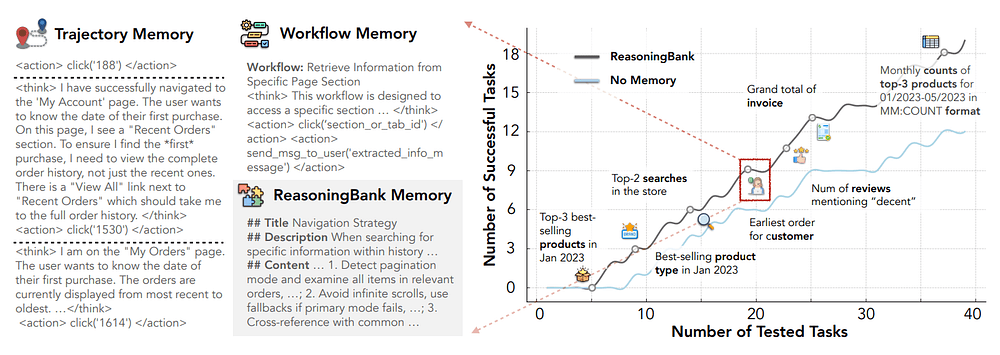
ReasoningBank is a memory framework from Google Research for agentic systems that extracts reusable reasoning strategies from both successful and failed agent trajectories, retrieves relevant strategies at test time, and writes new lessons back into the bank after each task.
In this article, we will cover:
what it actually stores
why failure memory matters more than most teams expect
how Memory-aware Test-Time Scaling works
what to steal for your own production agent stack
The core idea is simple:
Do not store everything the agent did. Store what the agent learned.
The bug in most agent memory implementations
A typical memory implementation helps preserve user preferences, recovers old facts, reminds a support agent that a customer already tried a workaround or lets a coding agent remember that the repo uses pnpm instead of npm.
The problem is raw trajectories contain too much noise.
For example, a web-browsing trajectory includes irrelevant page observations, dead-end clicks, repeated searches, half-formed action attempts, and environment-specific details, where most of it should not be replayed.
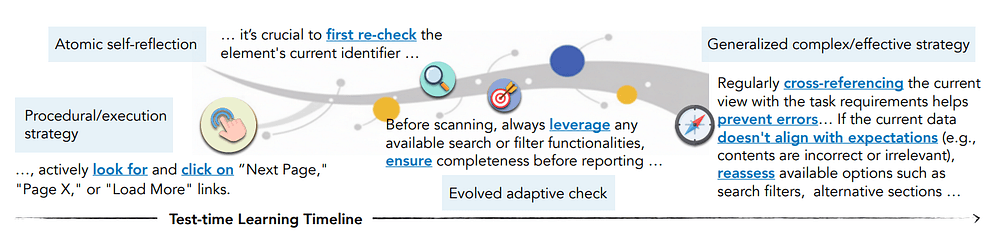
But agents only need to remember the transferable lesson.
For example, this raw trajectory is not very reusable:
Clicked Orders. Saw Recent Orders. Searched for item. Could not find it. Clicked browser back. Opened account menu. Clicked Order History. Changed page. Found older order on page 2. Extracted tracking number.
A better memory item would be:
When an order lookup task asks for a historical purchase, do not stop at the Recent Orders widget. Open the full order history and paginate or filter by date before concluding that the order is missing.
The difference is that a trajectory is an event log but a memory item should be an operational lesson.
That's why ReasoningBank focuses on reusable strategies, hints, and failure-avoidance rules.
Agents need memory that turns experience into reusable reasoning strategies, including lessons from failures.
What ReasoningBank actually is
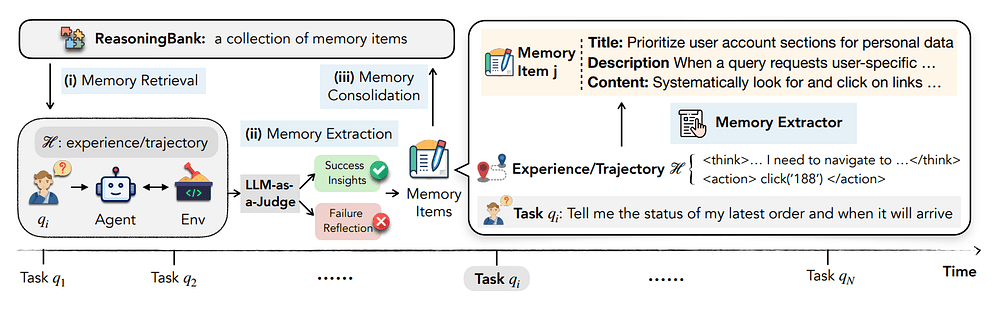
ReasoningBank is a closed-loop memory system for agents.
The loop looks like this:
Code
text
Task arrives
  |
  v
Retrieve relevant memory items
  |
  v
Agent acts in environment
  |
  v
Trajectory is evaluated as success or failure
  |
  v
Memory induction extracts reusable lessons
  |
  v
New memory items are written back
  |
  v
Future tasks retrieve better guidance
ReasoningBank separates five responsibilities:
Actor: the ReAct-style agent that performs the task.
Retriever: selects relevant memory items for the current query.
Evaluator: decides whether the trajectory succeeded or failed.
Inducer: converts the trajectory into strategy-level memory.
Memory store: persists memory items for future tasks.
The research team describes each memory as a structured item with a title, description, and content.
A practical schema looks like this:
Code
json
{
"task_id": "shopping_42",
"query": "Find the tracking number for a previous order...",
"status": "success",
"memory_items": [
  {
    "title": "Use full order history for historical purchases",
    "description": "Avoid relying only on recent orders when the query implies an older transaction.",
    "content": "Open the full order history, paginate or filter by date, and only then conclude whether the order exists."
  }
]
}
The implementation stores memory in JSONL files. The browser agent then writes selected memory items into a text file that is injected into the prompt for the current task.
The important part is the distillation step.
ReasoningBank asks the model to read the trajectory, decide why it succeeded or failed, and produce at most a small number of reusable, non-overlapping, actionable memory items.
Editor's note: To celebrate the community we recently released Compass: a blueprint of a production-grade customer support agent built to demonstrate how modern agent systems are actually engineered and operated in real environments. Compass is part of our Agent Foundry program and you can get it here completely for free.
Why failures should become first-class memory
In agent systems, failures are often more informative than successes.
Imagine a web agent that repeatedly fails product lookup tasks because it trusts the first search result, or a software-engineering agent that repeatedly modifies implementation code without first locating the test that defines the expected behavior.
While a success-only memory bank might store happy paths, a failure-aware memory bank stores guardrails.
ReasoningBank's extraction prompts handle both cases:
for successful trajectories, extract strategies that made the task work
for failed trajectories, extract lessons that would have prevented or recovered from the mistake
A failed browser task can produce a memory like:
Before declaring an item unavailable, check whether the current page is only a filtered or summarized view. Expand to the full listing, clear filters, or paginate through all available pages.
A failed coding task can produce a memory like:
When a bug report includes a failing edge case, reproduce it with a focused test before editing the implementation. Use the failing test to distinguish the root cause from incidental symptoms.
Every task becomes a chance to improve the next task.
The architecture pattern
Here is the ReasoningBank pattern in one diagram:
Code
text
                       +--------------------+
                     |   Memory Store     |
                     | JSONL / DB / index |
                     +---------+----------+
                               | retrieve
                               v
+------------+        +--------------------+        +--------------------+
| New Task   |------->|   Agent Runtime    |------->| Environment/Tools  |
| query/spec |        | ReAct + memory     |        | browser/shell/API  |
+------------+        +---------+----------+        +--------------------+
                              | trajectory
                              v
                     +--------------------+
                     | Evaluator / Judge  |
                     | success or failure |
                     +---------+----------+
                               | labeled trace
                               v
                     +--------------------+
                     | Memory Induction   |
                     | extract strategies |
                     +---------+----------+
                               | write back
                               v
                     +--------------------+
                     |   Memory Store     |
                     +--------------------+
First, the actor should not directly decide what becomes memory. The actor is busy solving the task. In the ReasoningBank implementation, memory induction is a separate pass over the trajectory after evaluation.
Second, memory is retrieved before the agent acts. This makes the memory part of the decision process, not just an after-the-fact explanation.
Third, the memory store is not just a transcript database. It contains distilled strategy items. In the WebArena path, the system retrieves a small number of memory entries, then writes the selected items into a memory text file for the agent prompt.
Fourth, the evaluation signal is critical. ReasoningBank needs to know whether the trajectory succeeded or failed. In WebArena, the repo uses an auto-evaluation path.
In SWE-Bench, success is grounded in whether the generated patch resolves the benchmark instance. In production, this is where you should invest heavily.
Web browsing and software-engineering benchmarks
The benchmark environments include WebArena, Mind2Web, and SWE-Bench Verified, and the implementation currently is for WebArena and SWE-Bench.
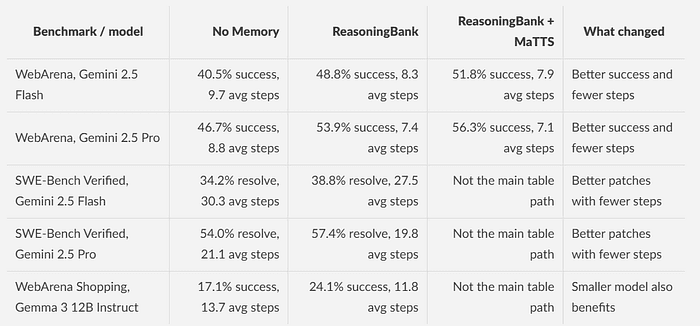
Here are selected numbers from the paper and repository.
The exact numbers matter less than the design implication.
If your agent pricing is driven by token count, tool calls, or browser steps, better memory can reduce cost.
If your latency is dominated by long wandering traces, better memory can reduce latency.
If your user experience suffers because the agent looks uncertain, better memory can make the agent look less random.
For agent memory, relevance beats volume.
In the WebArena path, the default logic selects top memory entries by embedding similarity and the surrounding scripts often use a single selected memory file for the current run, which is a good default.
The dependency list includes BrowserGym/WebArena packages, Playwright, OpenAI, Anthropic, Google GenAI, Google Cloud AI Platform, LangChain packages, PyTorch, and related utilities.
You will also need browser automation dependencies.
Code
bash
playwright install
For OpenAI models, set an API key:
Code
bash
export OPENAI_API_KEY="your-openai-api-key"
The repository mentions support for model names such as:
Code
text
gpt-3.5-turbo
gpt-4
gpt-4o
For Gemini and Claude through Vertex AI, authenticate with Google Cloud:
The selected memory text is then passed into the browser agent.
In other words, the browser agent does not need to know how the memory store works, it just gets a file containing relevant memory items.
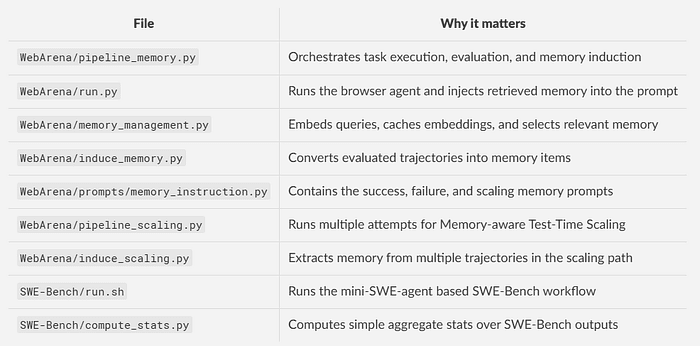
memory_management.py implements the retrieval path with embeddings.
It supports Gemini embeddings and also includes code for Qwen embeddings.
The Gemini path uses gemini-embedding-001, stores cached embeddings in JSONL, normalizes vectors, scores memories with a dot product, and returns the top matches.
Simplified:
Code
python
def select_memory(n, reasoning_bank, cur_query, task_id, cache_path, prefer_model):
  ranked_ids = screening(
      reasoning_bank=reasoning_bank,
      cur_query=cur_query,
      cache_path=cache_path,
      prefer_model=prefer_model,
  )

  results = []
  for idx in ranked_ids:
      item = reasoning_bank[idx]
      if item["task_id"] != task_id:
          results.append(item)
      if len(results) >= n:
          break
  return results
The code avoids returning memory from the same task ID, which prevents a benchmark task from simply retrieving its own answer.
How memory is induced from trajectories
The memory extraction logic lives in WebArena/induce_memory.py.
The script reads the task output, reconstructs the trajectory, checks whether the task succeeded or failed, and then picks the correct prompt from memory_instruction.py.
Simplified:
Code
python
reward = read_reward_or_autoeval(result_dir, task)
status = "success" if reward == 1 else "fail"

trajectory = format_trajectory(result_dir, task)
if memory_mode == "reasoningbank":
  if status == "success":
      instruction = SUCCESSFUL_SI
  else:
      instruction = FAILED_SI
elif memory_mode == "awm":
  if status == "success":
      instruction = AWM_SUCCESSFUL_SI
  else:
      return
elif memory_mode == "synapse":
  if status == "success":
      memory_items = [raw_trajectory]
  else:
      return
memory_items = model.generate(instruction + trajectory)
append_jsonl(output_path, {
  "task_id": task,
  "query": query,
  "status": status,
  "memory_items": memory_items,
})
This shows the difference between the memory modes:
synapse stores successful trajectories.
awm extracts memory from successful trajectories.
reasoningbank extracts memory from both successful and failed trajectories.
The extraction prompt for successful tasks asks the model to identify why the trajectory worked and produce reusable memory items.
The failure prompt asks the model to diagnose the mistake and produce preventative strategies.
It also includes constraints that are worth copying into your own agent memory pipeline:
produce at most a few memory items
avoid repeated or overlapping items
prefer concrete, actionable insights
avoid embedding literal task strings or one-off values
focus on transferable strategies
An example of a memory item
Suppose a WebArena shopping task asks the agent to find information about a previous order.
A no-memory agent might do something like this:
Open account page. Click Recent Orders. Look for item. Item is not visible. Search current page. Fail.
A successful agent might instead learn:
Open account page. Click full order history. Use pagination or filters. Search older orders. Find the item. Return requested information.
ReasoningBank should then store a generalized rule:
Code
text
# Memory Item 1
## Title
Check full history before concluding an order is missing
## Description
Recent-order widgets may omit older purchases that are still available in the full account history.
## Content
For order lookup tasks, open the full order history and use pagination or filters before deciding that a requested item is unavailable. Do not rely only on summary widgets or recent-order panels.
This memory item is specific enough to change behavior, which tells the agent what to do next time, and also general enough to transfer to other shopping tasks.
The same style works for SWE-Bench.
A failed coding trajectory might produce:
Code
text
# Memory Item 1
## Title
Reproduce the reported failure before patching
## Description
Editing implementation code before reproducing the bug can lead to plausible but unverified patches.
## Content
When the issue describes a concrete failure mode, first add or run a focused test that reproduces the behavior. Use that test to guide the patch and rerun it after editing.
A successful coding trajectory might produce:
Code
text
# Memory Item 1
## Title
Trace from failing assertion to smallest responsible function
## Description
Large repositories often contain wrappers that hide the actual bug location.
## Content
Start from the failing assertion or stack trace, identify the smallest function that controls the incorrect behavior, and patch that function before changing higher-level wrappers.
Memory-aware Test-Time Scaling
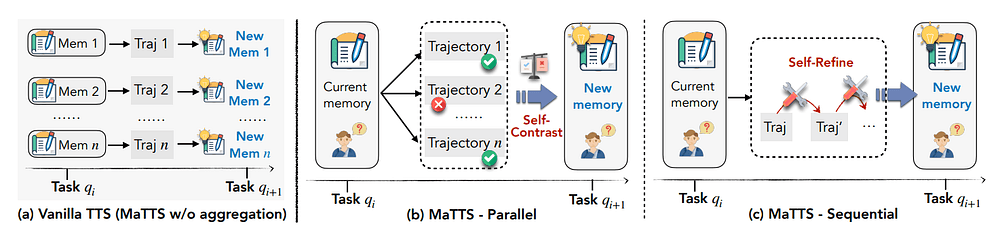
ReasoningBank also introduces Memory-aware Test-Time Scaling, abbreviated MaTTS.
Test-time scaling is the idea that you spend more inference at test time to get a better result.
For agents, this often means running multiple attempts, sampling different trajectories, selecting the best one, or letting the model reflect and refine.
MaTTS uses memory to make test-time scaling less disposable.
There are two paths described in the paper:
Parallel self-contrast: run multiple trajectories for the same task, compare successes and failures, and induce memory from the contrast.
Sequential self-refine: use memory to guide iterative refinement over attempts.
The implementation exposes the WebArena scaling path through pipeline_scaling.py and induce_scaling.py.
The orchestration is roughly:
Code
python
for task_id in selected_task_ids:
  for trial in range(num_trials):
      run_agent_attempt(task_id, trial, memory_path="memories_scaling/...txt")

  induce_scaling_memory(
      task_id=task_id,
      result_dirs=[f"results_{i}" for i in range(num_trials)],
      output_path="memories_scaling/site.jsonl",
  )
The memory induction prompt for the parallel path receives multiple trajectories for the same query, and it asks the model to compare and contrast them, identify what successful trajectories did well, identify what failed trajectories did wrong, and extract transferable strategies.
If you are already running multiple agent attempts for high-value tasks, you should ask:
Are we only selecting the best output, or are we converting the losing attempts into future memory?
For many agent products, the second option is where the compounding advantage comes from.
Productionizing the ReasoningBank pattern
For production, you need more structure.
Here is a production-grade version of the same design.
Code
text
Task event
-> agent run
-> trace store
-> verifier/evaluator
-> memory candidate extraction
-> schema validation
-> deduplication and conflict check
-> human or automated approval for high-risk domains
-> memory index update
-> retrieval with observability
Instead of letting the agent directly write trusted memory into the system prompt for future users, use a memory lifecycle.
1. Store traces separately from memory
A trace store should include:
run_id
task_id
user/org/repo scope
input query
tool calls
actions
observations
final output
evaluation result
model metadata
token usage
latency
selected memory IDs
A memory store should include:
memory_id
scope
kind
title
description
content
source_run_ids
source_status
created_at
updated_at
confidence
usage_count
success_count_after_use
failure_count_after_use
embedding
approval_state
Do not mix them.
Raw traces are for auditing and reprocessing and memory items are for retrieval and prompt injection.
2. Add scope boundaries
Memory must be scoped. For example, a lesson learned in one customer's account should not leak into another customer's prompt.
Useful scope keys:
organization_id
user_id
workspace_id
repo_id
environment_id
agent_type
task_family
policy_domain
3. Validate memory items before indexing
The ReasoningBank prompts ask for structured Markdown.
In production, you can use structured JSON and validate it.
def is_too_vague(memory: MemoryCandidate) -> bool:
  vague_phrases = [
      "be careful",
      "try harder",
      "check everything",
      "use common sense",
      "make sure to verify",
  ]
  text = f"{memory.title} {memory.description} {memory.content}".lower()
  return any(phrase in text for phrase in vague_phrases)
4. Deduplicate and consolidate
ReasoningBank includes consolidation as part of the conceptual loop but in production, this should be explicit.
If five failed runs produce versions of the same lesson, consolidate them.
Example duplicates:
Use pagination when searching old orders. Check next page before saying the order is missing. Do not rely only on recent order widgets.
Consolidated memory:
For historical order lookup tasks, open the full order history and use filters or pagination before concluding that an item is missing. Recent-order widgets may omit older purchases.
Memory consolidation can be run as a scheduled job:
Code
python
def consolidate_memory_items(candidates):
  clusters = cluster_by_embedding_similarity(candidates, threshold=0.86)
  consolidated = []

  for cluster in clusters:
      if len(cluster) == 1:
          consolidated.append(cluster[0])
          continue
      merged = summarize_cluster_as_single_memory(cluster)
      consolidated.append(merged)
  return consolidated
5. Measure memory usefulness after retrieval
It is good if future tasks improve when memory is retrieved.
Track this:
memory_id
retrieved_for_run_id
similarity_score
rank
was_injected
agent_success
agent_steps
token_cost
human_rating
Then calculate:
success rate after retrieval
avg steps after retrieval
failure rate after retrieval
number of times retrieved but ignored
number of times retrieved before a bad outcome
This creates a feedback loop for memory quality.
6. Keep memory short
The paper's retrieval ablation is a useful warning: more retrieved experience can hurt.
For production prompts, I would start with:
1 to 3 memory items for narrow tasks
3 to 5 memory items for complex coding tasks
a hard token budget per memory block
no raw traces in the main prompt unless explicitly needed
Memory should be a steering layer, not a second task description.
A good memory block might look like:
Code
text
Relevant lessons from prior tasks:
1. Use full order history for historical purchases.
 Recent-order widgets may omit older purchases. Open the full history and paginate or filter before concluding the item is missing.
2. Verify page scope before searching.
 If search returns no results, check whether the page is scoped to a category, date range, or account section before retrying.
7. Use verifiers
ReasoningBank uses LLM-as-judge in parts of the WebArena workflow.
The paper explicitly discusses dependence on LLM-as-judge as a limitation and points toward stronger verifiers, human-in-the-loop review, and ensemble judgment as future directions.
An LLM judge can help classify messy outcomes, but do not make it the only source of truth in high-risk workflows.
Concluding thoughts
ReasoningBank is worth paying attention to because it gives you a concrete memory pattern for agentic systems.