Why 48GB VRAM Is the Sweet Spot for Local Coding Agents
Agent Native•June 18, 2026
Most developers are wondering:
How can I run a 70B model locally?
Can I run a 120B MoE?
Can I finally stop paying API bills?
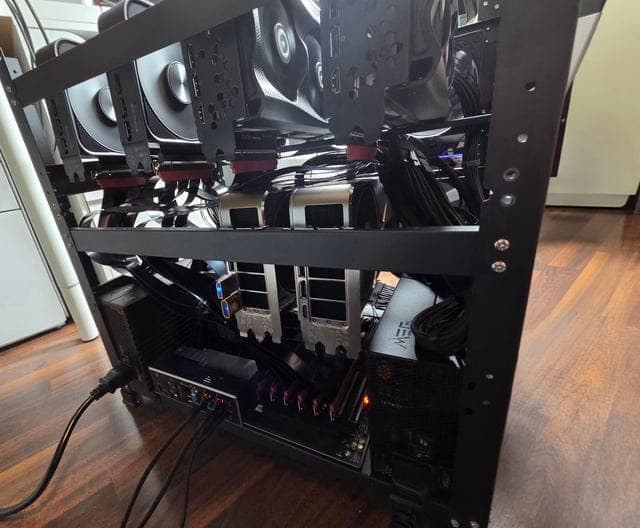
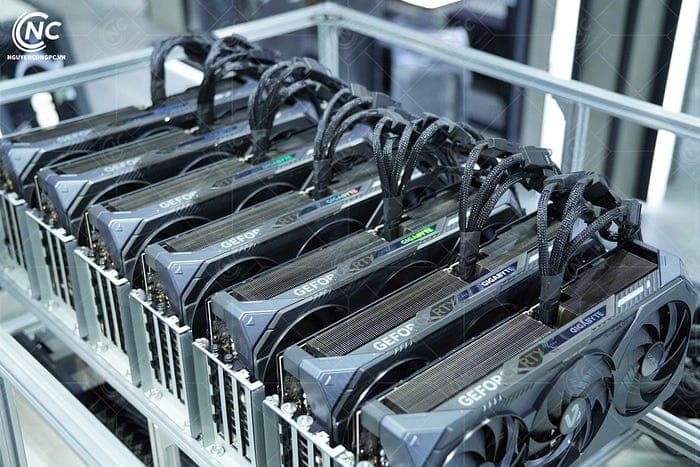
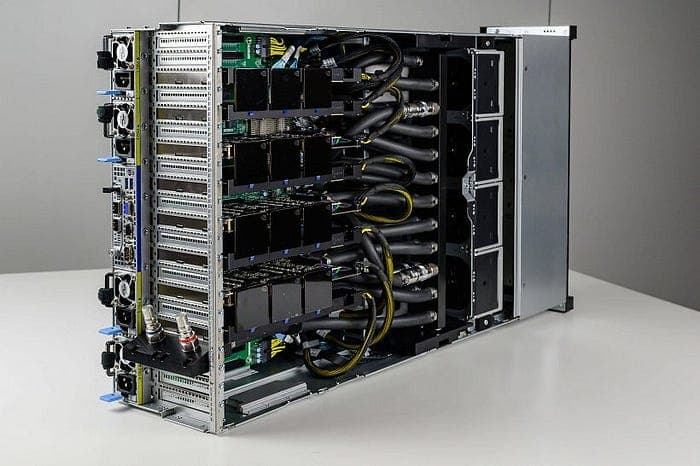
People with 2x RTX 3090s, RTX 6000-class cards, Strix Halo systems, big-memory Macs, and mixed GPU rigs are able to run a completely different class of models, and I will walk you through the typical local setup later in the article such as the one shown below.
But first, I want to explain why 48GB makes the current 27B to 35B agentic model tier feel operational.
Bigger VRAM is where long sessions survive. It is where the KV cache grows while your coding agent reads files, edits code, runs tests, receives tool output, retries, summarizes, and keeps going.
It is where speculative decoding, vision towers, tool parsers, speech models, embeddings, rerankers, and concurrent users all compete for headroom.
So you may ask:
What is the most reliable local agent workflow I can run all day without babysitting it with my setup?
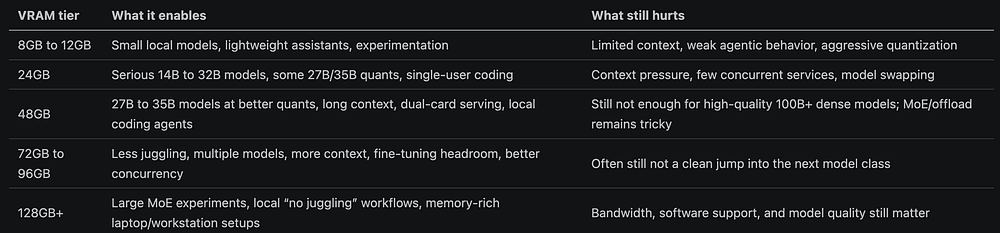
You can run smaller models on 8GB or 12GB, and you can also run good models on 24GB, but 48GB is the tier where local agentic AI starts to look like software infrastructure.
It gives you enough room for high-quality quants, useful context, actual tool use, and sometimes multiple services at once.
It still does not make local inference magic though. You are not suddenly running every frontier-class model at full precision.
You are still trading off quantization, memory bandwidth, concurrency, context length, and latency, but the trade space changes.
So instead of asking "Can I boot the model?", you start thinking about "Can I build a stable workflow around it?"
48GB is mostly a quality-of-life jump
So what really changes when you move from 24GB or 32GB to 48GB?
You can even move to 96GB and still mostly run the same model family, but with hundreds of thousands of tokens of context and more speed.
The upgrade mostly brings you a better quality of life: more than one model loaded, easier local fine-tuning, and fewer hard memory edges.
Upgrades give you room to run the models you already trust in a less fragile way.
The current sweet spot is roughly:
Dense 27B models when you care about reasoning, code, and consistency.
31B dense models when quality per parameter is strong.
35B sparse/MoE models when speed and active-parameter efficiency matter.
70B-ish models at lower quantization when you accept quality and latency trade-offs.
120B+ MoE experiments only when the architecture and offload path make it tolerable.
However, I believe you will still use a small set of daily drivers: Qwen3.6 27B, Qwen3.6 35B-A3B, and Gemma 4 31B/26B variants, because these and similar models are sized for the current local-agent gap: large enough to do real coding work, small enough to serve locally, and context-friendly enough for repository workflows.
Agentic workloads punish weak memory planning
It is important to understand that a local chatbot and a local coding agent stress hardware differently.
A chatbot mostly needs enough memory for the weights and a moderate context, but a coding agent needs memory for a moving, growing state machine:
System prompt and tool schema.
Repository instructions.
User request.
Planning tokens.
File reads.
Search results.
Diffs.
Test output.
Tool call JSON.
Retried tool calls.
Summaries and compaction.
More file reads.
More test output.
This is why long context sounds simple but is not simple.
A 262K context window is a memory reservation problem because the KV cache has to live somewhere, the runtime needs activation headroom, speculative decoding may add draft state, and vision adds projectors or encoders.
And tool calling adds parser behavior, while streaming adds edge cases.
You can see why, if you serve multiple agents, each session needs its own context budget.
Does the model fit with the context, parser, quant, draft path, concurrency, and tool traffic I need?
This is where many local setups fail, because they pass a short prompt, pass a benchmark, but then an agent reads a large file, returns a huge trace, or accumulates 80K tokens of history, and the server OOMs.
For example, if a task has a built-in correction loop, lower quant mistakes may be recoverable, but if you ask a model to summarize a document or extract "the important things," there may be no external error signal, so if the model misses something, you may never know.
That is a useful rule for local agents:
Use aggressive quantization when the workflow has external correction. Use conservative quantization when the output is the only source of truth.
For coding, Q4 or Q5 may be acceptable if the agent must run tests before finishing.
For legal, compliance, medical, research, or document analysis workflows, a missed fact can be silent, and in those cases a higher quant, stronger model, retrieval checks, multi-pass validation, or cloud fallback may be worth more than extra tokens per second.
This is also why "Q4 is 95% of Q8" can be misleading, because a 5% behavioral difference is not evenly distributed.
It may show up exactly where you care: tool-call formatting, subtle bug fixes, long-range recall, or constraint following after 100K tokens.
Software engineers understand this intuitively. A system that fails 1% of the time in the wrong place is not production-ready.
The 48GB argument
48GB VRAM is the practical tier for running one strong local coding model with real context, tool support, and enough headroom to avoid constant operational friction.
It is not the tier for every model or the tier for effortless multi-user inference, but it is enough to build something real.
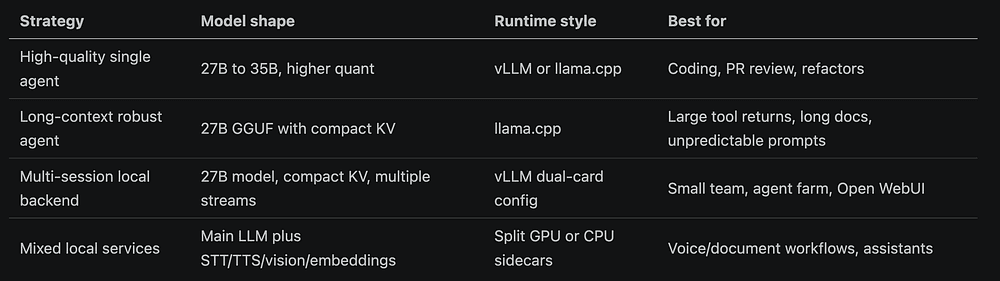
With 48GB, you can usually pick one of four strategies.
So in these contexts, Qwen3.6-27B shows up repeatedly as a daily driver for technical tasks, programming, OpenCode, long-context work, and local agent setups, since this is a 27B model with a vision encoder, native 262K context, MTP training, and a context extension path up to roughly 1M tokens.
So if you have 48GB VRAM, you can run Qwen3.6-27B at a higher quant or with a longer context than a single 24GB card can comfortably support. For example, you can run Q8 variants with large context, or AutoRound INT4 or GGUF variants depending on engine and hardware.
llama.cpp gives robustness, broad hardware support, GGUF convenience, and practical long-context paths on consumer setups.
Editor's note: Thank you for your support and building alongside our articles. We recently released Compass: a blueprint of a production-grade customer support agent built to demonstrate how modern agent systems are actually engineered and operated in real environments. Compass is part of our Agent Foundry program, and you can get it here completely for free.
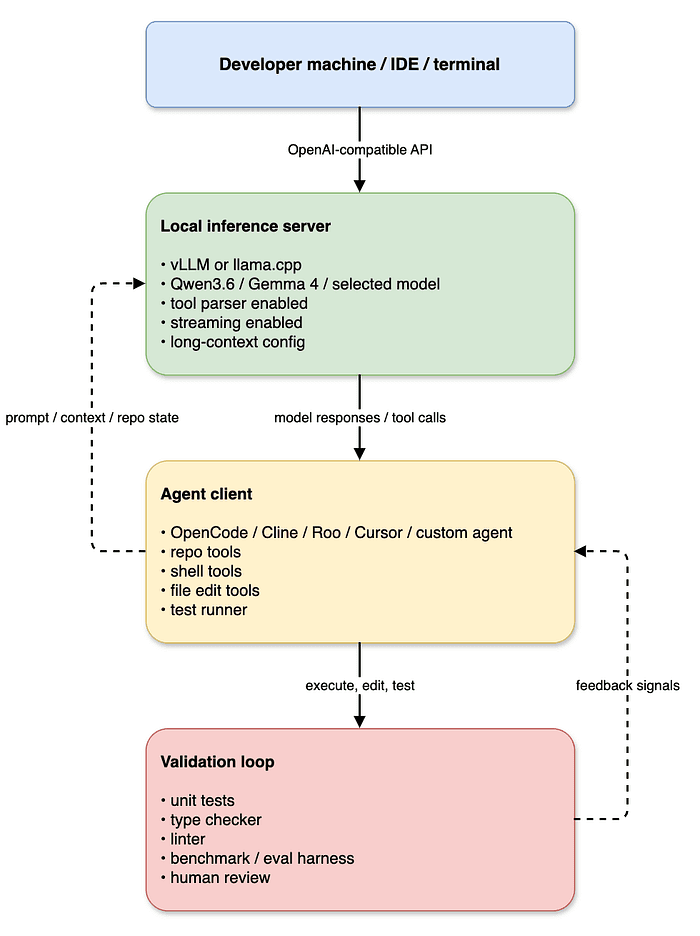
The local agent stack
A practical 48GB local-agent stack looks like this:
This architecture is more important than the exact GPU.
Once your local model speaks the same API shape as cloud models, your developer tooling becomes portable.
OpenCode, Cline, Roo, Cursor, LiteLLM, Continue, custom scripts, and Open WebUI can all point at the same endpoint.
You can route your existing agent workflow through a local endpoint.
Which config should you start with?
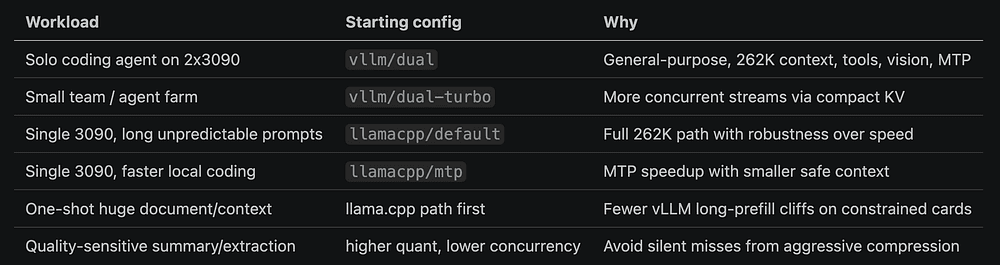
For dual RTX 3090-style 48GB setups, club-3090's dual-card guide recommends picking by workload.
The page lists Qwen3.6-27B dual.yml as a general-purpose default with vision, tools, long context, FP8 KV, and MTP, and describes it as the recommended starting point for IDE coding agents (club-3090 dual-card docs).
A simplified selection matrix looks like this:
The rule is simple: optimize for the thing your workflow breaks on.
If your workflow breaks on speed, choose vLLM and MTP/DFlash-style paths.
If it breaks on long unpredictable context, choose llama.cpp or reduce concurrency.
If it breaks on multiple developers, reduce max context per stream or use compact KV.
If it breaks on quality, increase quant quality or use cloud fallback.
Concluding thoughts
The 48GB VRAM tier is about moving from fragile local setups to durable local workflows.
The best current 48GB setups are running strong 27B to 35B models with enough context, tool support, and runtime headroom to make agentic development practical.
Qwen3.6-27B, Qwen3.6-35B-A3B, and Gemma 4 31B are interesting because they land directly in that zone.
They are large enough to reason over code, structured enough for tools, and efficient enough to run locally with the right engineering.
48GB makes a high-performing stack realistic for individual developers and small teams, and more VRAM will always be useful.
Key takeaways
5 items
148GB VRAM is the tier where local agentic AI starts to behave like software infrastructure, not a fragile demo.
2Coding agents stress memory differently than chatbots because the KV cache grows across file reads, tool calls, retries, and compaction.
3Match quantization to the workflow: aggressive quants where there is external correction, conservative quants where the output is the only source of truth.
4Qwen3.6-27B, Qwen3.6-35B-A3B, and Gemma 4 31B land in the current local-agent sweet spot.
5Pick your runtime by what your workflow breaks on: vLLM for throughput, llama.cpp for long unpredictable context.