LangGraph and Cloudflare Agents are both among your options, but they solve the problem from different layers of the stack.
LangGraph is a workflow/orchestration framework for building stateful agent logic, with checkpointing and “resume from where you left off” baked into the execution model.
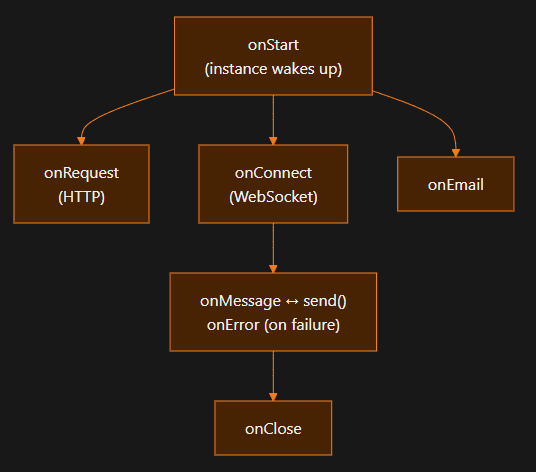
Cloudflare Agents is an edge/serverless runtime + SDK for building stateful, real-time agents on top of Durable Objects, with built-in task queueing and scheduling, and optional for true durable, multi-step background runs.
Workflows
So the right question usually isn’t “which is better?” but:
“Do I need aworkflow engine, aserverless stateful runtime, or both?”
Let’s break it down in a practical way, especially around queueing, scheduling, and durable execution.
LangGraph: “my agent is a graph that checkpoints”
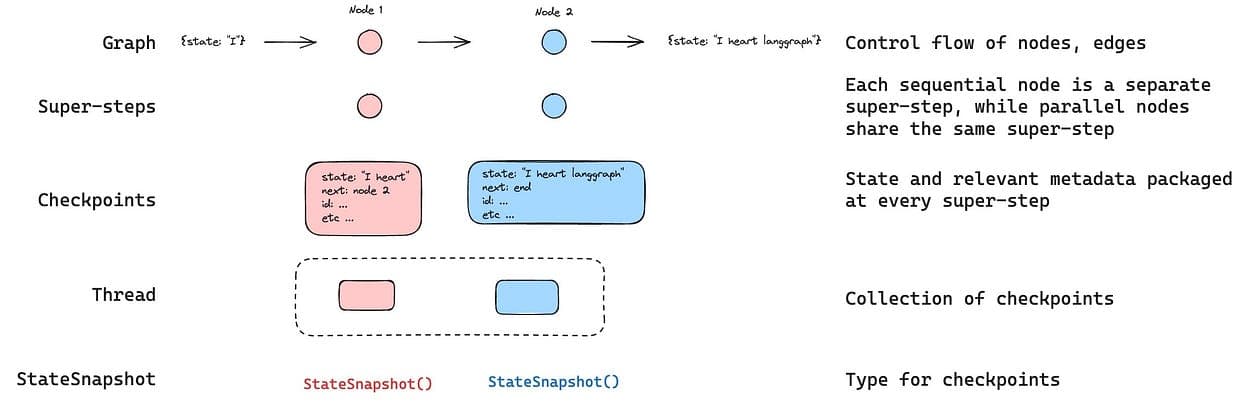
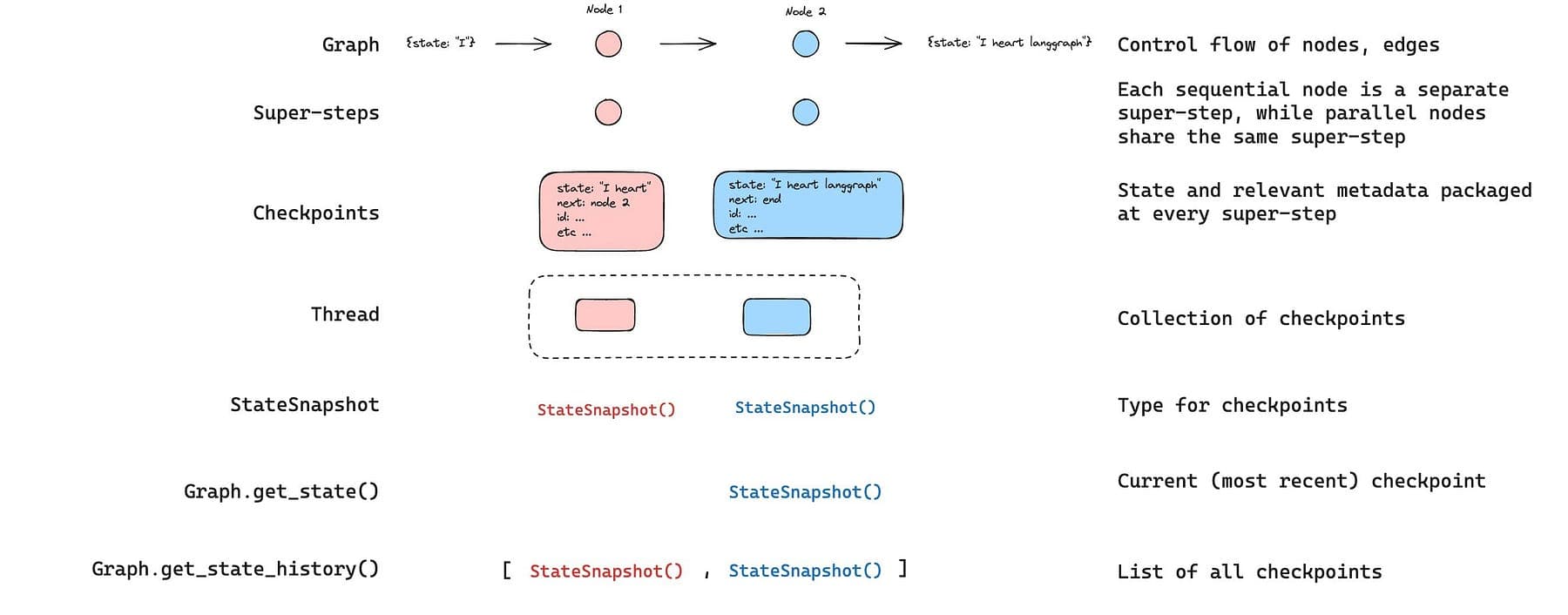
LangGraph runs your agent as a graph of nodes.
If you enable persistence (a checkpointer), it saves the graph state at each “super-step” to a thread, which unlocks resuming, time travel debugging, human-in-the-loop, etc.
Code
python
from langgraph.graph import StateGraph, START, END
from langgraph.checkpoint.memory import InMemorySaver
from langchain_core.runnables import RunnableConfig
from typing import Annotated
from typing_extensions import TypedDict
from operator import add

class State(TypedDict):
  foo: str
  bar: Annotated[list[str], add]

def node_a(state: State):
  return {"foo": "a", "bar": ["a"]}

def node_b(state: State):
  return {"foo": "b", "bar": ["b"]}
And when you need durable background execution beyond “normal request time”, you typically pair Agents with Cloudflare Workflows, which explicitly target durable, multi-step execution with retries and waiting for external events.
Practical comparison
(1) Queueing
Cloudflare Agents
Built-in queue() that persists tasks to SQLite (cf_agents_queues) and processes them sequentially (FIFO).
No built-in retries/priority; you implement retry logic manually.
Important limitation: “queue processing happens during agent execution, not as separate background jobs.”
If you need a “real queue” decoupled from the agent instance, you use Cloudflare Queues (separate product).
It’s reliable (messages aren’t deleted until successfully consumed), but does not guarantee publish order.
Code
python
class MyAgent extends Agent {
async processEmail(data: { email: string; subject: string }) {
  // Process the email
  console.log(`Processing email: ${data.subject}`);
}

async onMessage(message: string) {
  // Queue an email processing task
  const taskId = await this.queue("processEmail", {
    email: "user@example.com",
    subject: "Welcome!",
  });

  console.log(`Queued task with ID: ${taskId}`);
}
}
LangGraph
LangGraph doesn’t prescribe a queue and you can run graphs wherever (workers, Celery, Kubernetes jobs, etc.).
If you deploy via “Agent Server / LangGraph API”, you get background runs (async jobs with polling or webhook completion) and operational features built around that.
(2) Scheduling
Cloudflare Agents
schedule() supports delay / fixed date / cron, persists schedules to SQLite, survives restarts, and uses Durable Object alarms under the hood.
Code
python
import { Agent } from "agents";

export class ReminderAgent extends Agent {
async onRequest(request: Request) {
  const url = new URL(request.url);

  // Schedule in 30 seconds
  await this.schedule(30, "sendReminder", {
    message: "Check your email",
  });

  // Schedule at specific time
  await this.schedule(new Date("2025-02-01T09:00:00Z"), "sendReminder", {
    message: "Monthly report due",
  });

  // Schedule recurring (every day at 8am)
  await this.schedule("0 8 * * *", "dailyDigest", {
    userId: url.searchParams.get("userId"),
  });

  return new Response("Scheduled!");
}

async sendReminder(payload: { message: string }) {
  console.log(`Reminder: ${payload.message}`);
  // Send notification, email, etc.
}

async dailyDigest(payload: { userId: string }) {
  console.log(`Sending daily digest to ${payload.userId}`);
  // Generate and send digest
}
}
There’s also scheduleEvery() for fixed-interval recurring tasks with overlap prevention (recent addition).
Agents: durable state because Durable Objects persist storage and can be “woken up” via alarms.
Code
python
import { DurableObject } from "cloudflare:workers";

export class AgentServer extends DurableObject {
// Schedule a one-time or recurring event
async scheduleEvent(id, runAt, repeatMs = null) {
  await this.ctx.storage.put(`event:${id}`, { id, runAt, repeatMs });
  const currentAlarm = await this.ctx.storage.getAlarm();
  if (!currentAlarm || runAt < currentAlarm) {
    await this.ctx.storage.setAlarm(runAt);
  }
}

async alarm() {
  const now = Date.now();
  const events = await this.ctx.storage.list({ prefix: "event:" });
  let nextAlarm = null;

  for (const [key, event] of events) {
    if (event.runAt <= now) {
      await this.processEvent(event);
      if (event.repeatMs) {
        event.runAt = now + event.repeatMs;
        await this.ctx.storage.put(key, event);
      } else {
        await this.ctx.storage.delete(key);
      }
    }
    // Track the next event time
    if (event.runAt > now && (!nextAlarm || event.runAt < nextAlarm)) {
      nextAlarm = event.runAt;
    }
  }

  if (nextAlarm) await this.ctx.storage.setAlarm(nextAlarm);
}

async processEvent(event) {
  // Your event handling logic here
}
}
Workflows: explicitly positioned as durable multi-step execution with retries, recovery, and waiting for external events; recommended for long-running tasks (e.g. >30s) and human approval flows.
Code
python
import { AgentWorkflow } from "agents/workflows";
import type { AgentWorkflowEvent, AgentWorkflowStep } from "agents/workflows";
import type { MyAgent } from "./agent";

type TaskParams = { taskId: string; data: string };

export class ProcessingWorkflow extends AgentWorkflow<MyAgent, TaskParams> {
async run(event: AgentWorkflowEvent<TaskParams>, step: AgentWorkflowStep) {
  const params = event.payload;

  const result = await step.do("process-data", async () => {
    return processData(params.data);
  });
  // Non-durable: progress reporting (may repeat on retry)
  await this.reportProgress({

    step: "process",
    status: "complete",
    percent: 0.5,

  });
For “do this soon but not now”: this.queue() (FIFO, sequential implement retries yourself).
For “do this later / cron / every N minutes”: this.schedule() / scheduleEvery(), persisted to SQLite, backed by Durable Object alarms.
LangGraph
LangGraph shines when your complexity is best expressed as a graph (routing, branching, tool loops, HITL checkpoints), and you want deep inspection/debugging via checkpoint history.
The key primitives to understand (LangGraph durability)
A checkpointer stores a checkpoint of state at every super-step to a thread.
You invoke runs with thread_id so the engine can persist and resume.
If execution stops mid-node, resume restarts that node.
Minimal durable graph example:
Code
python
from typing import TypedDict, List
from langgraph.graph import StateGraph, START, END
from langgraph.checkpoint.postgres import PostgresSaver

class State(TypedDict):
  doc_url: str
  chunks: List[str]
  summary: str
  needs_approval: bool
  approved: bool

def parse_doc(state: State) -> State:
  # fetch + parse (external IO)
  chunks = ["chunk1", "chunk2"]
  return {"chunks": chunks}

def summarize(state: State) -> State:
  summary = f"Summary of {len(state['chunks'])} chunks"
  return {"summary": summary, "needs_approval": True}

def wait_for_approval(state: State) -> State:
  # In real systems, you interrupt and resume later with updated state.
  # (LangGraph supports interrupts/human-in-loop patterns via persistence.)
  if not state.get("approved"):
      raise RuntimeError("Not approved yet")
  return state

builder = StateGraph(State)
builder.add_node("parse", parse_doc)
builder.add_node("summarize", summarize)
builder.add_node("approval_gate", wait_for_approval)
builder.add_edge(START, "parse")
builder.add_edge("parse", "summarize")
builder.add_edge("summarize", "approval_gate")
builder.add_edge("approval_gate", END)

# Durable execution: persist checkpoints to Postgres
with PostgresSaver.from_conn_string("postgresql://...") as checkpointer:
  graph = builder.compile(checkpointer=checkpointer)

thread_id = "user-123/doc-456"
config = {"configurable": {"thread_id": thread_id}}
graph.invoke({"doc_url": "https://example.com/doc"}, config=config)
This example is intentionally simple, but it demonstrates the core durable mechanics:
state checkpoints saved to a thread
thread_id required for resume/time travel/hitl
node boundary restart behavior
Queueing & scheduling in LangGraph
If you run “just the library”, you bring your own runtime primitives (Celery, job queues, cron, etc.).
But if you deploy via the LangGraph API / Agent Server, you get:
background runs (async jobs with polling/webhooks)
cron jobs (scheduled runs)
The Python SDK provides a LangGraphClient where you can create cron jobs like:
That “create_for_thread” example is shown directly in the SDK reference.
Debuggability
LangGraph’s checkpoint history is a superpower, once you embrace checkpointing, you can:
inspect current and historical state
replay from checkpoints
do time-travel debugging
implement “human-in-loop” cleanly
Also if you use the platform tooling, LangGraph Studio exists as a UI for visualizing/debugging runs locally.
Cloudflare “unit of debugging” is the agent instance + workflow runs
Cloudflare Agents makes it very natural to debug:
per-user agent instance state (because it’s literally durable object state)
workflow run progress/step boundaries (when you use Workflows)
But if you rely heavily on queue() inside the agent, remember it’s FIFO/sequential, no built-in retry/priority, and runs during agent execution, not as an independent worker pool.
It’s just a different operational model.
Choosing between them
Choose Cloudflare Agents (plus Workflows) if you’re building:
a realtime product (chat, copilot UI, collaborative agent)
per-user/per-workspace stateful experiences
“push progress updates live while the job runs”
an edge-first stack (Workers + Durable Objects)
You get scheduling out of the box (schedule, cron, intervals) with persistence and DO alarms.
And you get a clean story for “durable long jobs” via Workflows (retries, waiting, approval gates).
the experience (realtime, stateful UX, edge-native) → start with Cloudflare Agents (+ Workflows when it gets serious).
the orchestration logic (graphs, routing, HITL, replay/debug) → start with LangGraph (and decide later whether you want to self-host or use the deployment layer).