And honestly, I think that is good news for engineers because for a brief moment, the agent discourse made it sound like software engineering rigor was about to be replaced by prompt wizardry.
As harnesses, models, and tools become more capable, strong engineering discipline matters more than ever.
So how do you operate OpenClaw agents safely, repeatably, and under failure?
Wouldn’t it be nice to have a production-grade Helm chart for running OpenClaw in Kubernetes, with secure defaults, pinned images, predictable upgrades, and an explicit focus on secure, observable, and reliable deployment for operators?
You will remember that last year, with OpenAI launching the Responses API last year with built-in tools for web search, file search, and computer use, a new Agents SDK was introduced for orchestrating single-agent and multi-agent workflows with integrated observability tooling to trace executions.
Around the same period, Google introduced Agent2Agent, or A2A, as an open protocol intended to complement Anthropic’s Model Context Protocol, with the goal of helping agents discover capabilities, exchange information securely, and coordinate long-running, multi-agent tasks across different vendors and frameworks.
Those releases were important, but they also showed that the center of gravity already moved to system design.
The better the models become, the more dangerous it is to wrap them in sloppy systems, and the companies that understand that earliest will build the most durable products.
And if you are building agentic products for real users, that changes pretty much everything.
KubeClaw points to the right abstraction
What I like about KubeClaw is the implied worldview.
The core problem is no longer whether an agent can think; it is whether the surrounding platform can make that thinking governable, observable, and upgradeable.
That is the worldview many agent teams still resist.
A lot of agent prototypes are still built as if the agent loop is the product:
Accept a user goal.
Let the model decide on tools.
Retry a few times.
Hope the trace looks reasonable.
Ship.
The moment the agent touches money, permissions, infrastructure, tickets, code, CRM records, or customer communications, every creative behavior becomes a failure mode with a blast radius.
In practice, orchestration is only one layer but the actual system also needs packaging, policy, rollout discipline, auditability, health semantics, secrets handling, and recovery behavior.
The more powerful the agent becomes, the more the non-model layers determine whether the product is usable.
That is also why Kubernetes is such an important reference point for agent builders, because Kubernetes trained the industry to separate desirable intent from operational enforcement.
We learned to distinguish a spec from a scheduler, a deployment from a container image, a service from a pod, and a control plane from workload execution.
Agentic systems now need the same mental discipline.
When I map that idea into agent architecture, I end up with something like this:
Code
yaml
User intent
|
v
Task contract / policy envelope
|
v
Planner / router / agent coordinator
|
+--> Tool invocation layer
| +--> Web / files / APIs / browser / code
|
+--> Memory / state / checkpoints
|
+--> Guardrails / authz / approval gates
|
+--> Tracing / evals / audit logs
|
v
Execution runtime with retries, timeouts, budgets, and rollback paths
KubeClaw is valuable precisely because it emphasizes secure defaults, pinned images, predictable upgrades, observability, and reliability, it treats the runtime envelope as a first-class concern rather than a deployment afterthought.
For anyone building agentic systems, that is directionally correct.
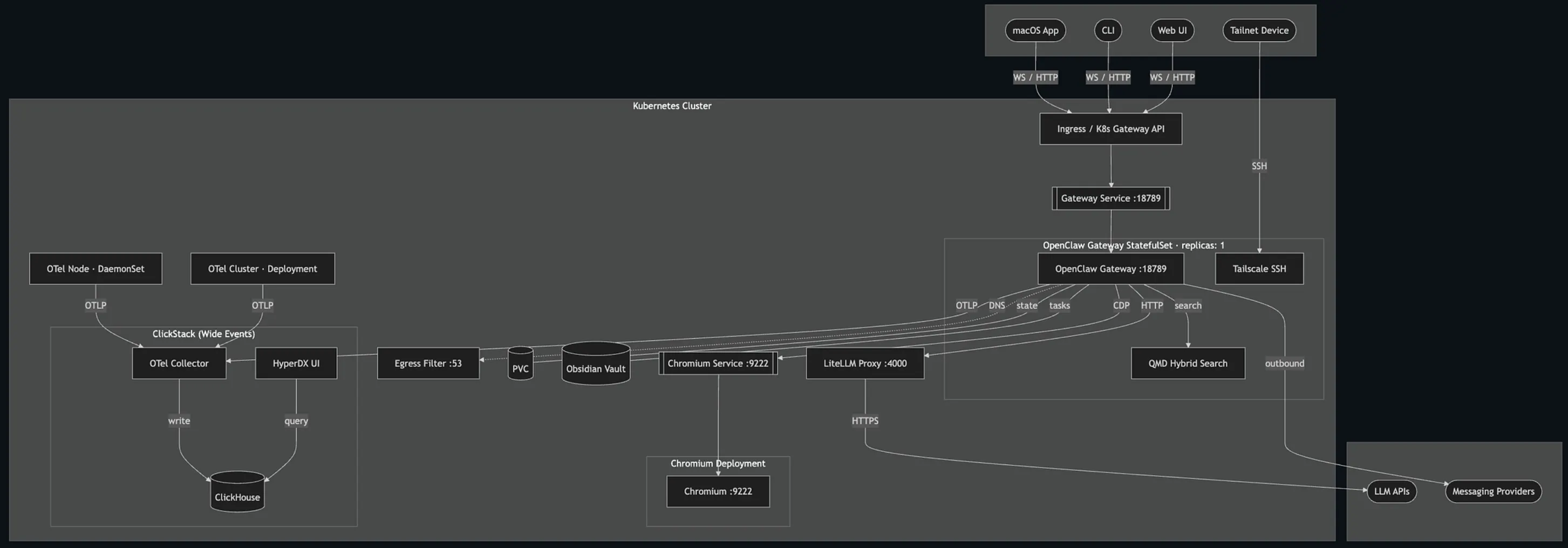
Let’s have a brief look at its architecture.
The main idea is that all user traffic, whether it comes from the macOS app, the CLI, and the web UI enters the cluster through a single front door: the Kubernetes ingress or gateway. From there, requests are routed to the OpenClaw Gateway, which is the central service doing the real work. It acts like the brain of the system, receiving requests, coordinating agent behavior, and deciding which supporting service it needs to call.
The gateway is connected to a few important helpers. It can drive a dedicated Chromium instance, which lets agents use a real browser for web tasks. It can talk to LiteLLM, which acts as a single proxy in front of external LLM providers, so the system does not have to manage each model API separately. It can also query the hybrid search service for retrieval and memory-like lookups, and it can send outbound messages through messaging providers.
On top of that, it has persistent storage attached, so it can keep its own state across restarts and also store tasks or notes in an Obsidian-style vault.
The setup also has production-focused controls around it. Tailscale SSH gives operators a private, secure way to reach the gateway directly without exposing admin access to the public internet. The egress filter helps control outbound network access, which is useful for keeping agent behavior constrained and safer in production. That means this is not just a system for running agents, but a system for running them in a more controlled, operationally safe way.
The architecture puts a lot of emphasis on observability.
The gateway and other cluster components send telemetry through OpenTelemetry into a collector, which writes everything to ClickHouse.
HyperDX then sits on top of that and gives operators a way to inspect logs, traces, and events.
In practice, that means you can see what an agent did, what it called, what failed, and how the whole system behaved over time.
Quick Start with KubeClaw
To work with KubeClaw, you should have the following prerequisites:
Kubernetes 1.25+
Helm 3.12+
A ReadWriteOnce-capable StorageClass (the default cluster StorageClass is used if none specified)
An OpenClaw Gateway image accessible from your cluster
KubeClaw provides a one-line installer:
Code
bash
curl -fsSL https://kubeclaw.ai/install.sh | bash
You can install it via Homebrew if you want the kubeclaw CLI for install, upgrade, diagnostics, and other workflows:
# Confirm masterkey is required when litellm.enabled=true (must error)
helm template kubeclaw charts/kubeclaw --set litellm.enabled=true
Initial Connection to Gateway
The Gateway Service is ClusterIP by default, so it is not reachable outside the cluster without port-forwarding, Ingress, or Gateway API routing.
You should use install.sh for local dev.
scripts/install.sh automatically starts a background port-forward after install and prints an authenticated dashboard URL rewritten to localhost:
Code
bash
./scripts/install.sh
# ...
# Port-forward running (PID 12345). Stop with: kill 12345
# Open in your browser: http://localhost:18789/?token=...
You can override the local port with LOCAL_PORT=8080 ./scripts/install.sh.
That’s it!
The real engineering patterns are old, but the pressure is new
These are the patterns we already trust in distributed systems, workflow engines, and platform engineering.
The twist is that the decision-maker inside the loop is now non-deterministic, which means the surrounding system has to become more deterministic, not less.
Let’s go through the patterns I think matter most.
1. Treat prompts as code and treat task contracts as APIs
A prompt can influence behavior, but a task contract defines permitted behavior.
If the agent can take actions, the contract should describe:
the task objective,
allowed tools,
prohibited actions,
required approvals,
input/output schema,
retry policy,
budget ceiling,
termination conditions.
A prompt says, “Be helpful and gather information before acting.” but a contract says, “You may read from these sources, write only to staging, never publish without approval, and abort after two failed tool invocations.”
The second is enforceable at runtime.
The ecosystem is also moving toward this distinction between conversational intent and governed execution.
2. Make every action idempotent or compensatable
The model will retry. The network will retry. Your queue will retry. Your workflow engine will retry.
Therefore, every meaningful side effect has to be either idempotent or reversible.
If an agent creates tickets, posts messages, modifies records, or launches jobs, you need deduplication keys, step checkpoints, and compensation logic.
3. Separate planning from execution
The planner should reason but the executor should comply.
If the same component both invents the plan and directly performs side effects, you lose the opportunity to insert policy, validation, approvals, or static checks.
I prefer a two-stage model:
The agent proposes an action graph.
A constrained runtime validates and executes steps against typed tools and policy gates.
That structure also improves debuggability because a bad plan is a reasoning problem but a bad execution is a runtime problem.
Blending the two makes both harder to fix.
4. Give tools stronger schemas than you think you need
Most agent failures that look like LLM reasoning problems are actually interface design problems.
Tool definitions should be painfully explicit:
typed inputs,
narrow enums,
default handling,
permission scopes,
timeout behavior,
machine-readable error classes.
If a tool can fail in five ways, teach the runtime to label those five ways. “Error” is not a useful feedback channel for an agent.
“AuthExpired,” “RateLimited,” “NotFound,” “ValidationFailed,” and “Conflict” are useful.
Agents recover better when the environment is semantically legible.
5. Observability is not logging; it is explanation
In normal backend systems, logs help you inspect state transitions, and in agentic systems, you also need to inspect decision transitions.
That means traces should include:
user goal,
system/task contract version,
selected tools,
arguments proposed,
validation outcomes,
latency per step,
retries,
handoffs,
approval events,
final side effects,
outcome grading.
A useful trace answers three questions:
What did the agent think it was doing?
What did the platform allow it to do?
What actually happened?
If you cannot answer all three, you do not yet have an operable agent system.
6. Budget everything
Together with budget tokens, you should also budget time, retries, tool calls, concurrency, approval debt, and privilege exposure.
An agent that solves a task in eleven minutes, three search calls, four browser interactions, and two unsafe retries may be “successful” from a benchmark perspective and still be unusable in a customer-facing workflow.
7. Reliability comes from narrowing action surfaces
Browser automation across arbitrary UI flows is dramatically more failure-prone than typed operations against stable APIs.
That does not mean browser-use is unimportant, it just means you should prefer the narrowest executable interface that can solve the task.
I use a simple hierarchy:
Typed internal API.
Typed external API.
Structured file/query interface.
Semi-structured browser workflow.
Full desktop or open-ended environment.
The broader the interface, the more you need checkpoints, approvals, human oversight, and recovery logic.
Concluding Thoughts
KubeClaw is more interesting than many flashier agent projects.
It advocates operational discipline: Kubernetes packaging, releases, security posture, linter-driven hygiene, secure defaults, pinned images, predictable upgrades, and a focus on reliability and observability.
For teams building agents that need to survive contact with production, that is exactly the right bias.
The next wave of agentic AI will be won by the teams that can answer boring but decisive questions:
What are the action boundaries?
What are the failure semantics?
How is state recovered?
What gets versioned?
Who can approve what?
What is observable?
What is enforceable?
What happens on the second retry, not just the first success?