OpenWolf is an open-source middleware layer that sits invisibly between you and Claude Code, it acts as a second brain with six Node.js hook scripts, a .wolf/ directory of markdown files, and a daemon that makes Claude Code dramatically smarter without you changing a single thing about how you work.
Let’s dive deeper into installation, architecture internals, and walk through every hook and discuss the tradeoffs.
Token Bleed Problem
Claude Code has no persistent memory of your project across sessions.
Every time it needs to understand your architecture, it opens files one by one.
When it needs to find a function, it scans directories.
When it hits the context window ceiling, Anthropic’s automatic context compaction kicks in, compressing conversation history to keep things moving but by then, you’ve already burned through tokens reading files you didn’t need to read.
Dr. Farhan, the creator of OpenWolf, tracked every file read across 132 sessions on 20 projects.
71% of all file reads were files Claude had already opened in that same session.
On one project, Claude read server.ts four times in a single session. Not because Claude had no awareness of what it had already seen.
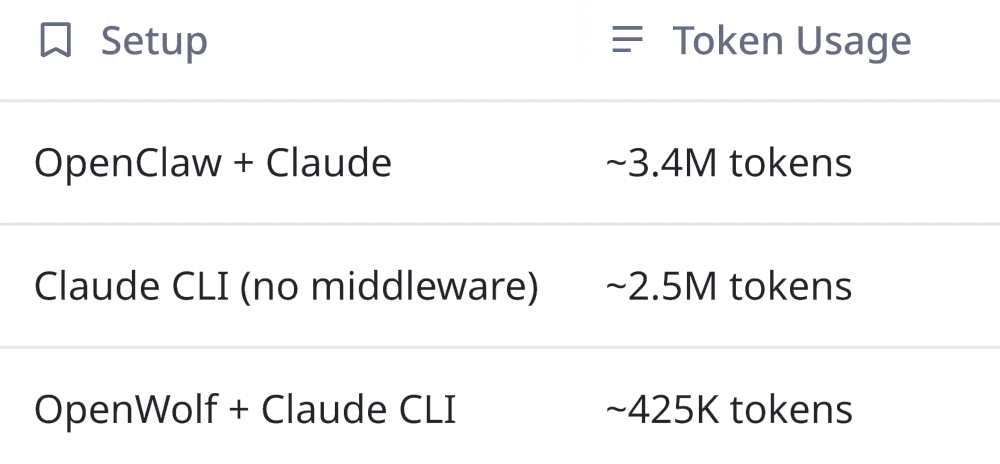
The cost comparison tells the story:
That’s roughly an 80% reduction on a large project, and a 65.8% average across 20 projects.
What Is OpenWolf?
OpenWolf gives Claude three things it doesn’t have natively:
A project index: a file-level map with descriptions and token estimates so Claude can make informed decisions about what to read
A learning memory: a persistent log of your corrections, preferences, and conventions that carries across sessions
A token-aware read layer: hooks that intercept every file read and write, tracking usage and preventing redundant operations
It runs entirely on your machine.
All hooks are pure Node.js file I/O with no network requests, external API calls or extra cost beyond your existing Claude subscription.
The only AI calls are optional scheduled tasks (anatomy rescans, memory consolidation) that use your existing Claude setup.
OpenWolf is also an advisory layer, Claude still has full autonomy but it just has better information.
Installation and Setup
Code
bash
npm install -g openwolf
That’s the only global install. Everything else is project-local.
Initialize a project:
Code
bash
cd  your-project
openwolf init
Here’s what happens when you run openwolf init:
Code
text
✓ OpenWolf v1.0.4 initialized
✓ .wolf/ created with 13 files
✓ Claude Code hooks registered (6 hooks)
✓ CLAUDE.md updated
✓ .claude/rules/openwolf.md created
✓ Anatomy scan: 24 files indexed
✓ Daemon: running via pm2
Let’s break down each step:
.wolf/ directory created: It contains all state files, hooks, configuration, and learning memory.
6 Claude Code hooks registered: These hook into Claude Code’s lifecycle events (PreToolUse, PostToolUse, SessionStart, Stop). They fire automatically on every Claude action.
CLAUDE.md updated: OpenWolf appends instructions to your project’s CLAUDE.md file, which Claude reads at the start of every session. This is the fallback mechanism when hooks don’t fire.
.claude/rules/openwolf.md created: Additional rules file for Claude’s rule system.
Anatomy scan: OpenWolf immediately indexes every file in your project, generating one-line descriptions and token estimates.
Daemon started: A pm2-managed background process that handles scheduled tasks like periodic anatomy rescans and memory consolidation.
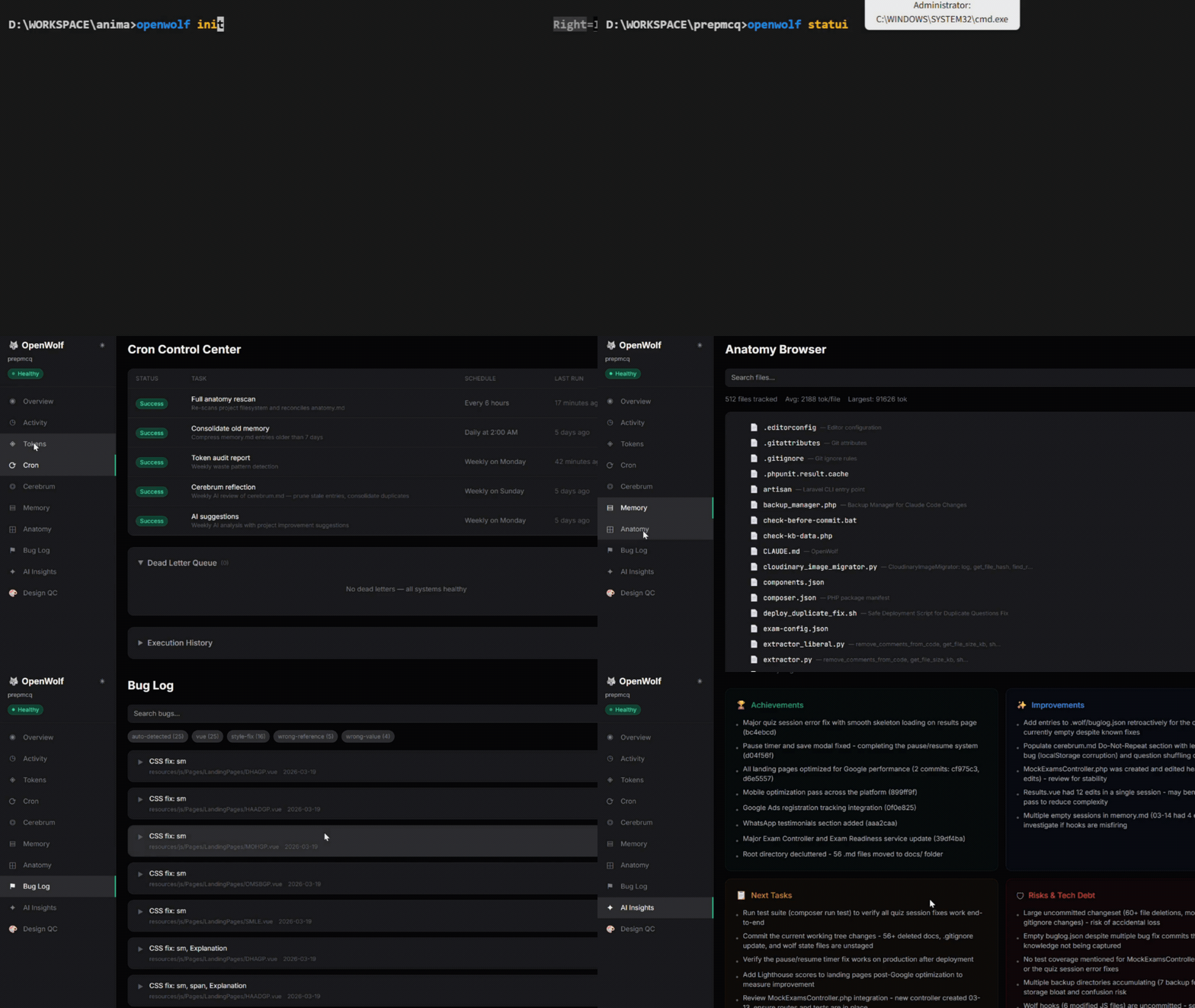
You can start with verifying its status
Code
bash
openwolf status
which will show your current session stats, lifetime token savings, and hook health.
Then you can just work with Claude:
Code
bash
claude
That’s it, the hooks will fire invisibly.
There are no new commands to learn for your daily workflow, no mental model shifts or configuration to fiddle with.
The .wolf/ Directory: Architecture Deep Dive
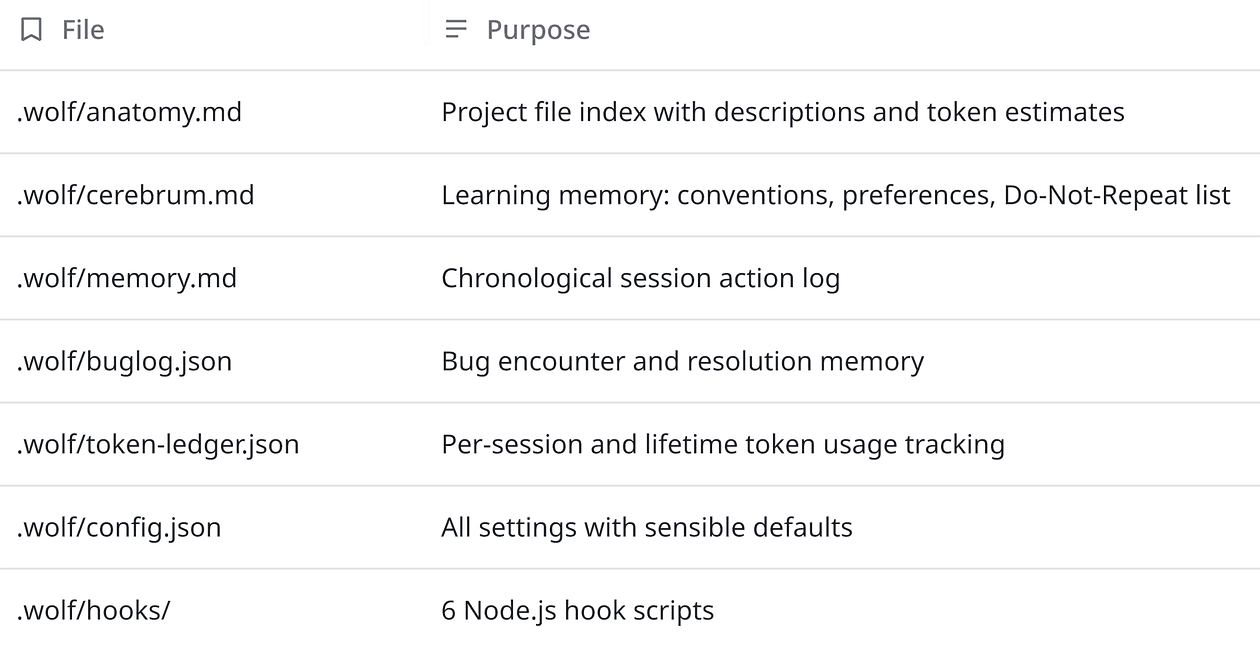
The .wolf/ directory is the heart of OpenWolf.
Let’s have a look at each of them.
anatomy.md: The Project Index
This is the file that prevents the most token waste.
It’s an auto-generated index of every file in your project with a one-line description and a token estimate:
Sample anatomy.md excerpt
text
src/api/
- auth.ts - JWT validation middleware. Reads from env.JWT_SECRET. (~340 tok)
- users.ts - CRUD endpoints for /api/users. Pagination via query params. (~890 tok)

src/components/
- Header.tsx - Main navigation header with auth state. (~450 tok)
- Dashboard.tsx - Dashboard layout with grid system. (~1,200 tok)
Before Claude reads any file, the pre-read.js hook injects the anatomy info for that file.
Claude sees “this file is your JWT validation middleware, approximately 340 tokens” and can decide: is the description enough, or do I need the full content?
For many operations, especially when Claude is scanning for a specific function or trying to understand project structure, the description is sufficient.
This alone eliminates a huge chunk of unnecessary reads.
The index auto-updates after every write via the post-write.js hook.
cerebrum.md: The Learning Memory
This is where OpenWolf gets genuinely interesting from a software engineering perspective.
cerebrum.md is a persistent, session-spanning memory of your corrections, preferences, and architectural decisions:
Sample cerebrum.md excerpt
md
## Conventions
- Named exports only, never default exports
- All API responses wrapped in { data, error, meta } shape
- Tests co-located with source files, suffix.test.ts

## Do-Not-Repeat
- 2026-03-10: Never use `var` - always `const` or `let`
- 2026-03-11: Don't mock the database in integration tests
- 2026-03-14: The auth middleware reads from `cfg.talk`, not `cfg.tts`
The pre-write.js hook checks new code against these entries before Claude writes it.
If Claude is about to write code using var, the hook catches it and warns Claude.
But compliance is approximately 85–90%, not 100%.
cerebrum.md depends on Claude actually following instructions to update it when you make corrections.
This is a fundamental constraint of prompt-based enforcement.
But 85-90% catch rate on repeat mistakes is dramatically better than 0%.
Over weeks and months, cerebrum.md accumulates a dense representation of your team’s conventions.
New sessions start with all of this context loaded.
Claude doesn’t need you to repeat “we use named exports” for the hundredth time, it already knows.
memory.md: The Session Log
A chronological action log recording every read, write, and decision per session.
This is primarily useful for debugging and understanding Claude’s behavior patterns.
When something goes wrong, memory.md tells you exactly what Claude read, in what order, and whether it was a redundant operation.
buglog.json: The Fix Memory
Every bug fix gets logged with structured data:
Code
bash
{
"error_message": "TypeError: Cannot read properties of undefined (reading 'map')",
"root_cause": "API response was null when users array was expected",
"fix": "Added optional chaining: data?.users?.map() and fallback empty array",
"tags": ["null-check", "api-response", "react"]
}
Before Claude starts debugging anything, the hook checks if that error signature already exists in the log.
Instead of spending 15 minutes rediscovering a fix, Claude finds it and applies it directly.
This is essentially a project-specific knowledge base for error resolution.
If you’ve worked on any long-running project, you know that certain bugs recur, especially environment-specific issues, API contract mismatches, or dependency quirks.
buglog.json captures institutional knowledge that would otherwise live only in developers’ heads.
token-ledger.json: The Receipt
Every session gets a line item with reads, writes, anatomy hits vs. misses, and repeated reads blocked.
Lifetime totals let you verify the savings yourself.
config.json: Settings
All settings with sensible defaults:
Token ratios for estimation accuracy tuning
Cron schedules for anatomy rescans and memory consolidation
Dashboard port configuration
Exclude patterns (node_modules,.git, etc.)
The Six Hooks: How Enforcement Actually Works
Claude Code supports lifecycle hooks, event handlers that fire at specific points in Claude’s tool-use cycle.
OpenWolf registers six of them:
Hook 1: session-start.js (SessionStart)
Fires when a new Claude Code session begins and creates a fresh session tracker in memory, initializes the session entry in memory.md, and loads the current cerebrum.md and anatomy.md state.
This ensures every session starts with full project intelligence.
Hook 2: pre-read.js (PreToolUse, Read)
Fires before Claude reads any file and does two things:
Injects the anatomy entry for the requested file like description, token estimate, and any relevant notes
Checks if Claude has already read this file in the current session. If yes, it issues a warning: “You already read this file 12 minutes ago. Contents haven’t changed.”
This is the highest-impact hook.
It’s the one responsible for the majority of token savings.
Hook 3: pre-write.js (PreToolUse, Write)
Fires before Claude writes to any file and cross-references the proposed write against the Do-Not-Repeat list in cerebrum.md.
If the new code matches a known anti-pattern, it warns Claude before the write happens.
Hook 4: post-read.js (PostToolUse, Read)
Fires after Claude reads a file and estimates the token count of the read content and records it in the session tracker.
This is how the token ledger gets its data.
Hook 5: post-write.js (PostToolUse, Write)
Fires after Claude writes to a file and updates the anatomy entry for the modified file (new description, new token estimate) and appends the write event to memory.md.
This keeps the project index accurate in real-time.
Hook 6: stop.js (Stop)
Fires when a Claude Code session ends and writes the complete session summary to token-ledger.json, total reads, writes, tokens consumed, anatomy hits, repeated reads blocked.
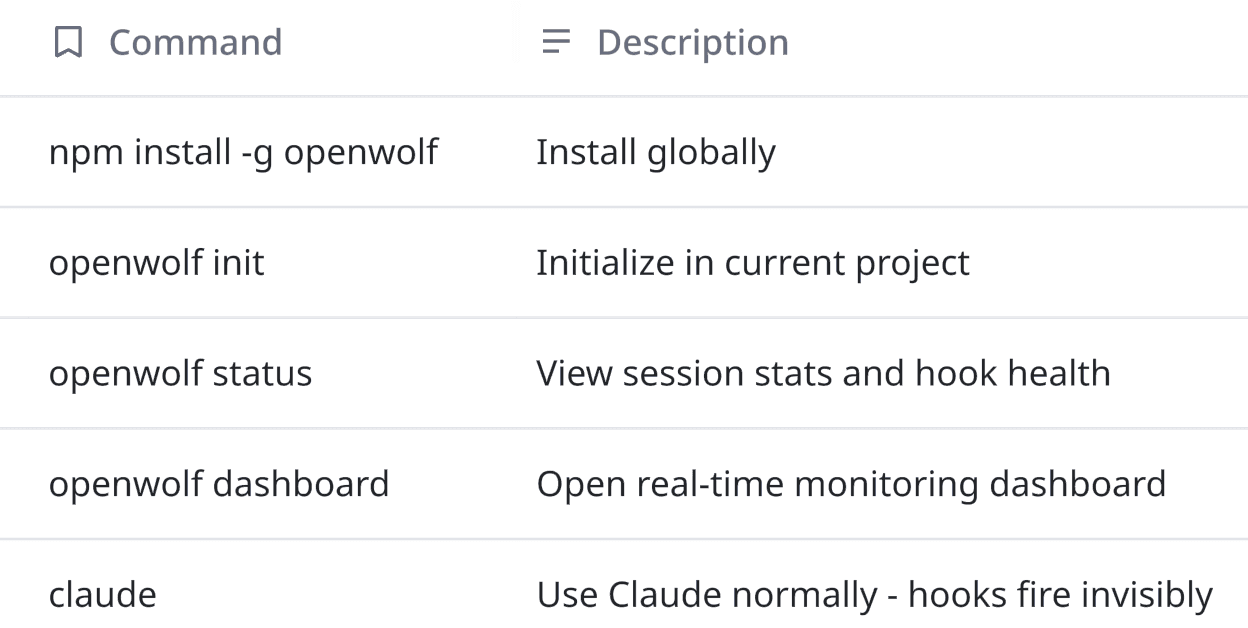
Here’s also a quick command reference which you may find handy: