Agent Native
Practical systems for builders shipping AI and agent-powered products.
GLM-4.7-Flash is one of those rare open-weights releases that changes what “local-first” can realistically mean for coding + agentic workflows.
It’s a 30B-class MoE model that only activates ~3.6B parameters per token, with strong benchmark results yet still practical to run on consumer hardware with ~24GB VRAM using quantized weights.
Here are the runtime options:
llama.cpp + GGUF
vLLM
SGLang
Transformers
Let’s dive right in.
Why this is a “local LLM” breakthrough
What you’re getting is MoE efficiency.
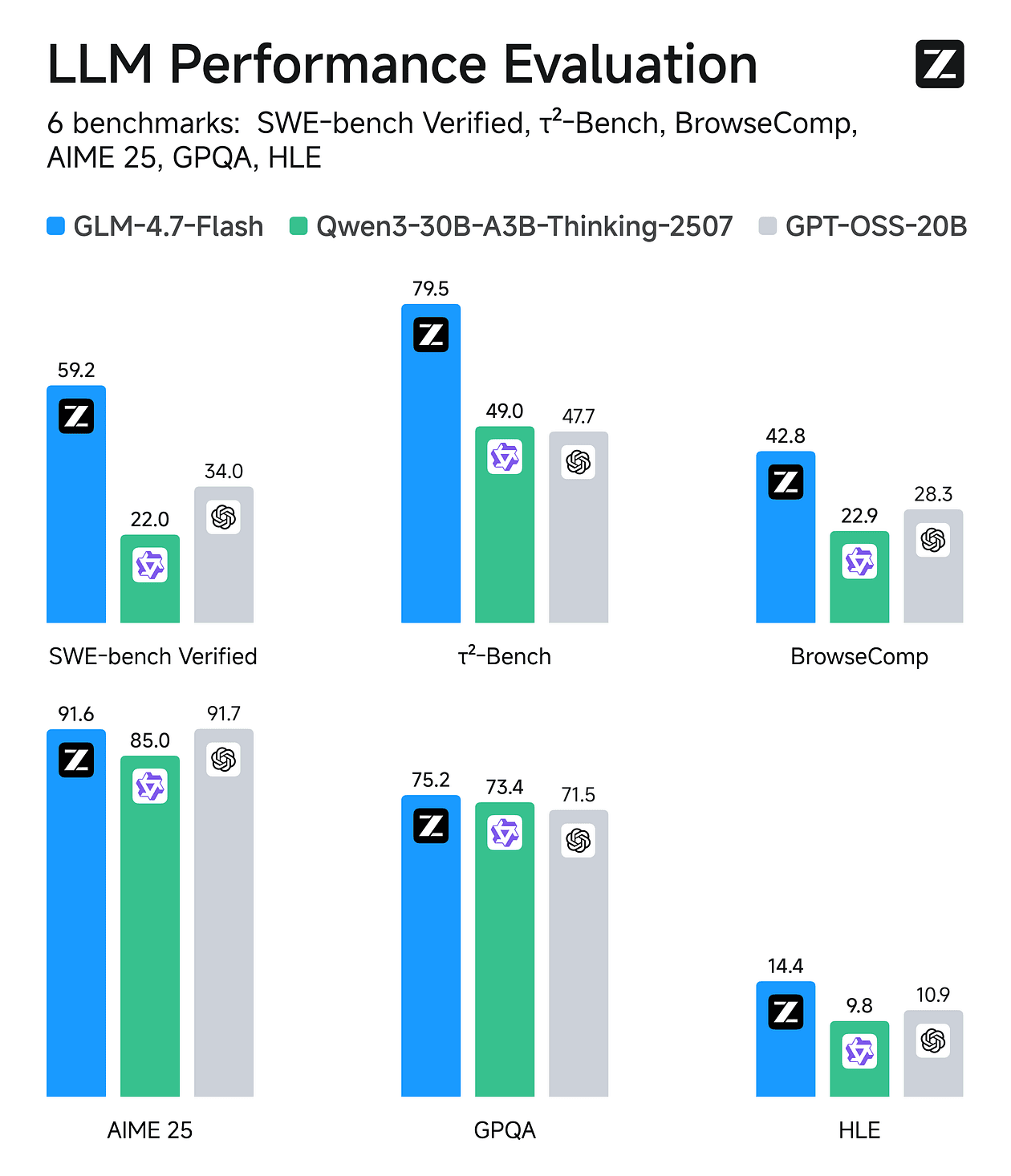
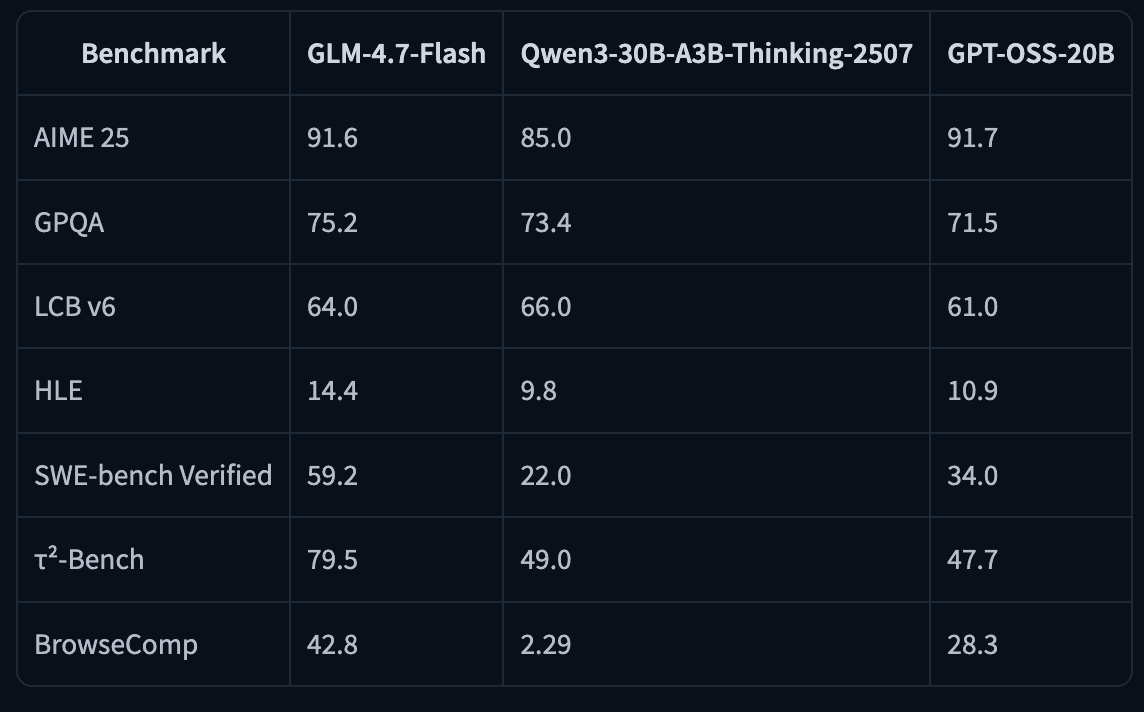
GLM-4.7-Flash is a 30B-A3B Mixture-of-Experts model (30B total, ~3B active). Benchmarks reported scores include SWE-bench Verified 59.2 and τ²-Bench 79.5 , among others.
You can run it on 24GB RAM/VRAM/unified memory (and notes ~18GB needed for their 4-bit path).
Quick specs for memory & context
Hardware target recommended is a ny modern GPU with
The Builder Brief
Get the patterns behind posts like this Join the Builder Brief for cost breakdowns, architecture notes, and production playbooks for shipping AI and agent products — free, straight to your inbox.
Double opt-in. No spam, unsubscribe anytime. See Privacy .
The Agent Foundry
Ship production-grade agents without the 6-month rework The engineering library for shipping production-grade agentic systems:implementation-focused books, deployable reference repositories, and managed-service-first architectures for Next.js application backends, Supabase authentication and tenant isolation, durable background jobs, event-driven lifecycle workflows, subscription and usage-based billing, rate limiting, retries, and production observability.
Production repos — auth, billing, tenant isolation, retries, observability — you can ship this week New playbooks and repos every month as models and stacks change Direct access to the person building it €0 today, then €14.99/mo · cancel anytime · one-time purchase also available
~24GB VRAM
Maximum context window of 202,752 tokens (your usable context depends heavily on KV cache memory).
If you have the right runtime and enough memory, you can reach 200K context.
Let’s look at the runtime options.
A) llama.cpp + GGUF (fastest path to ‘running locally’) Best when you want local CLI chat, desktop apps, and a simple OpenAI-compatible endpoint via llama-server.
1) Build llama.cpp (CUDA) apt-get update
apt-get install pciutils build-essential cmake curl libcurl4-openssl-dev -y
git clone https://github.com/ggml-org/llama.cpp
cmake llama.cpp -B llama.cpp/build \
-DBUILD_SHARED_LIBS=OFF -DGGML_CUDA=ON
cmake --build llama.cpp/build --config Release -j --clean-first --target llama-cli llama-mtmd-cli llama-server llama-gguf-split
cp llama.cpp/build/bin/llama-* llama.cppIf you don’t have a GPU (or want CPU-only), build with -DGGML_CUDA=OFF.
2) Run GLM-4.7-Flash (4-bit) in chat mode Unsloth suggests Z.ai’s recommended sampling parameters :
General: --temp 1.0 --top-p 0.95Tool calling: --temp 0.7 --top-p 1.0With llama.cpp, set **--min-p 0.01** (because llama.cpp’s default is 0.1).
General (most tasks) ./llama.cpp/llama-cli \
-hf unsloth/GLM-4.7-Flash-GGUF:UD-Q4_K_XL \
--jinja --threads -1 --ctx-size 32768 \
--temp 1.0 --top-p 0.95 --min-p 0.01 --fit on
Tool-calling-friendly sampling ./llama.cpp/llama-cli \
-hf unsloth/GLM-4.7-Flash-GGUF:UD-Q4_K_XL \
--jinja --threads -1 --ctx-size 32768 \
--temp 0.7 --top-p 1.0 --min-p 0.01 --fit on
--fit on helps llama.cpp fit memory behavior based on model metadata.You can push context higher as memory allows; Unsloth references up to ~202k max context.
Unsloth currently doesn’t recommend running this GGUF in Ollama due to potential chat template compatibility issues (llama.cpp + LM Studio/Jan backends are called out as working well).
3) Fix looping / repetition (important update) Unsloth reports a Jan 21 update where a llama.cpp-side bug had set "scoring_func": "softmax" but it should be "sigmoid", which caused looping/poor outputs.
They updated the GGUFs and recommend re-downloading for better quality.
If your outputs feel “stuck”:
Update llama.cpp to the latest commit and rebuild.
Re-download the updated GGUF from Unsloth.
Use the recommended sampling presets above.
4) Download the model Via (after installing pip install huggingface_hub hf_transfer ). You can choose UD-Q4_K_XL or other quantized versions.
#!pip install huggingface_hub hf_transfer
import os
os.environ["HF_HUB_ENABLE_HF_TRANSFER"] = "1"
from huggingface_hub import snapshot_download

snapshot_download(
  repo_id = "unsloth/GLM-4.7-Flash-GGUF",
  local_dir = "unsloth/GLM-4.7-Flash-GGUF",
  allow_patterns = ["*UD-Q4_K_XL*"],
)
5) Serve it like an API: llama-server (OpenAI-compatible) ./llama.cpp/llama-server \
--model unsloth/GLM-4.7-Flash-GGUF/GLM-4.7-Flash-UD-Q4_K_XL.gguf \
--alias "unsloth/GLM-4.7-Flash" \
--threads -1 \
--fit on \
--seed 3407 \
--temp 1.0 \
--top-p 0.95 \
--min-p 0.01 \
--ctx-size 16384 \
--port 8001 \
--jinja
6) Call it with the OpenAI Python SDK from openai import OpenAI
client = OpenAI(
base_url="http://127.0.0.1:8001/v1",
api_key="sk-no-key-required",
)
resp = client.chat.completions.create(
model="unsloth/GLM-4.7-Flash",
messages=[{"role": "user", "content": "What is 2+2?"}],
)print(resp.choices[0].message.content)
At this point you can point any OpenAI-compatible client (your apps, agent frameworks, evaluation harnesses) at your local endpoint.
Tool calling (agents): a practical pattern GLM-4.7-Flash is positioned for agentic workflows, and both the HF model card and Unsloth docs emphasize tool calling support.
A minimal “tool loop” looks like this:
Send messages + tools to the model
If the model returns tool calls, execute them locally
Append tool results to the conversation
Repeat until the model returns a final answer
Here’s a safe, minimal example (one tool):
import json
from openai import OpenAI

client = OpenAI(base_url="http://127.0.0.1:8001/v1", api_key="sk-no-key-required")

def add(a: float, b: float) -> float:
  return a + b

TOOLS = [{
  "type": "function",
  "function": {
      "name": "add",
      "description": "Add two numbers.",
      "parameters": {
          "type": "object",
          "properties": {
              "a": {"type": "number"},
              "b": {"type": "number"},
          },
          "required": ["a", "b"],
      },
  },
}]

messages = [{"role": "user", "content": "Add 12.5 and 3.4, then explain the result."}]

while True:
  resp = client.chat.completions.create(
      model="unsloth/GLM-4.7-Flash",
      messages=messages,
      tools=TOOLS,
      tool_choice="auto",
  )

  msg = resp.choices[0].message
  tool_calls = getattr(msg, "tool_calls", None)

  if not tool_calls:
      print(msg.content)
      break

  # Handle tool calls
  messages.append({"role": "assistant", "content": msg.content or "", "tool_calls": tool_calls})

  for tc in tool_calls:
      args = json.loads(tc.function.arguments)
      if tc.function.name == "add":
          result = add(args["a"], args["b"])
      else:
          result = f"Unknown tool: {tc.function.name}"
      messages.append({
          "role": "tool",
          "tool_call_id": tc.id,
          "content": str(result),
      })
Unsloth also provides a much larger reference example (multiple tools, guarded terminal execution, etc.).
B) vLLM (throughput + serving) Best when you want higher-throughput serving and more “server-y” deployment, but you’ll need vLLM’s main/nightly support right now.
vLLM announced day-0 support for GLM-4.7-Flash, but the HF model card notes that vLLM support is on main branches / nightly builds right now.
1) Install the right builds pip install -U vllm --pre --index-url https://pypi.org/simple --extra-index-url https://wheels.vllm.ai/nightly
pip install git+https://github.com/huggingface/transformers.git
2) Serve the model The model card shows a multi-GPU example:
vllm serve zai-org/GLM-4.7-Flash \
--tensor-parallel-size 4 \
--speculative-config.method mtp \
--speculative-config.num_speculative_tokens 1 \
--tool-call-parser glm47 \
--reasoning-parser glm45 \
--enable-auto-tool-choice \
--served-model-name glm-4.7-flash
On a single GPU, start by setting --tensor-parallel-size 1 and drop speculative flags until you’re stable.
C) SGLang (server + agent features) Similar “main branch required” story, good for structured tool calling + reasoning parsers.
The HF model card includes both install pins and a launch command:
uv pip install sglang==0.3.2.dev9039+pr-17247.g90c446848 --extra-index-url https://sgl-project.github.io/whl/pr/
uv pip install git+https://github.com/huggingface/transformers.git@76732b4e7120808ff989edbd16401f61fa6a0afa

python3 -m sglang.launch_server \
--model-path zai-org/GLM-4.7-Flash \
--tp-size 4 \
--tool-call-parser glm47 \
--reasoning-parser glm45 \
--speculative-algorithm EAGLE \
--speculative-num-steps 3 \
--speculative-eagle-topk 1 \
--speculative-num-draft-tokens 4 \
--mem-fraction-static 0.8 \
--served-model-name glm-4.7-flash \
--host 0.0.0.0 \
--port 8000
There’s also a note about attention backends for Blackwell GPUs.
D) Transformers (reference implementation) Best for correctness checks, experiments, and when you want to stay close to upstream HF APIs.
import torch
from transformers import AutoModelForCausalLM, AutoTokenizer

MODEL_PATH = "zai-org/GLM-4.7-Flash"

messages = [{"role": "user", "content": "hello"}]
tok = AutoTokenizer.from_pretrained(MODEL_PATH)

inputs = tok.apply_chat_template(
  messages,
  tokenize=True,
  add_generation_prompt=True,
  return_dict=True,
  return_tensors="pt",
)

model = AutoModelForCausalLM.from_pretrained(
  pretrained_model_name_or_path=MODEL_PATH,
  torch_dtype=torch.bfloat16,
  device_map="auto",
)

inputs = inputs.to(model.device)

generated = model.generate(**inputs, max_new_tokens=128, do_sample=False)
print(tok.decode(generated[0][inputs.input_ids.shape[1]:]))
If you have any questions, drop a comment!