Opening the post0.0s
19 min read
How well fine-tuning performs still depends on three factors: model size, hardware capability, and the framework you choose.
Let’s talk numbers.
Most modern open-source models in the 7–8B parameter range (like LLaMA 3, Mistral, or Qwen3) can now be fine-tuned on GPUs with 12–24 GB VRAM using 4-bit quantized adapters (QLoRA).
An 8B model typically needs just 5–6 GB of memory, making it feasible on a RTX 3060 or newer iterations.
For memory efficiency, dynamic quantization narrowed the accuracy gap such that using 4-bit has minimal downside.
QLoRA vs LoRA has negligible loss now, meaning you can confidently use 4-bit to save memory. You should train in the precision you plan to serve in (so if you want a 4-bit runtime model, train in 4-bit).
On speed, with optimizations like FlashAttention, LoRA, and sequence packing, you can fine-tune 8B model on 100k samples in few hours on an A100 (40GB), whereas the same on a consumer RTX 4090 (~24GB, slightly less memory and compute) might take longer (~10–12 hours) with these optimizations, and ~20+ hours on a 3090. Without the optimizations that these frameworks provide, it can take 2–3x longer.
If you have access to multiple-GPUs (e.g. two 3090s), you can split the load almost linearly. Fine-tuning a 13B model might go nearly 2x faster on 2 GPUs versus 1.
If you have Apple Silicon, to my knowledge, 7B and 13B fine-tuning is technically possible, but training is 5–10x slower due to the lack of Metal-optimized low-level kernels. If you’re on a MacBook with an M1 or higher, stick to 3B–7B models and limit to a few epochs, or offload training to a cloud GPU (like RunPod or Lambda). That said, I’m not an expert there, so I’d love to hear about your Mac/M-series experiences in the comments.
On the integrations side, all frameworks allow saving models in Hugging Face format, so you can easily push to the Hub or load with .
AutoModelIn this guide, I will walk you through four leading solutions,
We’ll explore features and practical examples (code, CLI, YAML) of each toolkit.
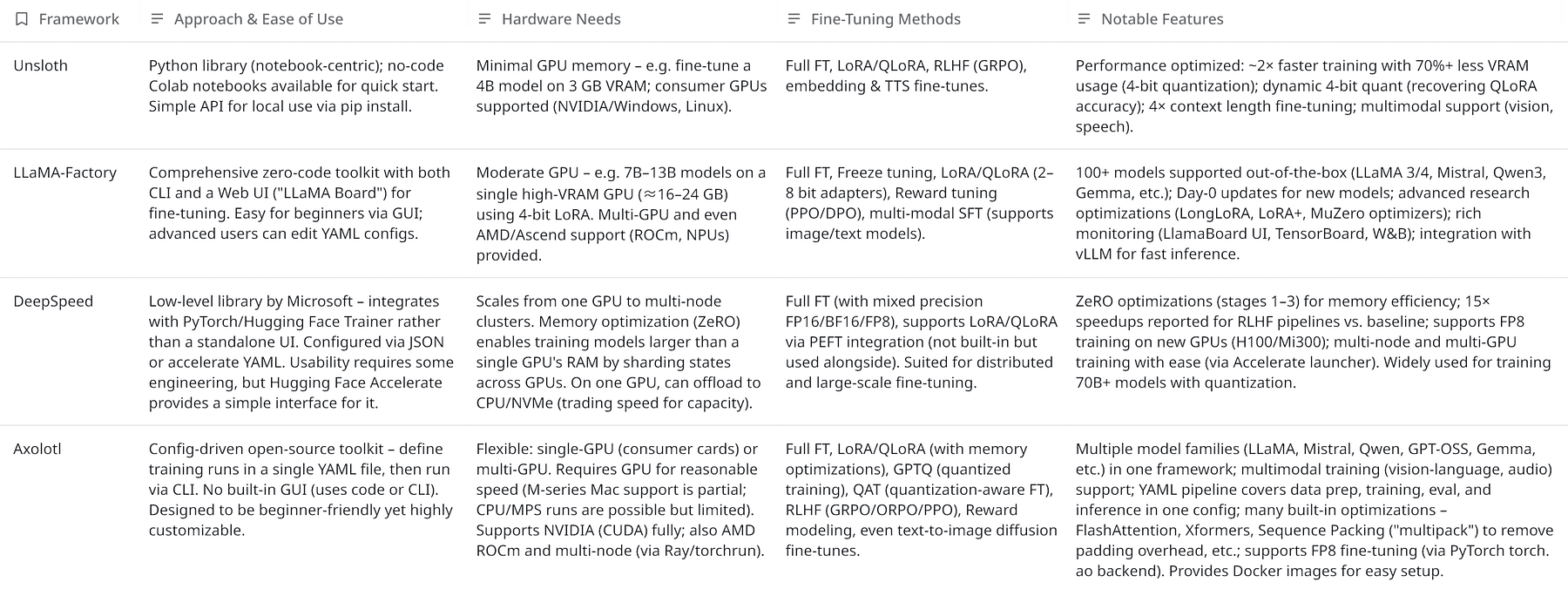
To set the stage, here’s a high-level comparison of the four frameworks:
Each tool targets a slightly different audience and use-case:
Below, we dive into each tool in detail, with examples and recent updates.
Unsloth has quickly gained popularity for its ability to fine-tune LLMs ultra-efficiently.
It advertises training “2x faster with ~70% less VRAM” usage than standard methods, thanks to techniques like 4-bit quantization and smart data processing.
In fact, Unsloth’s approach is so memory-light that one can fine-tune a 4B model (e.g. Qwen3-4B) on just 3 GB GPU VRAM, effectively bringing LLM fine-tuning to consumer laptops.
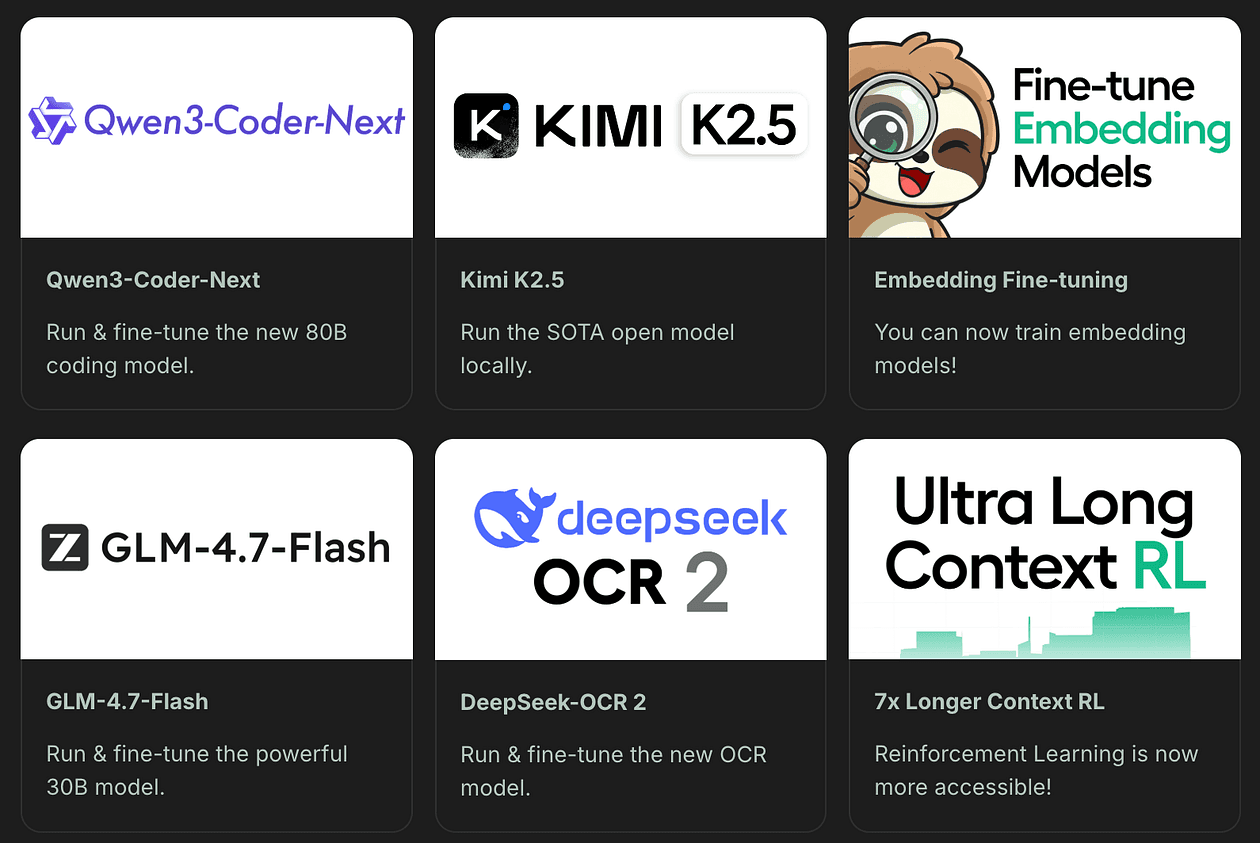
Unsloth is provided as a Python package (pip install unsloth) and a set of ready-made Jupyter notebooks.
Beginners can jump in by running Colab notebooks that guides through the whole fine-tuning process.
For instance with a single notebook you can fine-tune or do RLHF on Colab or Kaggle “for free,” requiring only a few gigabytes of GPU memory.
This lowers the entry barrier significantly.
Advanced users can use Unsloth’s Python API in their own scripts.
There’s no dedicated GUI, but the well-documented notebooks and simple function calls make the process straightforward.
Unsloth supports standard supervised fine-tuning (SFT) as well as Reinforcement Learning fine-tuning (for RLHF-style training with reward models).
It is compatible with parameter-efficient techniques, notably LoRA and QLoRA.
Under the hood, Unsloth can apply 4-bit quantization to the base model weights (using bitsandbytes) so that you fine-tune in 4-bit mode.
This is why Unsloth can handle larger models on small GPUs.
For example, QLoRA reduces memory by 4x, and Unsloth further refines this with its dynamic 4-bit quantization.
The “dynamic” part refers to Unsloth’s custom 4-bit weight quantization that preserves more accuracy than standard 4-bit methods (closing the gap between QLoRA and full 16-bit fine-tuning).
If you prefer, you can also do full 16-bit fine-tuning or 8-bit modes, Unsloth exposes flags like load_in_4bit=True/False or full_finetuning=True to toggle these modes (only one mode can be active at a time).
You are better to start with LoRA/QLoRA for most cases, since it achieves almost the same result as full fine-tuning at a fraction of the compute cost.
It also supports extended context training: with the right configuration, you can fine-tune models to 4x longer context lengths than normal (e.g. enabling 8192-token context for LLaMA by adjusting max_seq_length, thanks to FlashAttention support).
Beyond text LLMs, Unsloth can fine-tune other model types: e.g. it has modules for vision models, text-to-speech models, embeddings, etc., making it a broadly capable training library.
A recent update introduced sequence packing, which merges multiple short training samples into one sequence with proper masking, eliminating pad token overhead.
In datasets with many short prompts, this can theoreticaly give up to a 5x training speedup.
Even in default mode without packing, the custom fused kernels and optimizations yield about 1.1–2x faster training step times than earlier implementations.
Unsloth’s VRAM usage can drop by 30–90% for the same model compared to naive fine-tuning, for example, a 70B model fine-tune on a single 48 GB GPU where it would previously require multiple GPUs or not fit at all.
All this comes with “0% change in training loss curve,” i.e. no accuracy degradation. These claims are also backed by the library’s benchmarks and community testing.
In practice, one trade-off for using Unsloth is that it abstracts a lot for you, which is great for ease but means less manual control over training loops compared to frameworks like Axolotl.
Also, since it relies on PyTorch and NVIDIA tooling (like bitsandbytes), full support on Apple Silicon or AMD GPUs isn’t its focus (running on those might fall back to slower methods or not work).
But on an NVIDIA GPU, Unsloth is one of the fastest ways to get a fine-tuned LLM.
Fine-Tuning Example with Unsloth
With Unsloth, you typically write a short Python script or use their notebook.
For instance, using Unsloth’s high-level API, you might do something like:
from unsloth import SFTTrainer, AutoModelForCausalLM

model = AutoModelForCausalLM.from_pretrained("unsloth/llama-3.1-8b-unsloth-bnb-4bit")

trainer = SFTTrainer(
  model=model,
  train_dataset=my_dataset,
  lora_rank=8,   # using LoRA rank 8
  load_in_4bit=True,
  output_dir="output-model"
)

trainer.train()
The key idea is that you load an Unsloth-prepared 4-bit version of a model (here LLaMA 3 8B), specify LoRA or full FT, and call train().
LLaMA-Factory is a one-stop platform for fine-tuning LLMs, combining an easy WebUI, a CLI tool, and a kitchen-sink of advanced features under the hood.
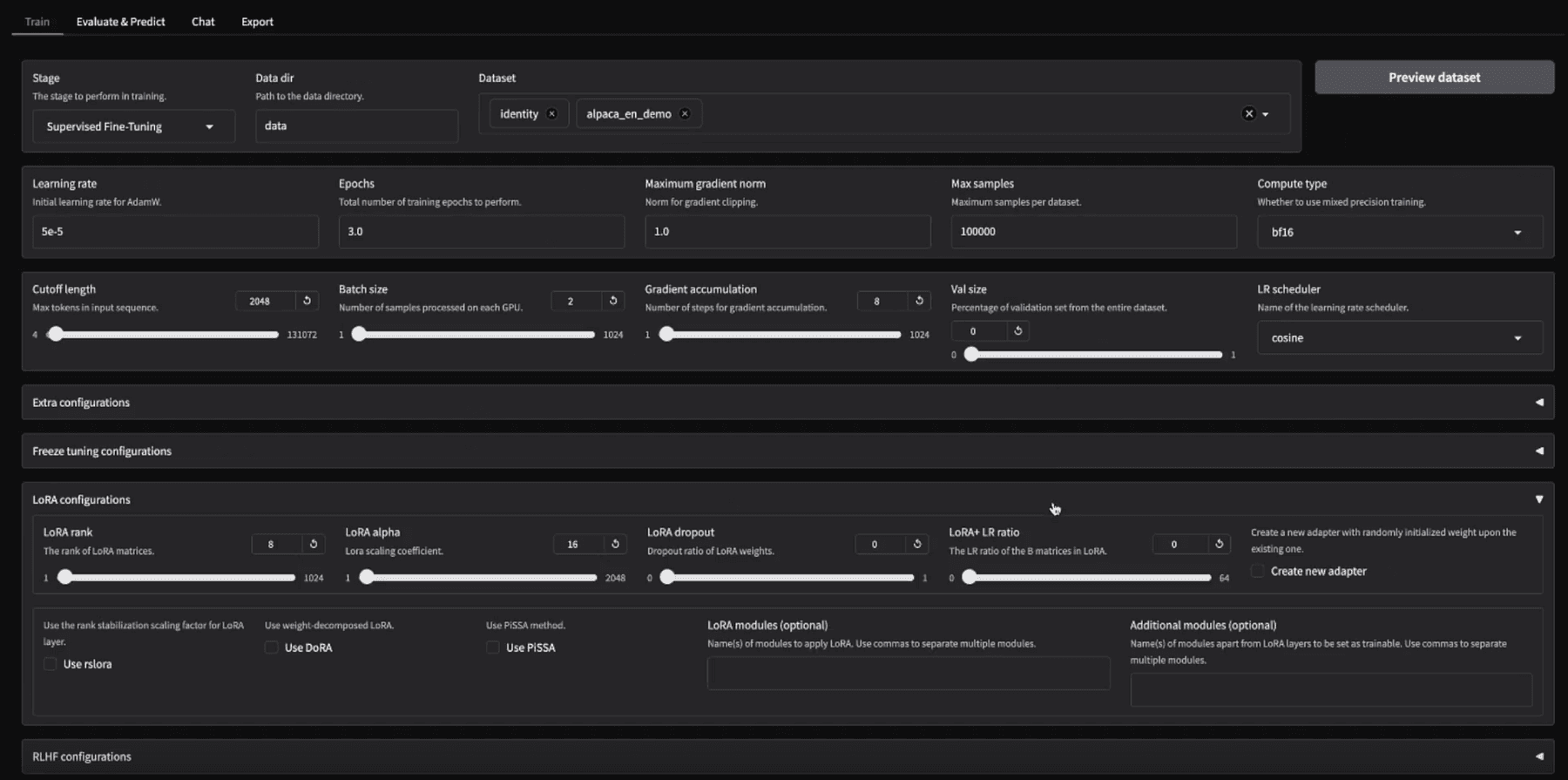
Its mission is to make fine-tuning “as easy as… click Start” while still allowing experts to leverage cutting-edge research.
The project is notable for being very actively maintained (often adding support for new models or techniques within days, they jokingly highlight “Day-0” or “Day-1” support for models like Qwen3, Llama 4, etc.).
There are two primary ways to use LLaMA-Factory:
llamafactory-cli webui, which opens a local Gradio-based web interface. This UI dramatically lowers the barrier, i.e. you can fine-tune a model without writing any code at all. Once training is done, the Evaluate/Chat tabs let you test the model’s performance right in the browser, and the Export tab lets you package the resulting model (with options to merge LoRA weights, quantize the model to GGUF/AWQ etc., and push to hub or save locally).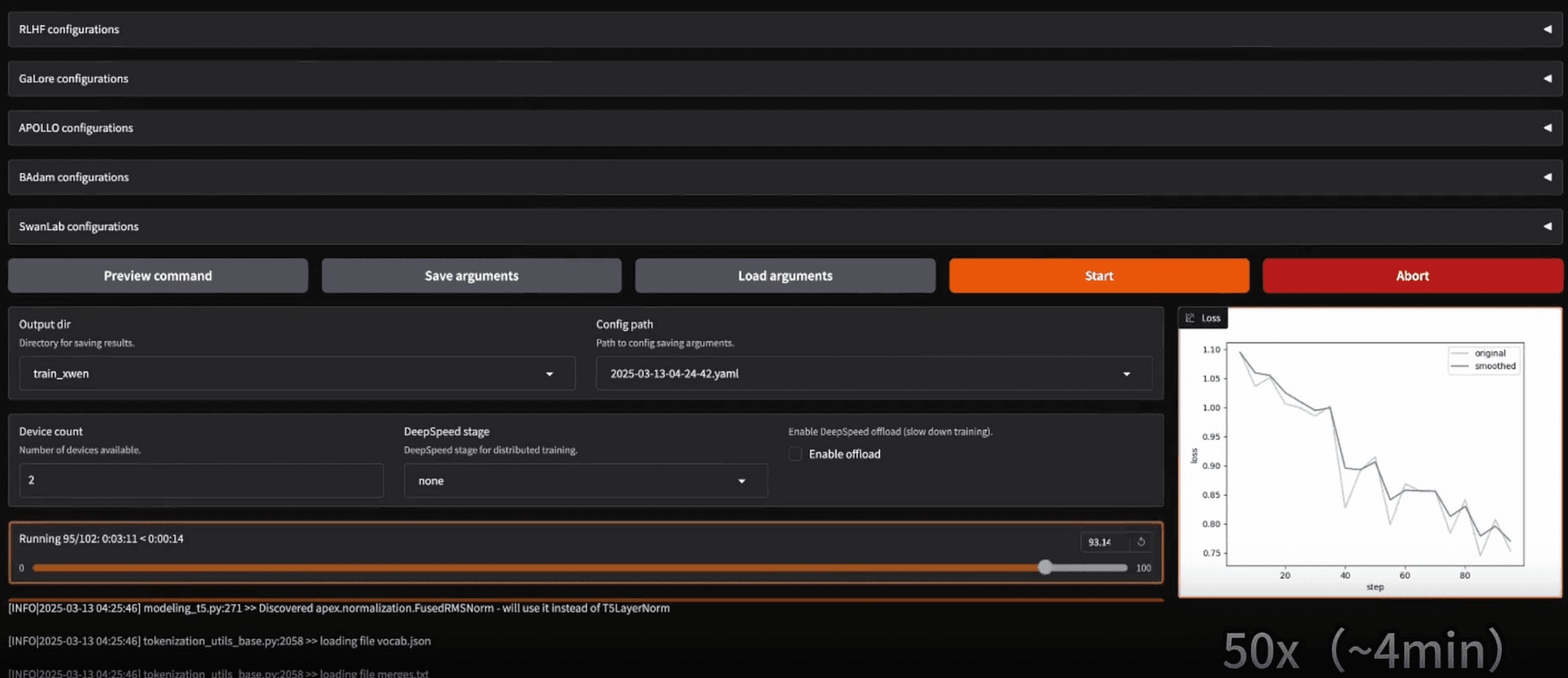
llamafactory-cli train examples/train_lora/qwen3_lora_sft.yaml
This single command will initiate training as per the YAML config (which contains all the settings).
Likewise, there are subcommands for chatting/inference and for merging adapters.
For instance, after training, you might run llamafactory-cli chat <config.yaml> to launch an interactive chat with the fine-tuned model, or llamafactory-cli export <config.yaml> to merge LoRA weights into the base model.
The CLI is zero-code in the sense that you just prepare config files; it’s suitable for those who prefer scriptable interactions or want to integrate fine-tuning into a pipeline.
Installation is a bit more involved than Unsloth or Axolotl because LLaMA-Factory has many optional components (for various hardware and features).
It supports NVIDIA GPUs (with CUDA), AMD GPUs (ROCm) and even Huawei Ascend NPUs, which is rare.
Depending on your hardware, you may install additional packages (e.g. for Windows, install bitsandbytes manually, for AMD, compile a custom bitsandbytes fork).
In short, it’s cross-platform but NVIDIA Linux is the smoothest path.
Factory supports an assembly line of fine-tuning approaches:
bitsandbytes NF4, or other experimental 3-bit/2-bit methods such as AWQ or AQLM). You can do 2/3/4/6/8-bit quantized fine-tuning, which is cutting-edge, even 2-bit LoRA (though likely with some trade-offs).For a code-based approach, LLaMA-Factory also exposes a Python API (in case you want to script things without YAML).
But typically, you’d edit a YAML, for instance, here’s a snippet from a config for LoRA fine-tuning:
model_name_or_path: Qwen/Qwen-3-4B finetuning_type: lora lora_rank: 8 dataset: path/to/dataset.json template: llama2 per_device_train_batch_size: 2 gradient_accumulation_steps: 4 num_train_epochs: 3 output_dir: output/qwen3-4B-lora
Running llamafactory-cli train on this config would fine-tune the Qwen-3 4B model with LoRA rank 8 on your dataset.
After training, you could open the Chat tab in the WebUI, load the base model and the LoRA weights (it provides a UI element for selecting the adapter file), and have a conversation with the fine-tuned model to evaluate its responses.
DeepSpeed is a different beast in this lineup, it’s not an all-in-one training app, but a deep learning optimization library.
Developed by Microsoft, DeepSpeed is renowned for enabling the training of billion-parameter models efficiently by overcoming hardware limitations.
It’s the engine under many research projects and complements tools like Hugging Face’s Trainer or PyTorch Lightning.
On its own, you typically use DeepSpeed by writing a Python training script and adding DeepSpeed initialization.
However for most users, the easiest way to leverage it is via Hugging Face Accelerate/Trainer integration.
For example, you can take a standard Transformers Trainer and simply supply a DeepSpeed config file (JSON), the Trainer will then use DeepSpeed under the hood for optimizations.
Alternatively, the Accelerate library can launch a distributed training with DeepSpeed by a simple config.
Here’s an example accelerate config snippet for multi-node fine-tuning:
distributed_type: DEEPSPEED
num_machines: 2
mixed_precision: fp8
deepspeed_config:
zero_stage: 3
In this configuration (used to fine-tune a LLaMA-70B in one case), zero_stage: 3 turns on DeepSpeed’s ZeRO-3 sharding, and mixed_precision: fp8 uses 8-bit floating point precision for even greater memory savings on supported GPUs.
With just this setup, you can call accelerate launch on your training script and it will automatically shard the model across 2 machines (each maybe with 4 GPUs), massively simplifying the orchestration.
For single-machine usage, you might use the deepspeed launcher script: e.g. deepspeed --num_gpus=2 train.py --deepspeed ds_config.json.
This would run your train.py with DeepSpeed wrapping your PyTorch model (assuming your script is DeepSpeed-compatible). In short, DeepSpeed requires some coding or integration, there’s no GUI or simple YAML for complete training (outside of the HF ecosystem).
But once set up, it’s largely “set and forget”, you let DeepSpeed handle parallelism and memory.
DeepSpeed’s flagship feature is the ZeRO (Zero Redundancy Optimizer). ZeRO allows splitting the model’s states (optimizer moments, gradients, and even parameters) across GPUs so that no single GPU needs a full copy.
This is how people fine-tune 30B, 65B, or larger models on a few GPUs. For example, with ZeRO-3, if you have 4 GPUs, each might hold only 1/4 of the model parameters in memory.
DeepSpeed also supports ZeRO-Offload, where some chunks of data (like optimizer states) can be offloaded to CPU RAM or even NVMe SSD, further extending the ability to train huge models on limited GPU memory (at the cost of speed).
Another core capability is distributed training across multiple nodes (not just multiple GPUs in one server, but across servers).
DeepSpeed integrates with communication backends to synchronize gradients efficiently. It’s known to scale to thousands of GPUs for massive models.
DeepSpeed also introduced specialized optimizations:
However, note that DeepSpeed itself doesn’t implement LoRA or QLoRA, but it works with them. For example, you can fine-tune a 70B with QLoRA by using Hugging Face PEFT to add LoRA layers to the model, and still use DeepSpeed ZeRO to handle the base model distribution and training.
This is a common setup: DeepSpeed + QLoRA + HF Trainer.
This combination can fine-tune LLaMA-70B on a 2x H100 (80GB) node setup, using ZeRO-3, 4-bit quantization, and LoRA adapters.
The result is a production-ready pipeline where even such a large model can be fine-tuned in a reasonable time.
Without DeepSpeed, it would be near-impossible to handle the model purely in memory.
DeepSpeed has been shown to increase throughput and reduce cost for large model fine-tuning significantly.
DeepSpeed can enable 15x speedup in certain RLHF fine-tuning stages (compared to naive approaches). For most users fine-tuning moderate models (6B–13B), the benefit of DeepSpeed on a single GPU is mainly in memory saving (ZeRO-Offload), which might allow you to use a larger batch size or longer sequence without out-of-memory.
On multiple GPUs, it shines by achieving near-linear scaling as you add more GPUs.
That said, if you’re just fine-tuning a 7B on one GPU, DeepSpeed might be overkill, something like Unsloth or Axolotl (with bitsandbytes) is simpler.
DeepSpeed comes into the picture when pushing limits: e.g. fine-tuning a 40B model on a 24 GB GPU by offloading half to CPU, or training a 70B on 8x 16GB GPUs by sharding.
It’s also invaluable for multi-node clusters where writing custom distributed code would be complex, DeepSpeed handles it internally.
Example for Fine-Tuning with DeepSpeed (via HF Trainer):
To illustrate, here’s how you might use DeepSpeed in a Transformers training script:
from transformers import Trainer, TrainingArguments, AutoModelForCausalLM

model = AutoModelForCausalLM.from_pretrained("meta-llama/Llama-2-70b-chat-hf")

# (wrap model with LoRA using PEFT if desired here)


training_args = TrainingArguments(
  output_dir="out-model",
  per_device_train_batch_size=1,
  gradient_accumulation_steps=8,
  fp16=True,
  deepspeed="ds_config_zero2.json"   # Path to DeepSpeed config

)

trainer = Trainer(model=model, args=training_args, train_dataset=my_data)
trainer.train()
With the deepspeed argument, when trainer.train() is called, it will initialize DeepSpeed. A simple DeepSpeed config (ds_config_zero2.json) might contain:
{
"zero_optimization": {
  "stage": 2,
  "offload_optimizer": { "device": "cpu" }
},
"fp16": {
  "enabled": true
}
}
This would use ZeRO Stage 2 (shard optimizer states and gradients across GPUs) and offload the optimizer to CPU (saving GPU memory).
The result: your 70B model’s gradients and optimizer live partly in CPU RAM, allowing the training to proceed on, say, 2 GPUs that each hold a shard of the weights. DeepSpeed handles all the syncing and swapping behind the scenes.
Axolotl is an open-source framework focused on simplicity and flexibility.
It’s often described as “fine-tuning with a single YAML config”.
The philosophy is to let you specify what you want to fine-tune and how (which model, data, method, hyperparams) in a config file, and Axolotl’s CLI will handle the rest, from preprocessing to training to saving the model.
Getting started with Axolotl typically involves installing it via pip or Docker, then using one of the example config files as a template for your task.
For instance, after installation you might run:
axolotl fetch examples axolotl train examples/llama-3/lora-1b.yml
This will download a bunch of sample YAMLs (covering different models and methods). You can modify the YAML to point to your dataset or change hyperparameters.
The YAML configuration approach means you don’t write code for each fine-tune, you just edit fields.
A config file typically includes sections like: model (pretrained model name/path), data (dataset paths or HuggingFace dataset names), training parameters (batch size, epochs, learning rate), LoRA parameters if applicable (rank, alpha), and any special settings (e.g. enabling FlashAttention, gradient checkpointing, etc.).
This design makes it very reproducible, you can share a config with someone else, and they can re-run the fine-tune exactly.
Axolotl lacks a GUI, but its console output is clear and it will periodically print training loss, etc.
It also supports logging to WandB if configured.
Because it’s config-driven, Axolotl is great for running on cloud instances or headless servers (no need for notebooks or GUIs).
Despite its light footprint, Axolotl is feature-packed:
Optimizations
Under the hood, Axolotl bundles lots of tricks:
Essentially, Axolotl tries to give you the benefits of DeepSpeed/Accelerate without you writing that code, you flip a switch in the config to turn on DeepSpeed ZeRO stage 2 or 3 for example.
It’s like a meta-framework that orchestrates PyTorch, Transformers, PEFT, DeepSpeed, etc., based on the YAML.
It can load datasets from local files, HF Hub, or even cloud buckets (S3, GCS). And when training is done, you can easily push the model to Hugging Face Hub (via the huggingface_hub library, by providing your token).
Axolotl also provides Docker images to encapsulate the environment, which is handy for ensuring consistency across setups.
Other features:
torch.ao backend), making it one of the first open tools to allow FP8, which is great for new GPU owners.Example for Axolotl YAML (LoRA fine-tune)
Suppose we want to fine-tune a Mistral 7B model on a custom instruction dataset using QLoRA.
We might create mistral_qlora.yml:
base_model: lmsys/mistral-7b-v0.1
datasets:
- path: data/my_instructions.json
  type: alpaca   # data format (Alpaca-style)
training:
num_epochs: 2
batch_size: 16
lr: 2e-4
peft:
method: qlora
lora_r: 16
lora_alpha: 32
target_modules:
  - q_proj
  - v_proj
  # (which parts of the model to attach LoRA to)
hardware:
mixed_precision: bf16
deepspeed: "zero2"    # enable DeepSpeed ZeRO Stage 2
Then running axolotl train mistral_qlora.yml will commence the fine-tuning according to those settings.
Axolotl will handle converting the dataset, loading the model, applying LoRA, using DeepSpeed with BF16, etc.
The target_modules in LoRA config let us specify we only want LoRA on certain layers (common for Mistral and LLaMA to target Q and V linear layers).
This level of detail is configurable, whereas other tools might hardcode defaults.
Each framework and tool come with an authentic community and extensive documentation to help you achieve the best results in customizing LLMs for your product or research.
Happy fine-tuning!