Running ALL as One System: Claude Code, Codex, Copilot, Grok, and Pi
Agent Native•July 11, 2026
Your agent stack is becoming a process-management problem.
You can use Claude Code for repository-wide changes and Codex for implementation, while reaching for Copilot CLI.
You may also want a smaller model for cheap exploration, a design-focused model for UI work, and a separate reviewer before anything is merged.
The usual answer is to build another agent framework but it is often the wrong abstraction.
You do not necessarily need to wrap every model in a new prompt loop, move provider authentication into your service, or replace the coding harnesses your developers already trust.
You may only need a reliable way to launch those harnesses, observe their work, collect their results, resume their sessions, and stop them when they drift.
Orchestrator is a local CLI and installable agent skill for coordinating existing coding agents in the background.
It currently supports Claude Code, Codex, Codex App Server, GitHub Copilot CLI, Grok Build, Pi, shell commands, and custom process-based runtimes.
Its most important design choice is also its least flashy:
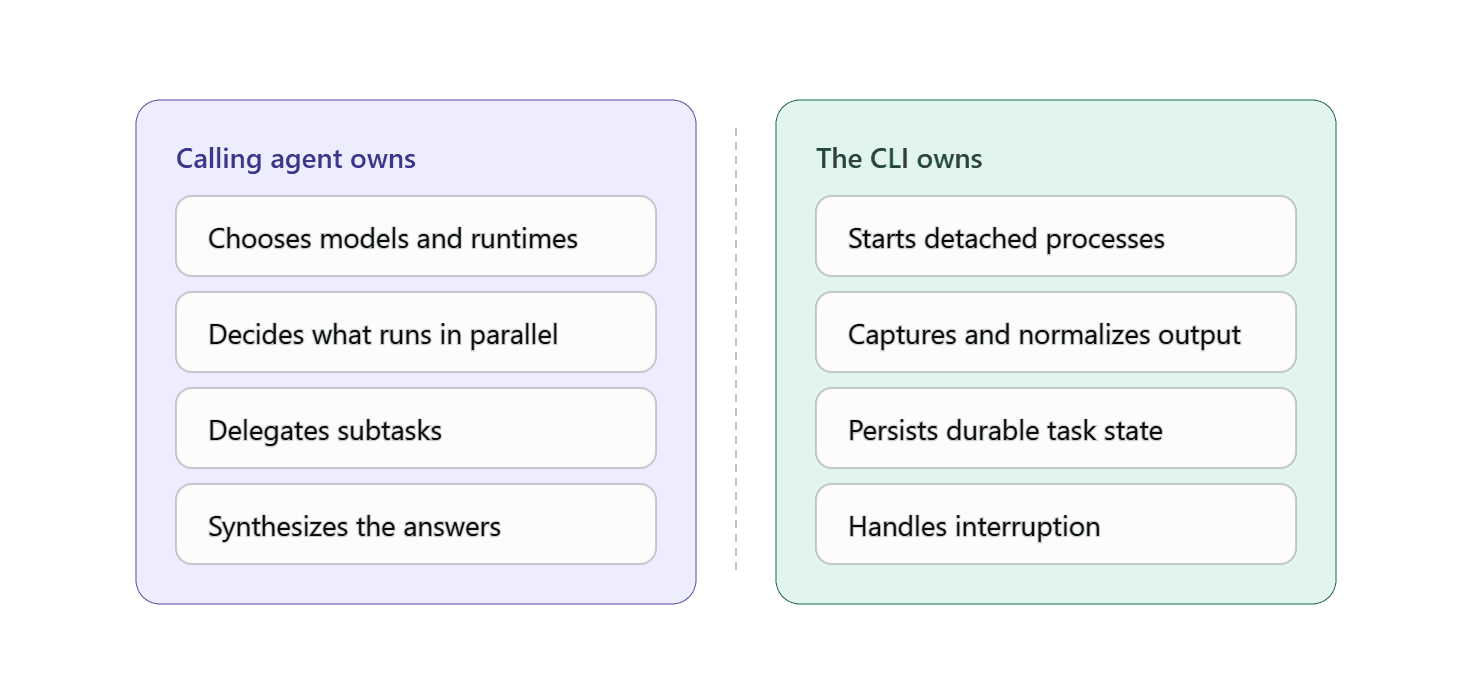
The CLI owns process supervision and task state and the calling agent owns judgment, delegation, and synthesis.
That separation makes Orchestrator more interesting than another demo where five agents role-play a software team in one Python process.
Let’s look at the details.
Editor’s note:To celebrate reaching 10,000 community members on Medium, who relentlessly design, ship, and iterate on agents every day, we’re also making thefull repository available for free, which is part of ourAgent Foundryprogram.
The problem is not “how do I call another LLM?”
Operating several coding agents is not easy.
Each provider has a different executable, authentication flow, model catalog, output format, session identifier, resume command, timeout behavior, and failure mode.
Once you run several in parallel, basic questions become surprisingly difficult:
Which tasks are still active?
Which model and runtime did each task use?
Did the process finish, fail, time out, or disappear?
Where are stdout, stderr, structured events, and the final answer?
Can the provider session be resumed safely?
Is a recorded PID still the same process?
How do you stop one child without killing unrelated work?
How does a parent agent call all of this without scraping terminal text?
A shell script can launch four commands with &but it does not give you a durable agent control plane.
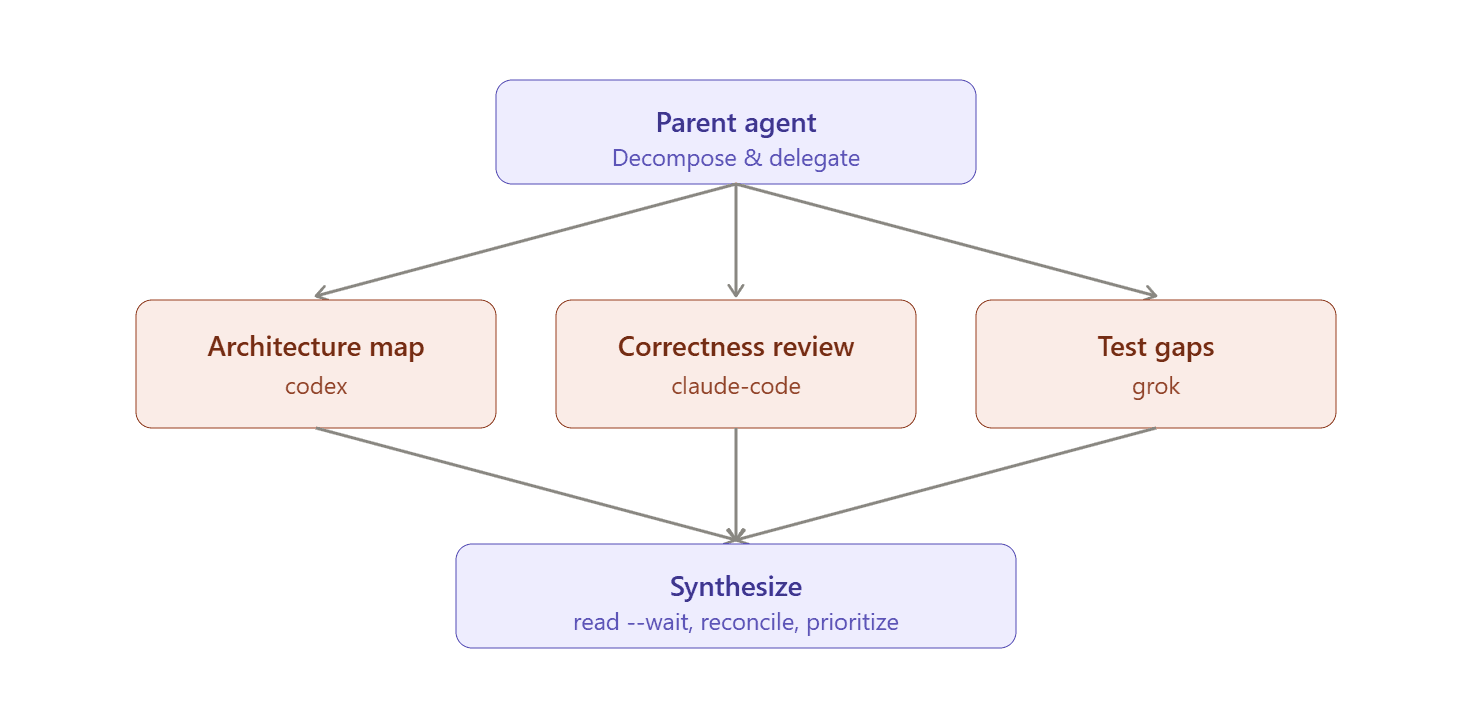
The pattern is called orchestrator-workers: a central model dynamically decomposes work, delegates subtasks, and synthesizes the results.
The pattern is useful for coding because the required subtasks are rarely known in advance, Orchestrator implements the operational half of that pattern without forcing you to replace the parent agent you already use.
What Orchestrator actually is
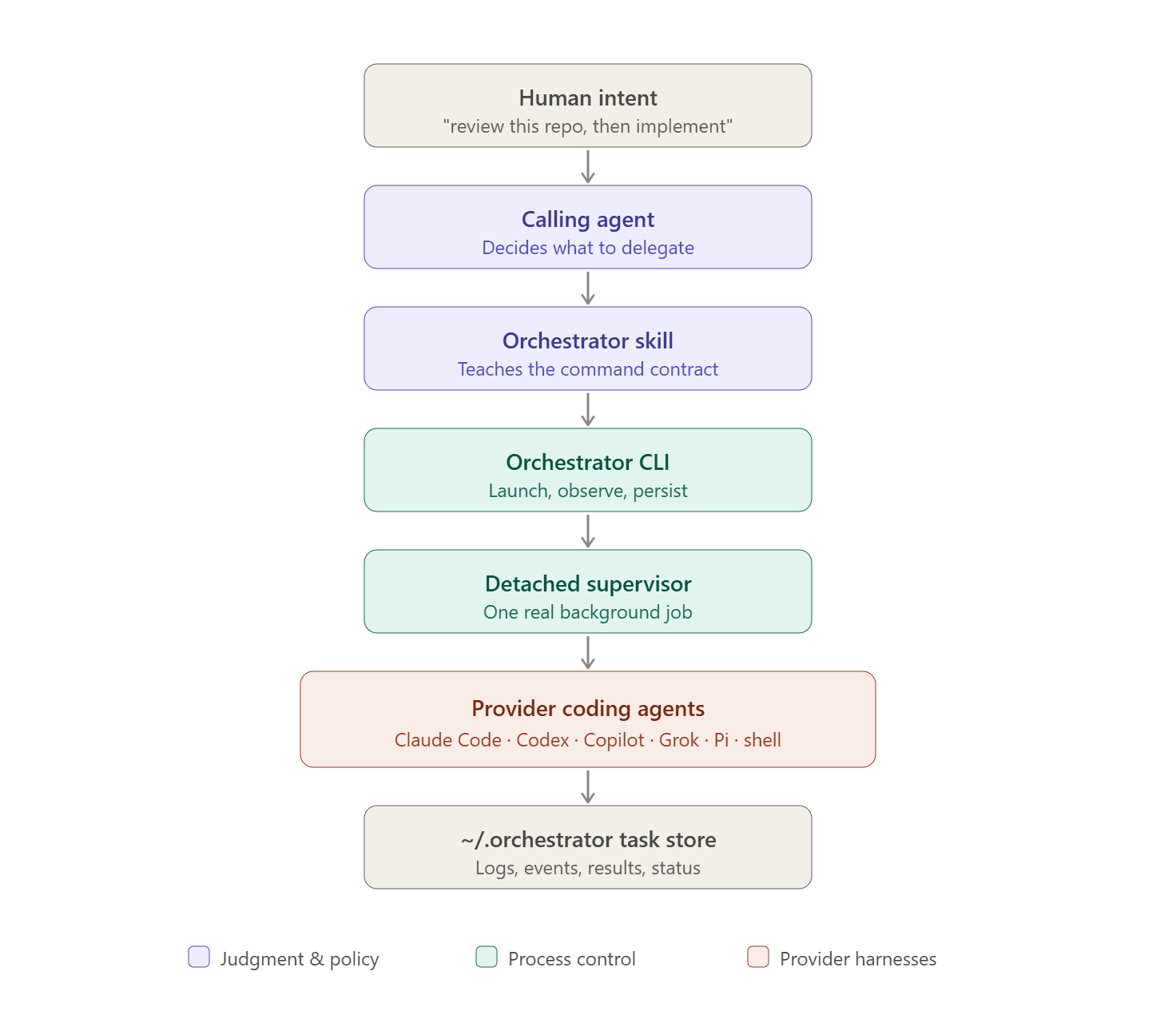
The repository describes the system with this mental model:
Code
text
user
-> calling agent
   -> Orchestrator skill
      -> orchestrator CLI
         -> detached task supervisor
            -> Claude Code, Codex, Copilot, Grok, Pi, shell, or custom process
         -> ~/.orchestrator task store
There are three layers:
The calling agent decides what to delegate, which runtime to use, whether work can run in parallel, and how to combine the answers.
The Orchestrator skill teaches that agent the command contract and loads optional routing preferences.
The CLI creates launch plans, starts detached processes, captures output, normalizes events, persists task state, and handles interruption.
This is deliberately narrower than LangGraph, AutoGen, CrewAI, or the OpenAI Agents SDK.
Those tools help you construct agent applications, graphs, handoffs, tool loops, and application state but Orchestrator mainly operates already-built agents.
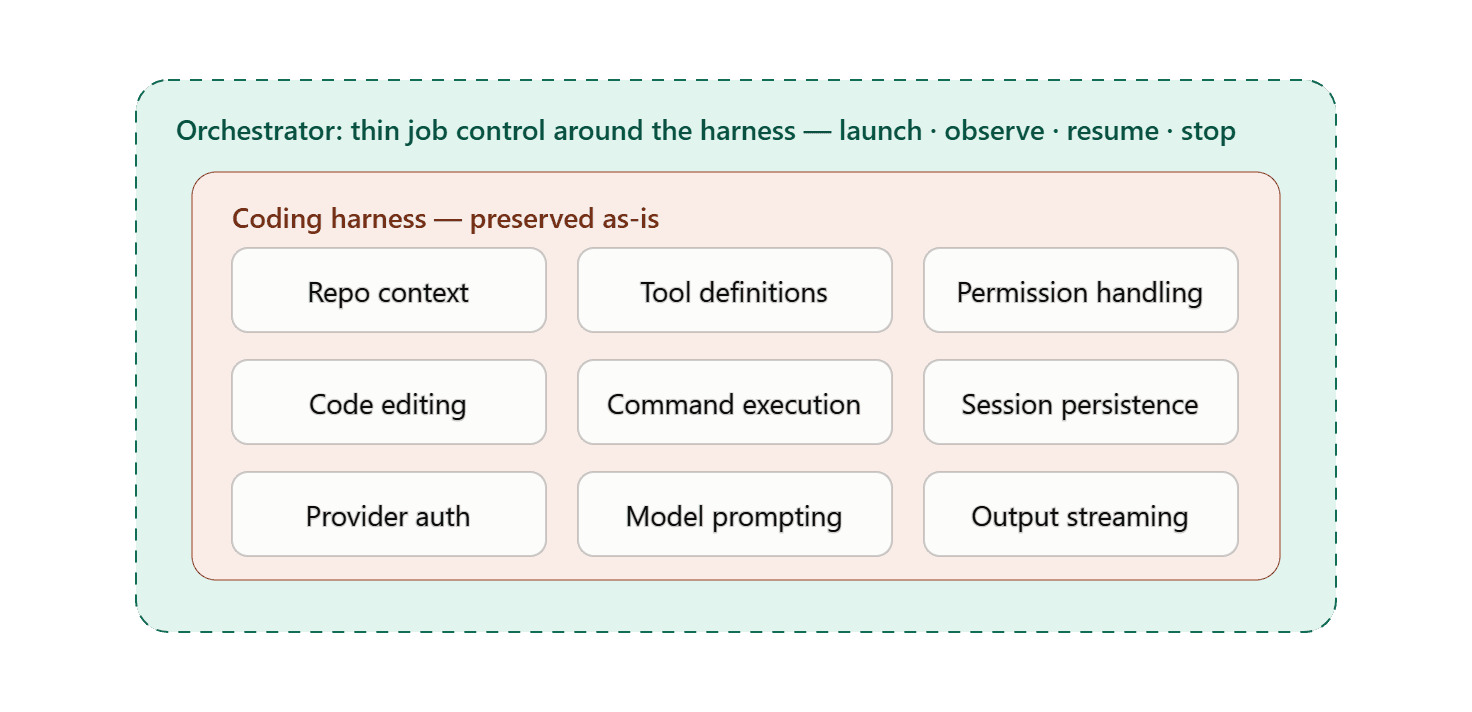
It is closer to job control for coding harnesses.
A coding harness already contains a large amount of provider-specific engineering:
repository context collection
tool definitions
permission handling
code editing
command execution
session persistence
provider authentication
model-specific prompting
output streaming
Wrapping the raw model API means rebuilding part of that stack but launching the harness preserves it.
Provider-specific execution and neutral control
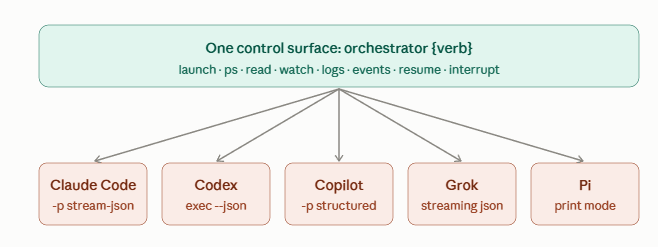
Orchestrator has a runtime registry that maps each supported agent to its real command-line interface.
The built-in configuration in [packages/core/src/runtime/runtimes.ts](https://github.com/backnotprop/orchestrator/blob/main/packages/core/src/runtime/runtimes.ts) shows the approach.
Claude Code is launched in print mode and defaults to streaming JSON:
claude -p --output-format stream-json --verbose
Codex uses the stable non-interactive execution path:
codex exec --skip-git-repo-check --json
Copilot CLI uses its programmatic prompt interface and structured output. Grok uses streaming JSON, Pi uses print mode, and shell tasks use sh -lc.
These are not arbitrary wrappers. They match provider-native automation surfaces:
Claude Code supports non-interactive -p, JSON or stream-JSON output, named sessions, and resume controls.
Codex documents codex exec for scripted runs and exposes App Server for protocol-level sessions.
GitHub Copilot CLI exposes interactive and programmatic interfaces through -p or --prompt.
Pi supports print/JSON mode and an RPC protocol.
The provider commands stay provider-specific and the control surface becomes consistent:
You do not need every workload to be identical internally, you just need a small set of predictable operations over workloads with different implementations.
Setup
Install the skill:
Code
bash
npx skills add backnotprop/orchestrator
Install the CLI:
Code
bash
npm install -g @backnotprop/orchestrator-cli
The CLI install is optional at first because the skill can install it when needed, but installing it explicitly makes the setup easier to inspect.
You also need at least one supported provider CLI installed and authenticated as Orchestrator does not replace the provider’s authentication system.
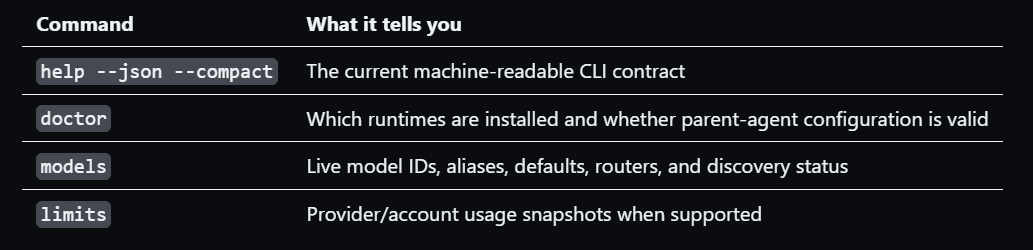
Run preflight checks before launching work:
orchestrator help --json --compact
orchestrator doctor --json --compact
orchestrator models --json --compact
orchestrator limits --json --compact
These commands answer different questions.
Do not skip doctor in automation.
Examples in documentation age quickly. Installed CLIs differ across machines. A runtime that exists in the repository may not exist on the host.
The skill specifically tells the calling agent to choose only from runtimeSummary.availableIds.
A practical workflow for a real feature
Assume you need to add organization-level rate limits to a TypeScript service.
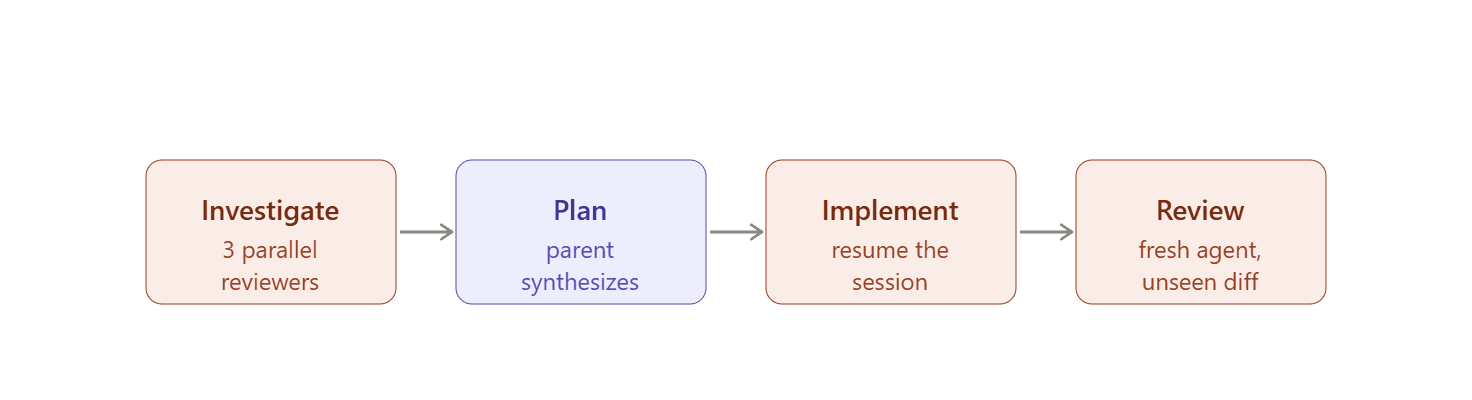
A strong orchestration plan could be:
Explorer
Code
text
orchestrator launch codex \
--name "rate-limit architecture" \
--json --compact --brief \
"Map the request path, current auth boundaries, persistence layer, and existing throttling code. Propose the smallest safe design."
orchestrator launch grok \
--name "rate-limit test plan" \
--json --compact --brief \
"Design deterministic unit, integration, and concurrency tests for organization-level rate limits."
After the three complete, the parent agent compares their outputs and produces one implementation plan.
Then resume the architecture session for implementation:
Code
text
orchestrator resume {architecture-task-id} \
--json --compact \
"Implement the approved design. Incorporate the security and test constraints below: ..."
Finally, launch a fresh reviewer that has not seen the implementation conversation:
Code
text
orchestrator launch claude-code \
--name "independent final review" \
--json --compact --brief \
"Review the completed diff for correctness, tenant isolation, race conditions, and missing tests. Do not assume the design is correct."
This workflow uses agents for distinct cognitive jobs but it does not create a fictional Scrum team with role names and unlimited group chat.
Where Orchestrator is strong
It preserves provider-native harness quality: You keep Claude Code’s, Codex’s, Copilot’s, Grok’s, or Pi’s actual coding loop instead of reducing every provider to a generic chat completion.
It makes background work inspectable: Tasks have names, IDs, states, logs, events, results, timeouts, and stop controls.
It separates policy from mechanism: The calling agent chooses models and delegation strategy. The CLI executes and reports facts.
It handles heterogeneous structured output: Provider events are normalized without pretending every provider has the same protocol.
It has a usable machine interface: JSON mode, compact payloads, structured errors, and returned argv arrays make it practical for parent agents.
It is local-first: The default system does not require a hosted orchestration service or a new central credentials proxy.
Where it is not the right tool
Orchestrator is explicit about its scope.
It is not:
a distributed scheduler
a provider API proxy
an automatic model router
a full workflow graph engine
a remote multi-tenant agent platform
a replacement for provider sandboxes
a budget-enforcement system
The limits command reports snapshots but it does not decide where to route work or prevent spending.
Most built-in tasks use shared workspace isolation and a provider runtime may support worktrees, but Orchestrator is not automatically giving every parallel agent a conflict-free branch.
Parallel implementation tasks that edit the same checkout can still collide.
You need a repository strategy: read-only parallel reviews, separate worktrees, isolated clones, or explicit file ownership.
Security and operational boundaries
Agent orchestration multiplies execution power and that means it also multiplies mistakes.