Local Claude Code on Your Mac. Setup Working Local Agent!
Agent Native•September 11, 2026
Your local model can write a correct function but still fail to create a file.
The missing piece might be a malformed tool call, a rejected argument, or a response stream the client cannot consume.
Meanwhile, the terminal keeps saying it will get to work.
That is why claude-code-local deserves a look.
It connects Claude Code to models running on Apple Silicon, and exposes the integration work that makes a local coding agent useful: prompt conversion, tool parsing, cache management, and execution feedback.
The engineering question is whether the entire loop can complete a task reliably.
Follow the request all the way to the filesystem
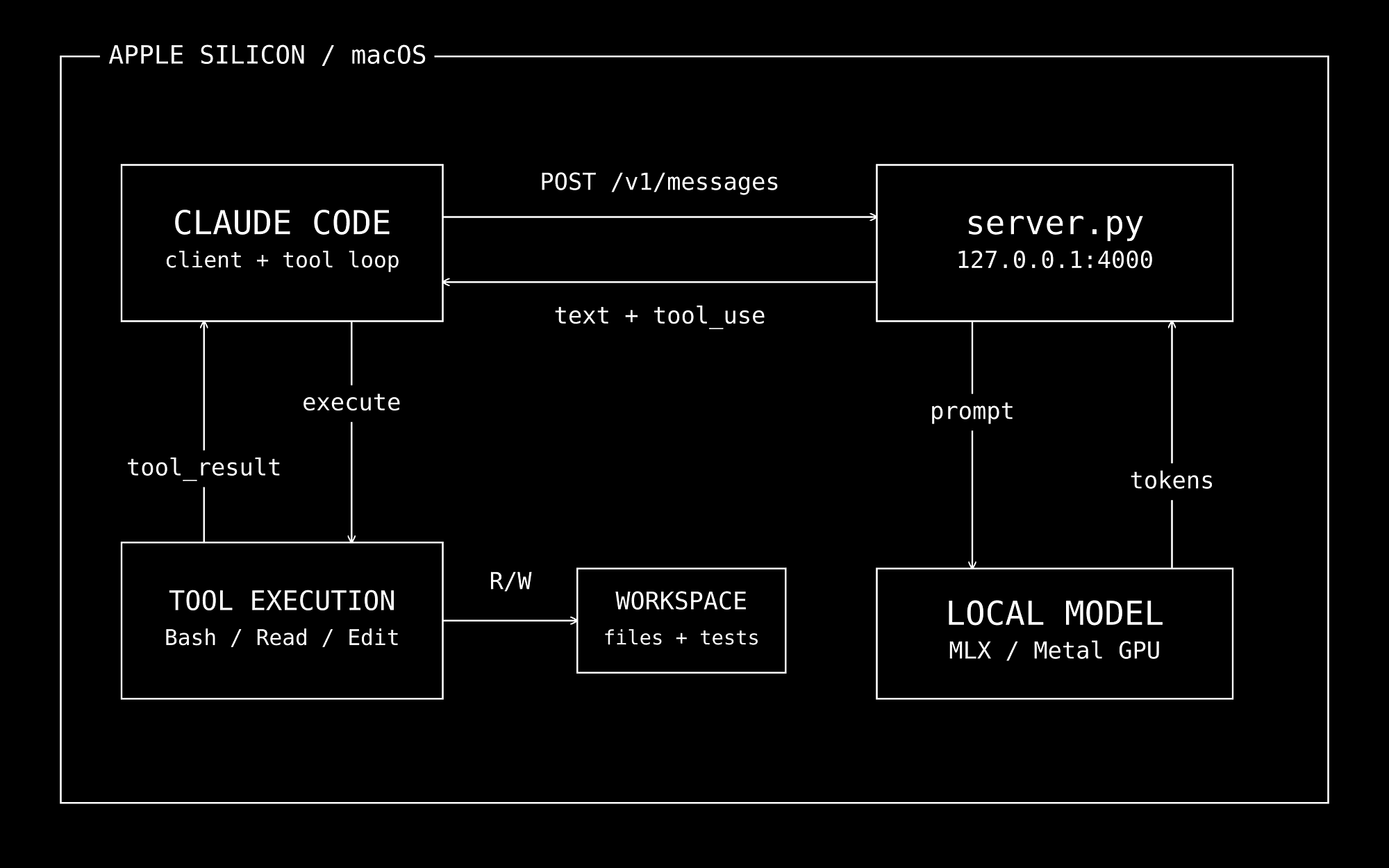
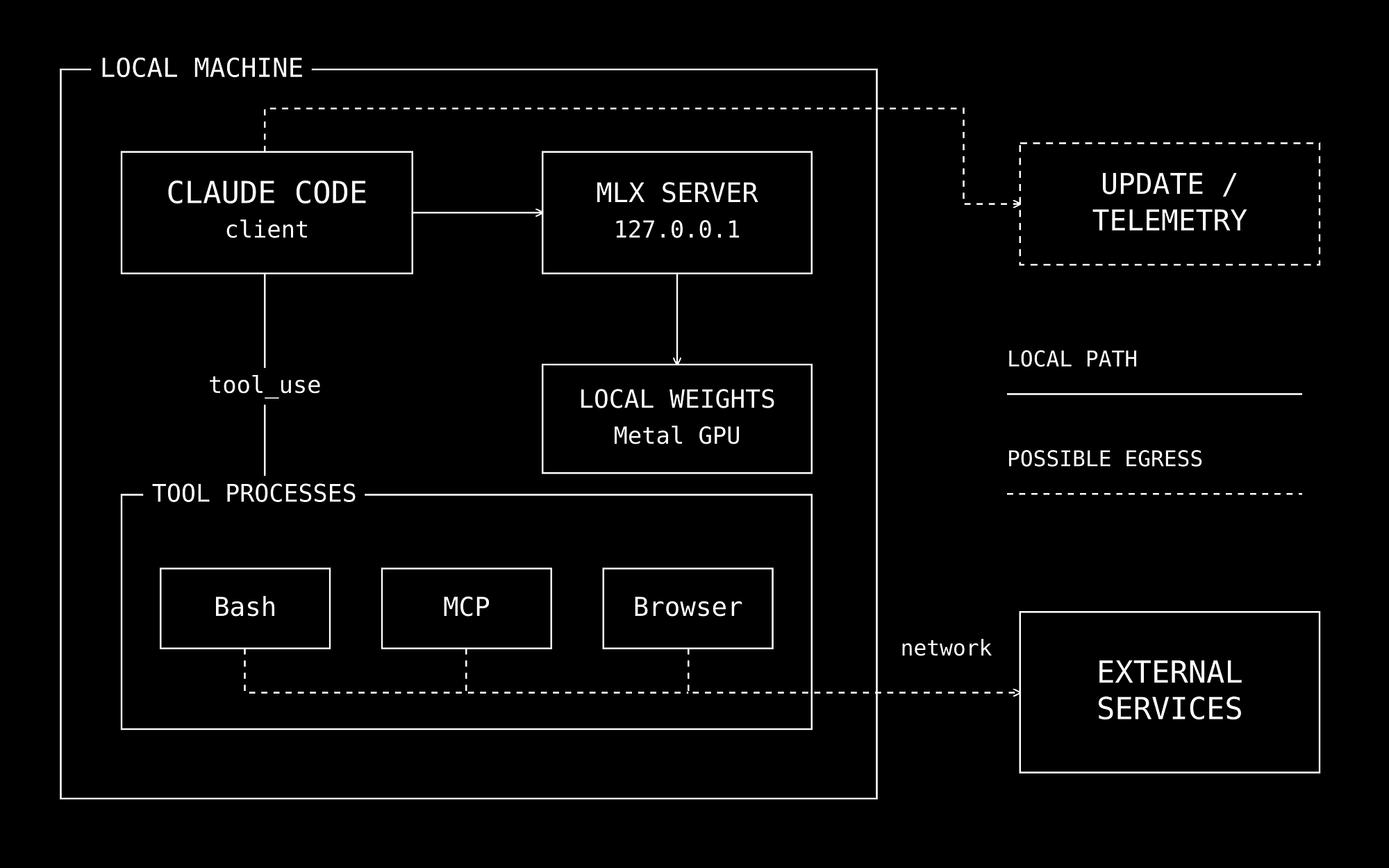
The main path keeps Claude Code as the client.
Its requests go to proxy/server.py, which implements the Anthropic Messages protocol and runs inference through MLX.
Claude Code executes returned tool calls and sends back their results.
The directory name is historical: this server loads the model itself.
There is no separate OpenAI-to-Anthropic proxy process in this path as it converts messages and tool dialects internally.
Apple’s MLX states that CPU and GPU operations can share arrays in unified memory which makes Apple Silicon a practical target, but weights, caches, and temporary allocations still compete for memory.
Set up a small, inspectable first run
You need an Apple Silicon Mac, Git, Python 3.12, and a current Claude Code installation.
You should also download dependencies and weights before attempting offline use.
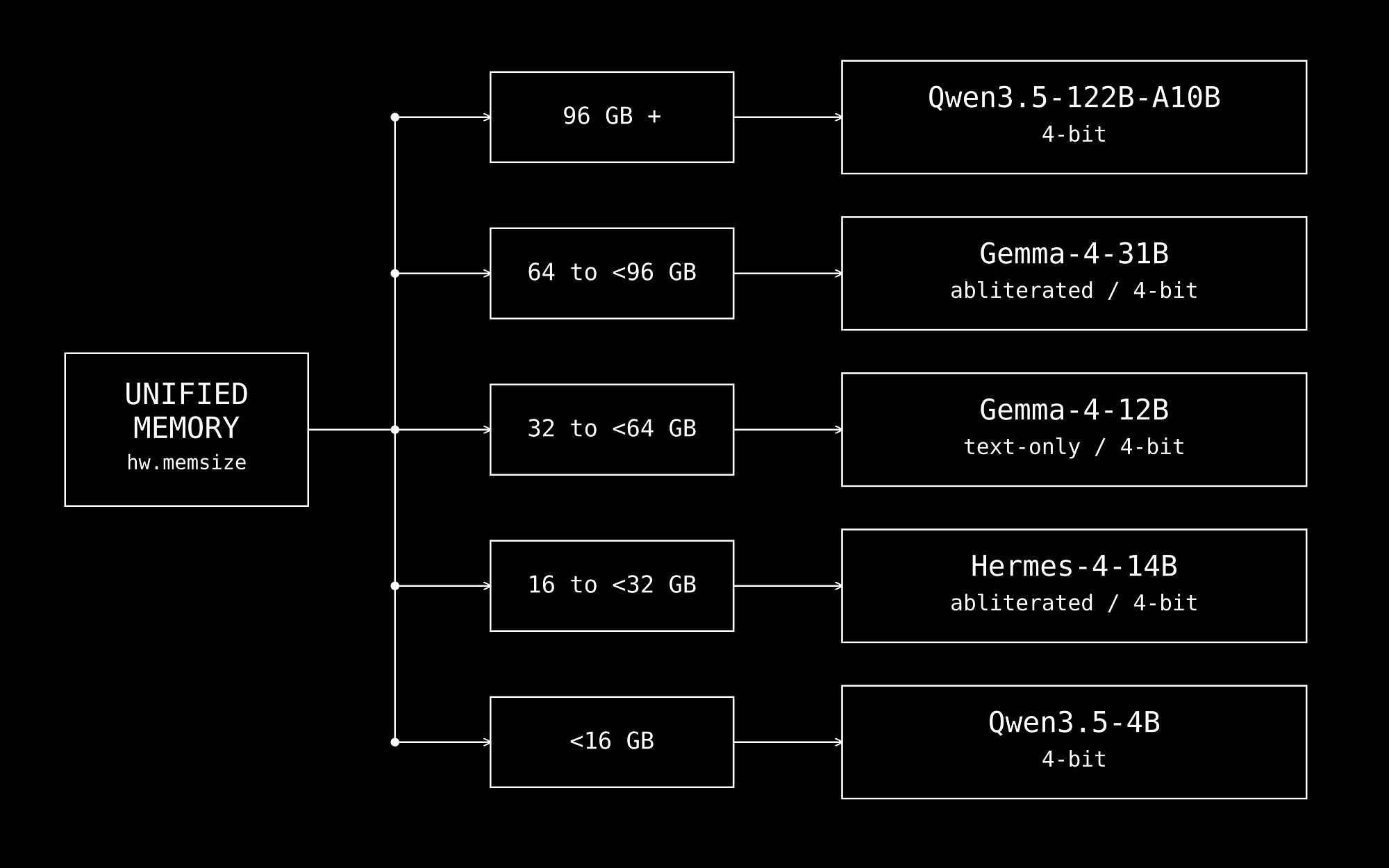
The automatic installer runs setup.sh and these are its actual memory branches at the pinned revision:
DETECTED MEMORY SELECTED MODEL
Below 16 GB Qwen3.5-4B, 4-bit
16 to below 32 GB Hermes-4-14B, abliterated 4-bit
32 to below 64 GB Gemma-4-12B, abliterated text-only 4-bit
64 to below 96 GB Gemma-4-31B, abliterated 4-bit
96 GB and above Qwen3.5-122B-A10B, 4-bit
These are installer choices, not guarantees about long-context capacity.
Code
text
Several defaults use community-modified weights; record the exact model ID and revision in your evaluation.
For a predictable first run, here is the manual workflow adapted to a project-local virtual environment.
This example chooses Hermes, the installer’s 16 GB tier, initial loading downloads its weights.
This adapts the repository launcher into an explicit first-run configuration. Also --bare and MCP isolation keep normal permission prompts and starts without external MCP servers.
At this revision, the launcher generated by setup.sh differs from the checked-in launcher and lacks --bare.
Use the explicit invocation above when following this walkthrough.
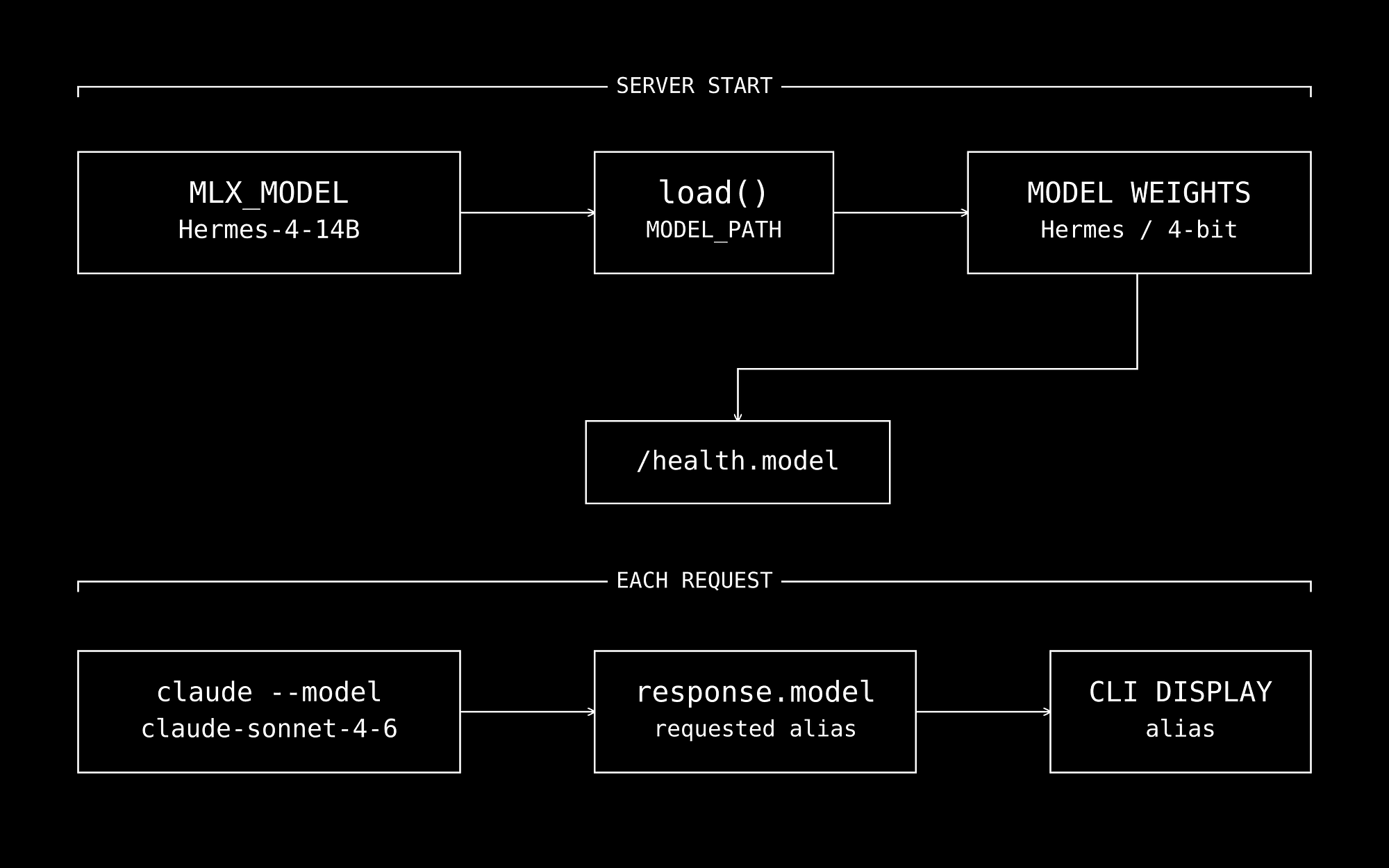
The claude-sonnet-4-6 argument is a compatibility alias.
**MLX_MODEL**selects the actual weights at server startup.
Code
text
The server even echoes the requested alias in response metadata; check `/health` for the loaded model.
Changing the CLI alias does not hot-swap weights.
Try a task with an observable result:
Create slugify.py with slugify(text: str) -> str using only the
standard library. Lowercase ASCII input, replace runs of non-alphanumeric
characters with one hyphen, and strip leading/trailing hyphens.
Add unittest cases for spaces, punctuation, empty input, and repeated
separators. Run the tests and report the files created and test results.
Approve the relevant actions.
Then inspect the files and run python3 -m unittest discover -v yourself.
If startup fails, diagnose the layer before changing models:
SYMPTOM FIRST CHECK
Connection refused Server terminal: model loading or an
import failure may have prevented
binding.
Unexpected model behavior /health: another server may already
occupy port 4000.
Login prompt or Claude Code version and the exact
unsupported flag launch command.
Short requests work; Peak memory and prefill size under the
file reads stall actual prompt.
Tool calls are an interface contract
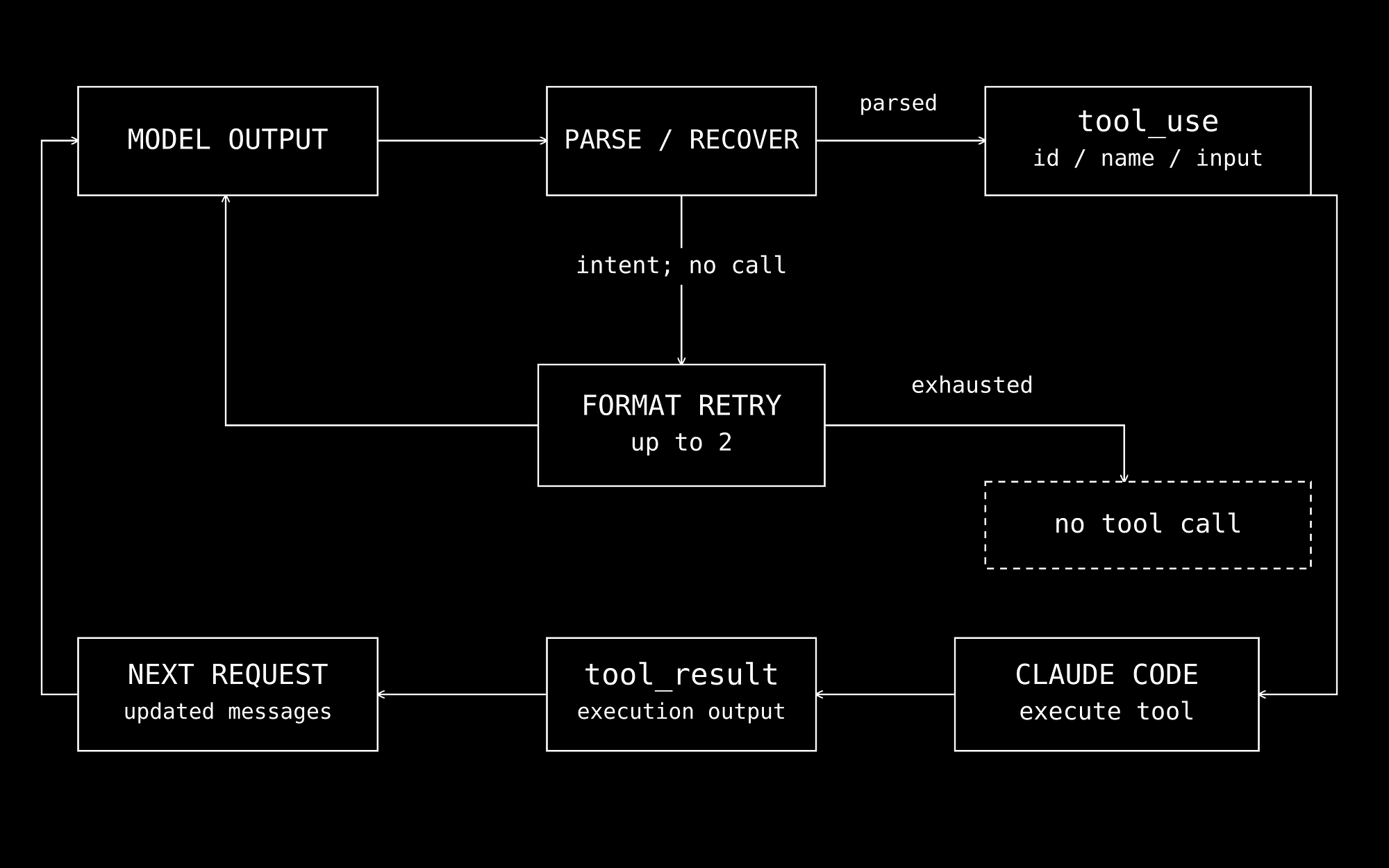
The server recognizes multiple model-specific tool formats and converts them into Anthropic tool_use blocks.
Claude Code then performs the action and returns a tool_result, allowing the next model turn to use real execution feedback.
Here is the extraction function from the repository’s test harness:
Code
python
def extract_tool_calls(response):
  """Extract tool_use blocks from an Anthropic response."""
  calls = []
  for block in response.get("content", []):
      if block.get("type") == "tool_use":
          calls.append(block)
  return calls
You can also exercise that boundary without launching Claude Code. Save this adapted harness example as smoke_tool_call.py in the checkout and run it with .venv/bin/python smoke_tool_call.py while the server is running:
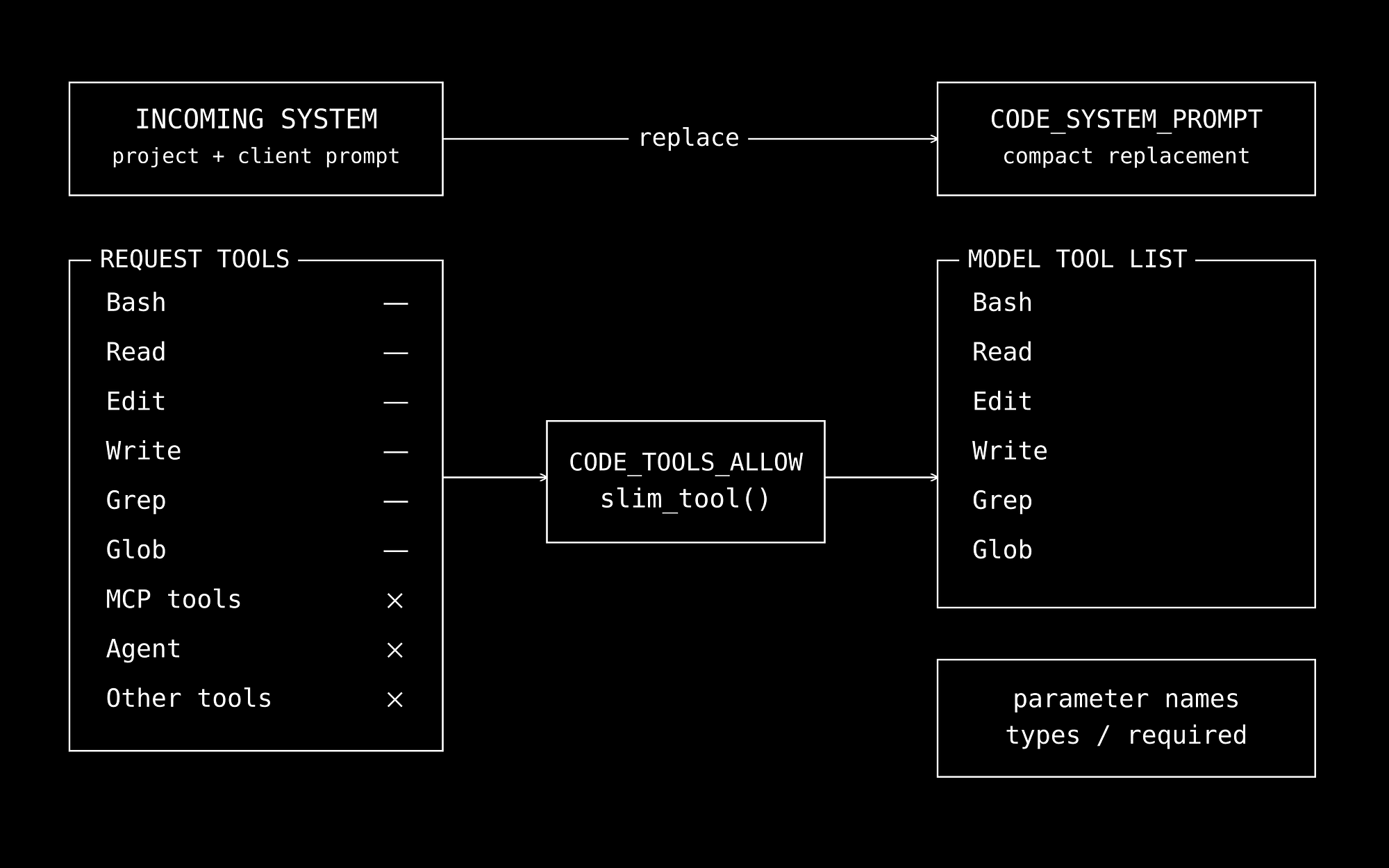
Tool slimming retains top-level parameter names, types, and required fields.
Rich descriptions and nested schema detail can disappear… Additional tools can disappear too.
This reduces prefill work, but it changes the information available to the model.
Evaluate project instructions and custom tools after enabling it. MLX_CODE_MODE=0 disables the transformation, MLX_APPEND_SYSTEM_PROMPT_FILE can append project guidance after it.
Treat the prompt and tool schema as versioned application code.
Streaming has two different paths
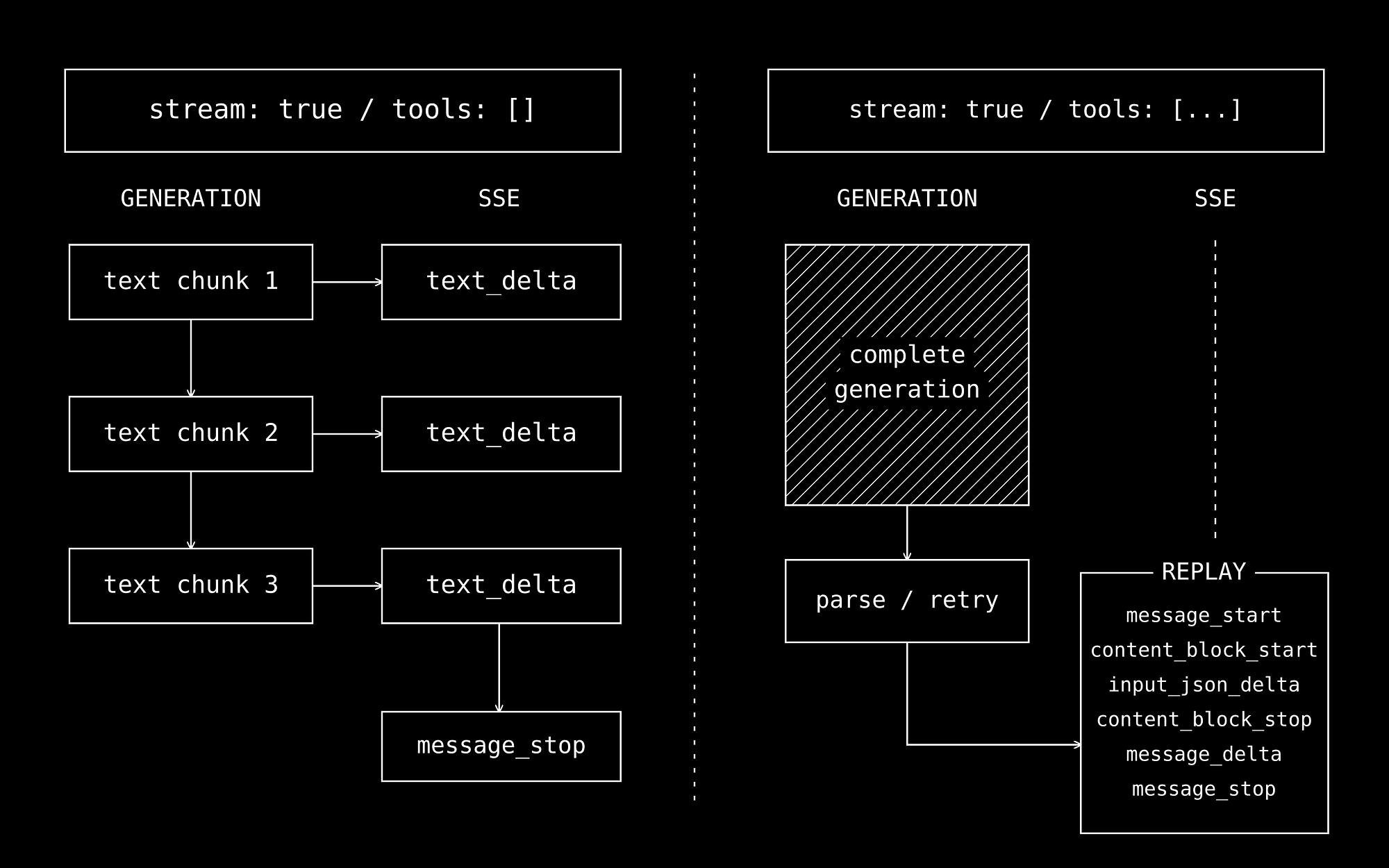
The server streams text during generation when a streaming request has no tools.
Requests containing tools use a different path: generate the response, parse and potentially retry it, then replay the finished result as server-sent events.
Consequently, stream: true does not imply live tool-argument delivery.
The client can wait through a complete generation before seeing the response, and you should track time to first visible output separately from generation throughput and task completion time.
Cache the part of the conversation that stays fixed
The repository also includes an optional native agent in [agent/agent.py](https://github.com/nicedreamzapp/claude-code-local/blob/55fe329b60baad52fa0fc5abe54e27ba81b9e0a6/agent/agent.py). It runs its own tool loop and can perform inference directly, without Claude Code in that path.
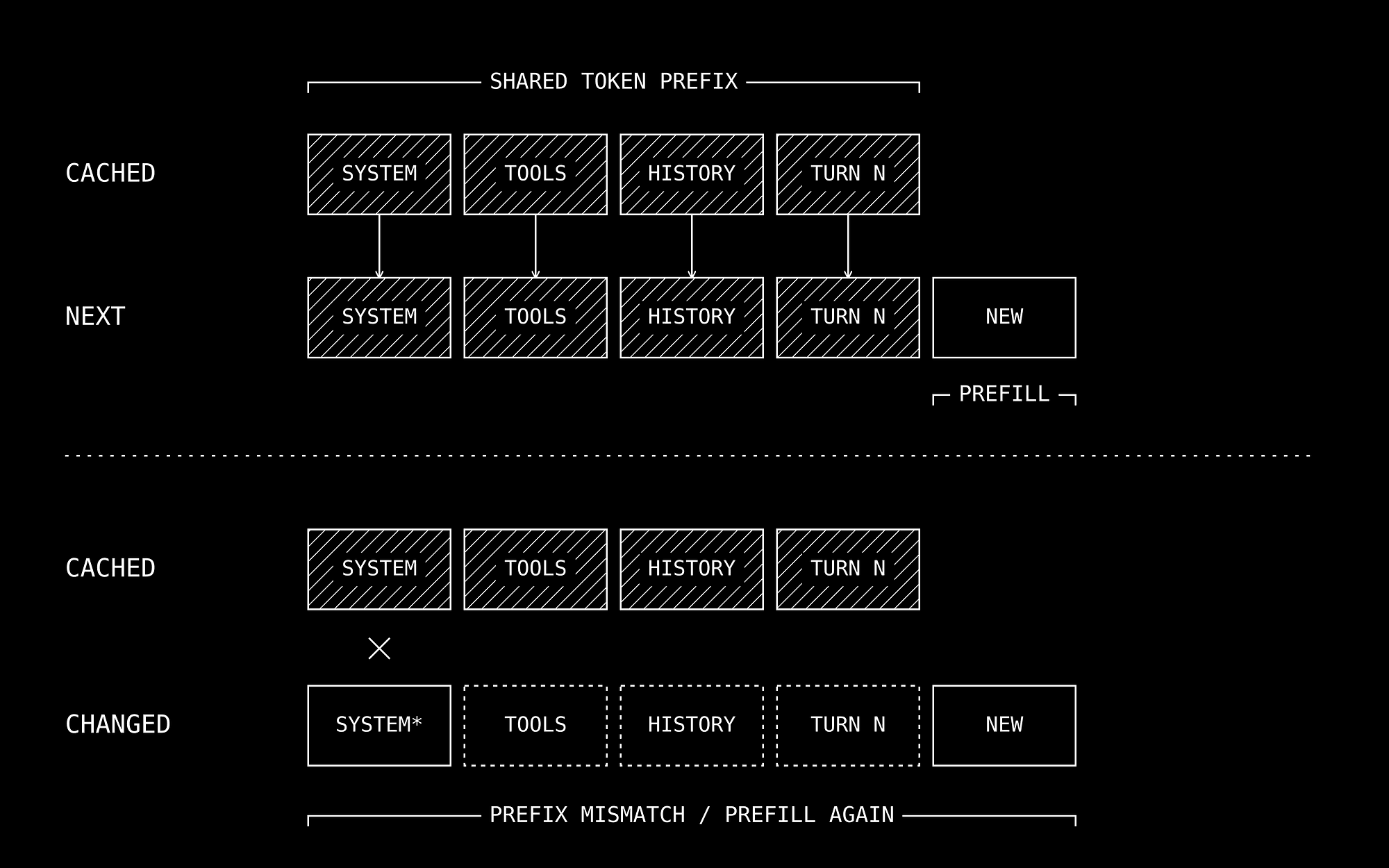
Its cache logic compares old and new token sequences, trims cached state to their shared prefix, and prefills the remaining suffix.
A changed token near the prompt’s beginning can eliminate most reuse.
Stable system prompts and deterministic tool ordering become performance features.
The native engine also replaces rotating caches with plain KV caches for supported model layouts.
This enables trimming after long conversations, while allowing more cache memory growth.
AGENT_ROLLING_KV=1 restores the stock cache behavior.
To explore the native path, stop the server in the first terminal to release its model allocation, return to the checkout, and run the documented Qwen example:
Code
text
AGENT_MODEL=lmstudio-community/Qwen3-Coder-30B-A3B-Instruct-MLX-8bit \
AGENT_DIALECT=native \
.venv/bin/python agent/agent.py

This is a larger model than the Hermes quick start; budget memory accordingly.
The native agent dispatches shell and file operations directly. It has its own execution behavior, so use a disposable workspace for initial evaluation.
The[bench/agent_bench.py](https://github.com/nicedreamzapp/claude-code-local/blob/55fe329b60baad52fa0fc5abe54e27ba81b9e0a6/bench/agent_bench.py) also compares cached and uncached runs across six turns.
MLX_KV_BITS=0 disables KV quantization but it says nothing about the model weights' quantization.
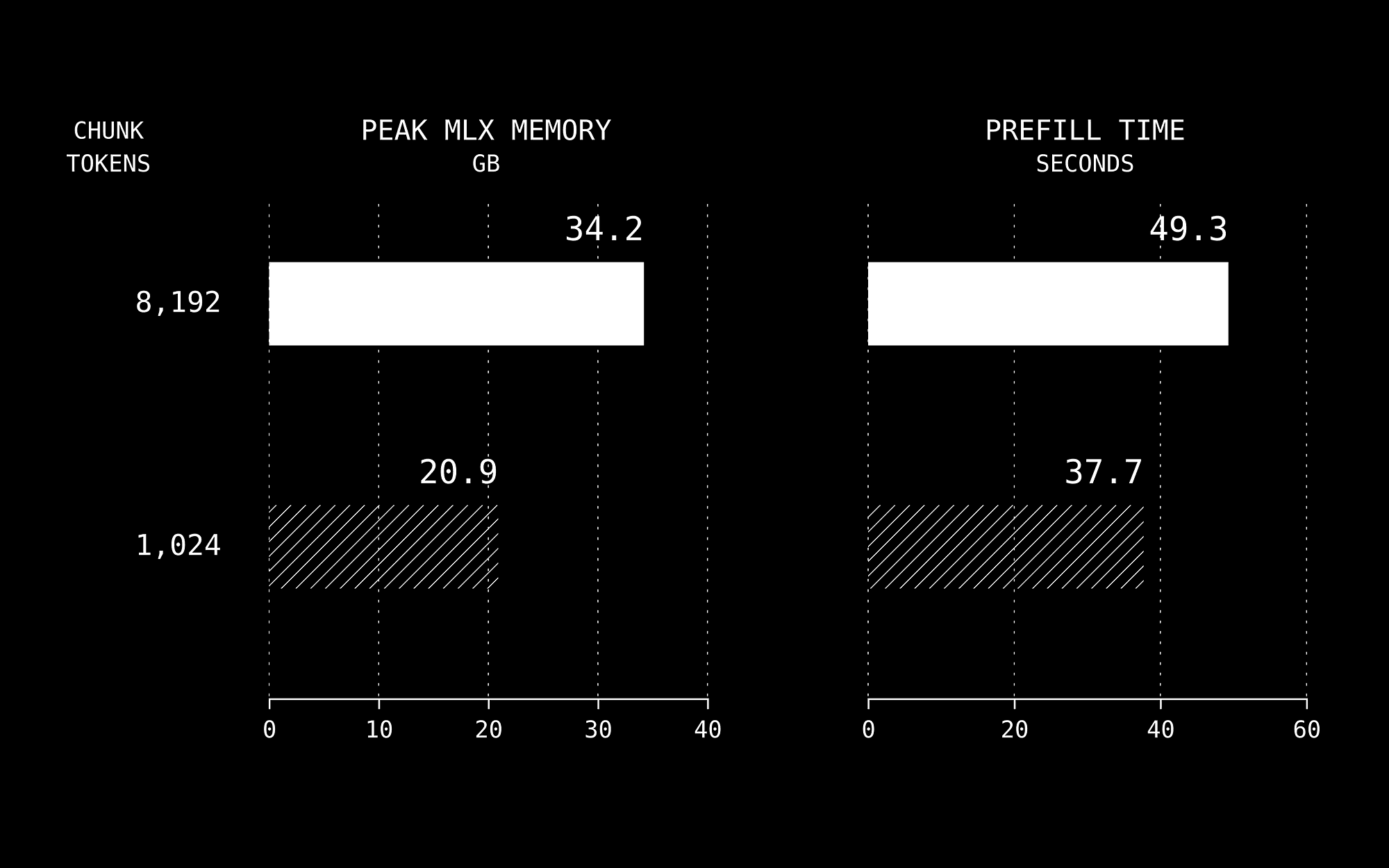
Gemma 4 31B test with a 21.4K-token prompt shows that reducing the prefill chunk from 8,192 to 1,024 tokens lowers peak MLX memory from 34.2 GB to 20.9 GB.
Prefill time also fell, from 49.3 to 37.7 seconds which are author measurements for that workload.
MLX-LM also documents prefill chunking as a memory/performance control.
Evaluate the harness you will actually ship
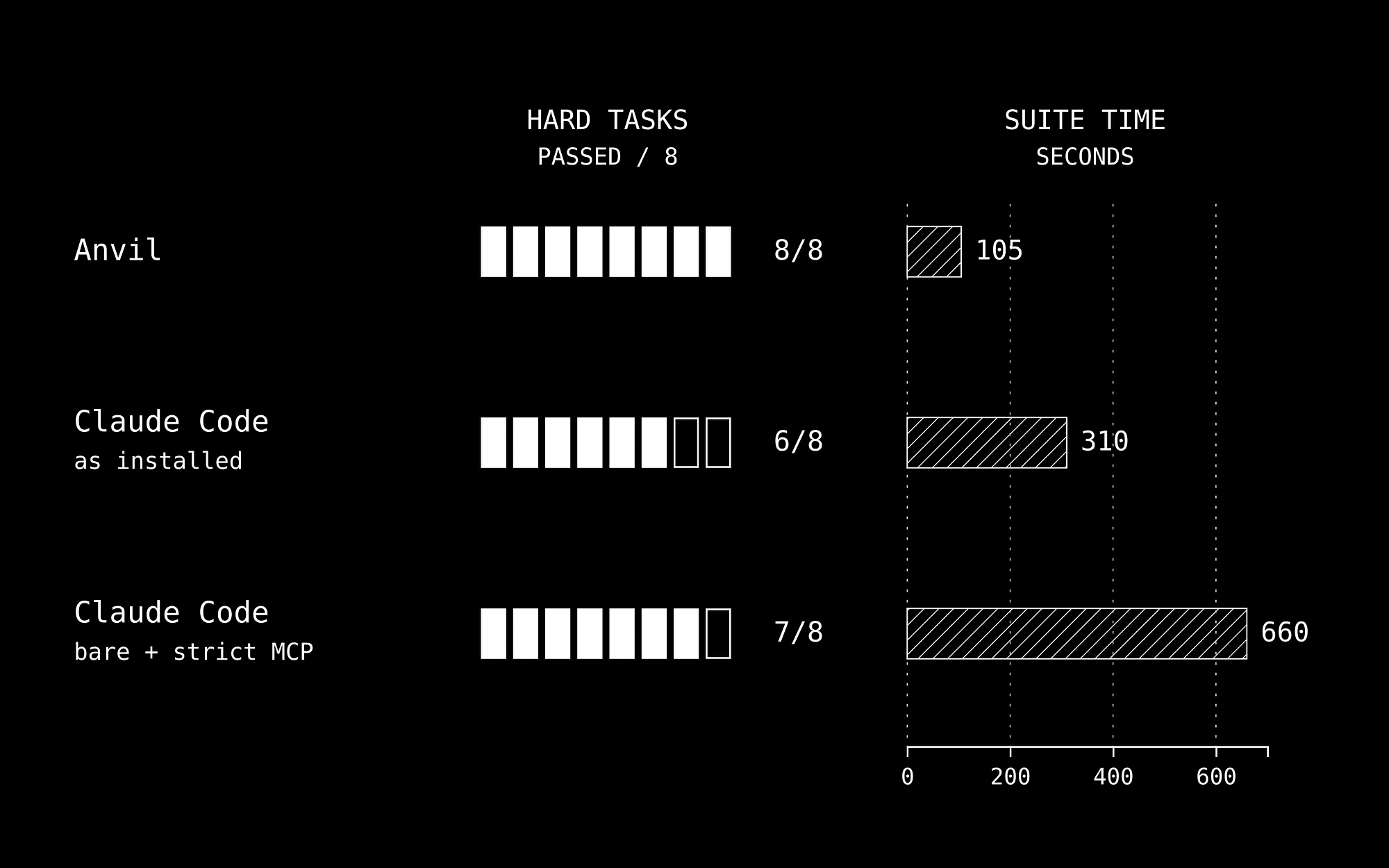
There is a linked contributor reproduction compared the same Qwen model and serving engine across harness configurations.
The smaller tool surface improved success in that run while increasing elapsed time.
Their 133-second versus 17.6-second comparison changes multiple parts of the stack; it cannot isolate the causal cost of a proxy.
Start with the bundled API tests, with the server running:
Code
text
.venv/bin/python scripts/test_mlx_server.py
The tests primarily check emitted tool names and nonempty arguments, with simulated tool results in multistep cases, but not establish correctness of an edited application.
For a team pilot, add real tasks with filesystem assertions and existing test suites, and also record model revision, dependency versions, prompt configuration, tool calls, retries, peak memory, completion time, and whether the final change passes review.
Keep failed attempts in the denominator.
A local model that needs three retries and extensive correction can consume more developer time than its token speed suggests.
Removing the model API bill still leaves hardware, electricity, maintenance, and review work in the cost per accepted change.
Make the local boundary explicit
The server binds to 127.0.0.1, and its handler does not authenticate the dummy sk-local key.
Code
text
Its synchronous HTTP server is a workstation starting point; shared serving needs separate concurrency and access-control work.
These controls essentially do not prevent a shell command, browser, or MCP tool from contacting an external service, and neither does downloading model weights onto a laptop.
Verify the complete workflow under the network restrictions you intend to use, and include child processes and tools in that check.
If you are building agentic products, remember that the model, prompt, protocol adapter, cache, and execution loop belong in the same evaluation.
You should version them together and make successfully verified code changes the unit of progress.