Qwen-MM-Plugins Turns Agent Harnesses Into Multimodal Agents
Agent Native•August 14, 2026
We have spent two years making models multimodal.
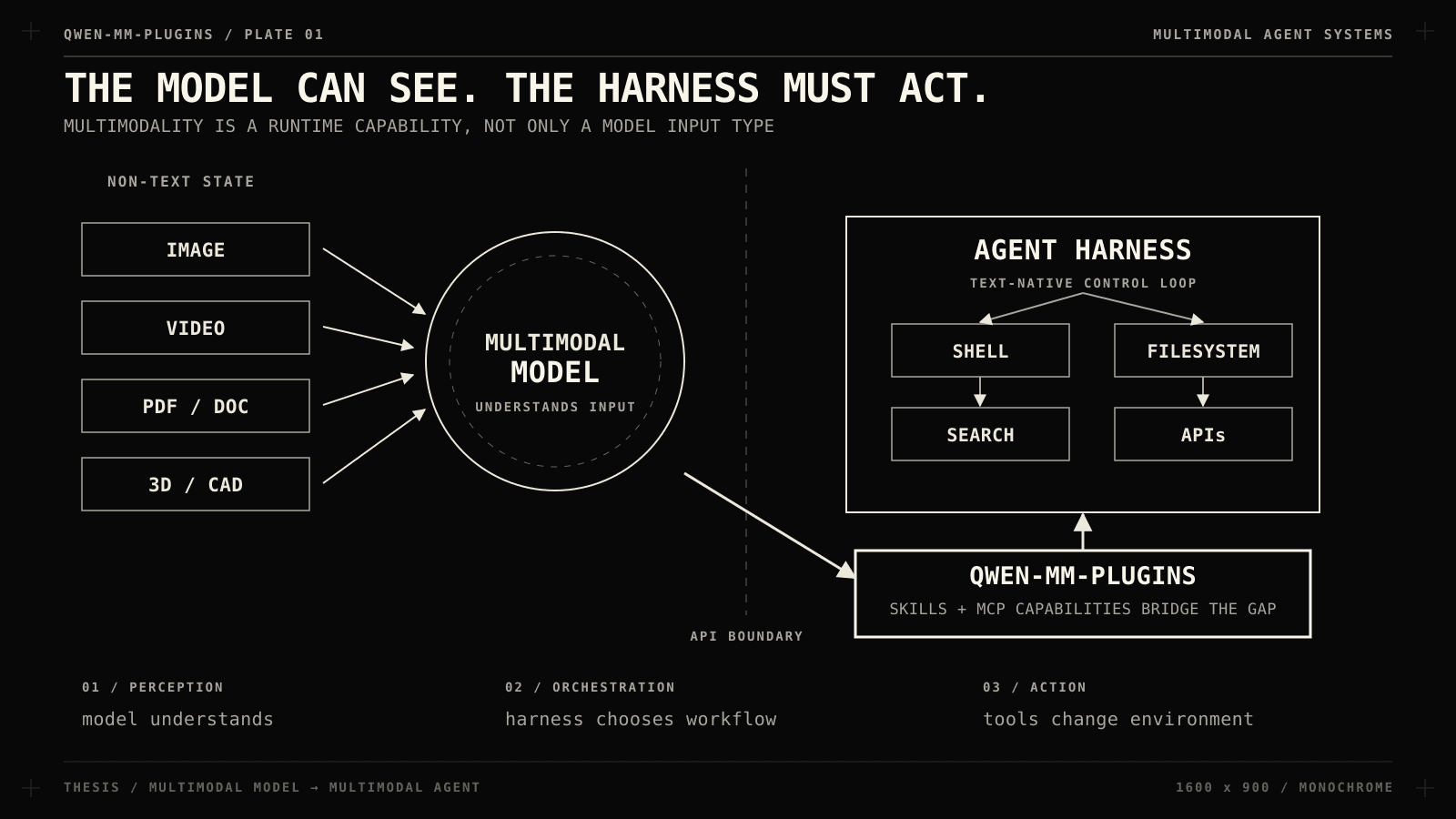
They read charts, inspect screenshots, transcribe audio, and increasingly operate GUIs but there is still a gap between a multimodal model and a multimodal agent.
A model understands an image if your application carefully encodes it into an API request.
That does not mean your coding agent can open a 4K dashboard, pull page 37 of a PDF, grab the right frame from a video, verify it against the web, or step into Blender and edit the scene.
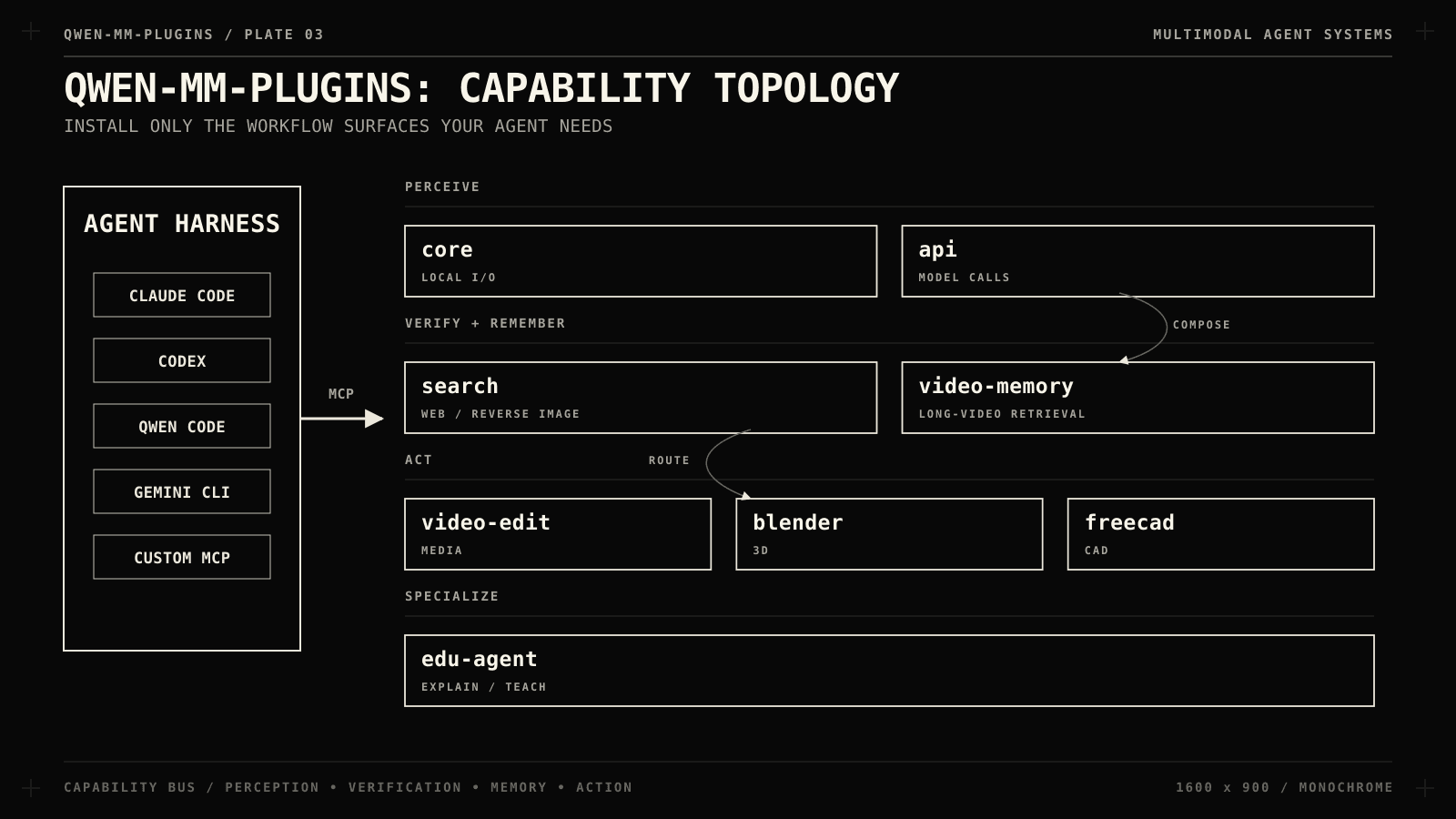
Instead of shipping another agent framework, Qwen packages multimodal capabilities as installable plugins for harnesses you already run, e.g. Claude Code, Codex, Qwen Code, Qoder, OpenClaw, Gemini CLI, or anything you can wire up manually.
If you build agentic products, the next bottleneck is whether your runtime has a consistent, inspectable, composable way to perceive and act on non-text state.
Qwen-MM-Plugins is a useful blueprint for that layer.
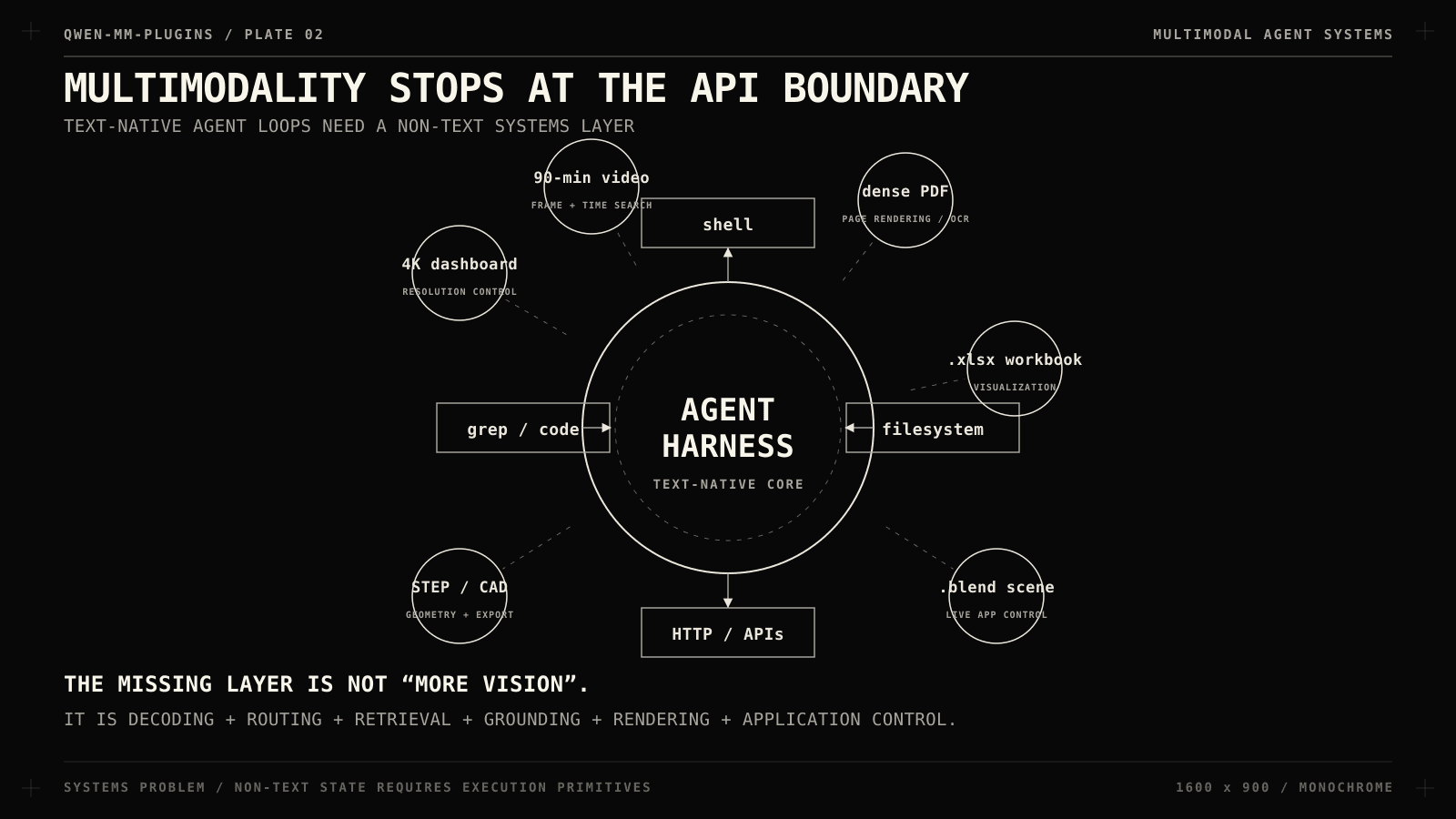
Multimodality stops at the API boundary
Most agent architectures still look like this:
user
|
v
agent harness
|
+--> LLM
+--> shell
+--> filesystem
+--> browser / search
+--> APIs
This works for code because code is already text.
The agent can grep, read a file, run tests, inspect a stack trace, patch, repeat.
Now replace server.py with a 4K monitoring dashboard, a 90-minute product demo, a PDF full of dense diagrams, an .xlsx workbook, a .blend scene, or raw footage that needs cutting.
The agent suddenly needs file decoding, media probing, frame sampling, resolution control, OCR, temporal search, object localization, annotation, rendering, application control, and an external verification path.
That is a systems problem… Qwen-MM-Plugins attacks it at the tooling layer.
Editor’s note:If you want todive deep into Local LLMs and Agentic Stack, you can join ourAgent Foundryprogram for hands-on, in-depth trainings.
What it ships
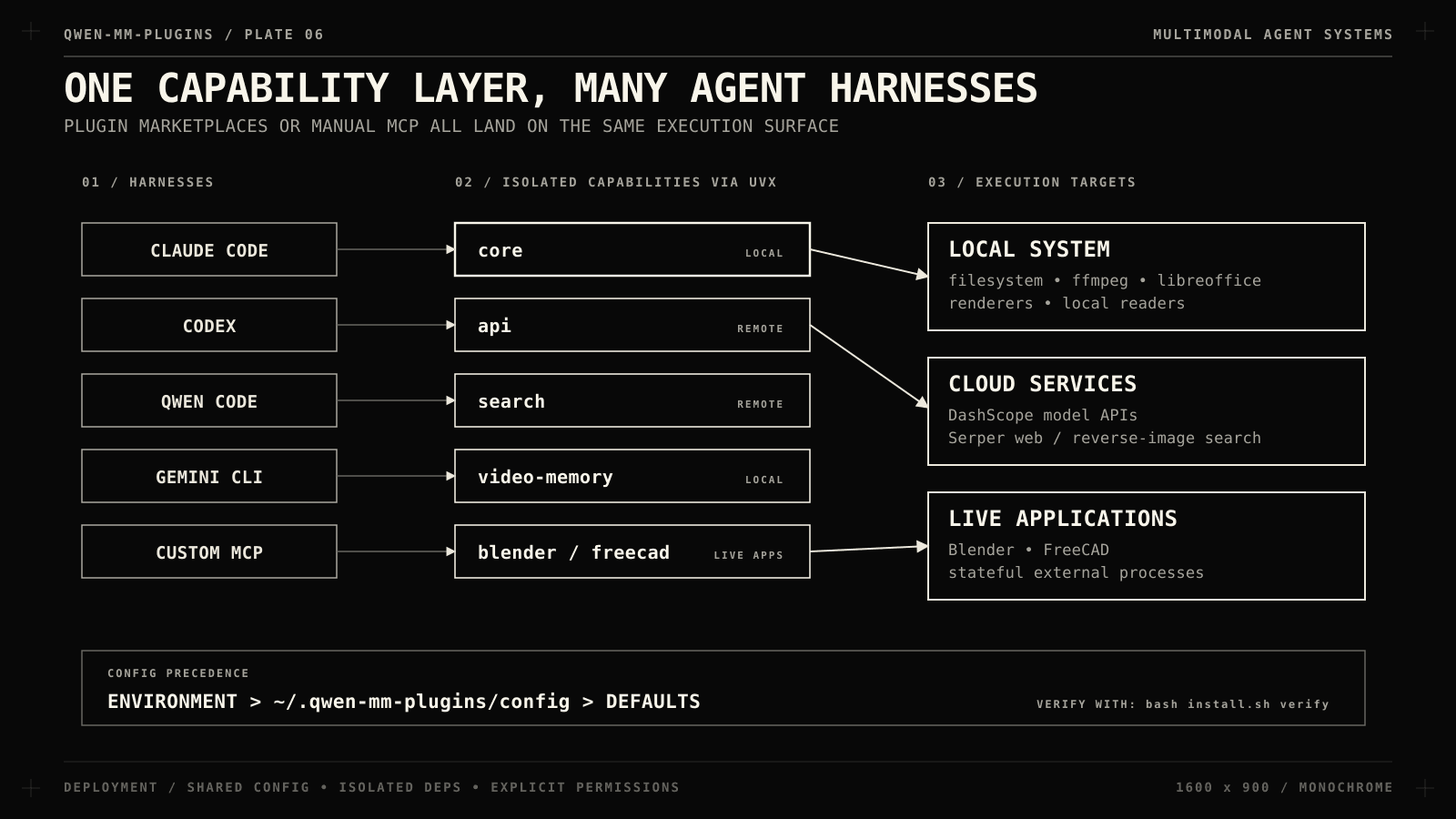
Functionality is split into capabilities you install independently:
**core**: local image, video, and file reading; document visualization (crop, bounding boxes, frame extraction)
**api**: cloud vision and omni-model calls: VQA, OCR, grounding, ASR, diarization, temporal grounding, event counting, music analysis
**search**: web search, page extraction, reverse-image search
**video-memory**: hierarchical memory and retrieval for long videos
**video-edit**: agentic video editing and media generation
**blender**: drives a live Blender instance
**freecad**: parametric CAD against a live FreeCAD instance
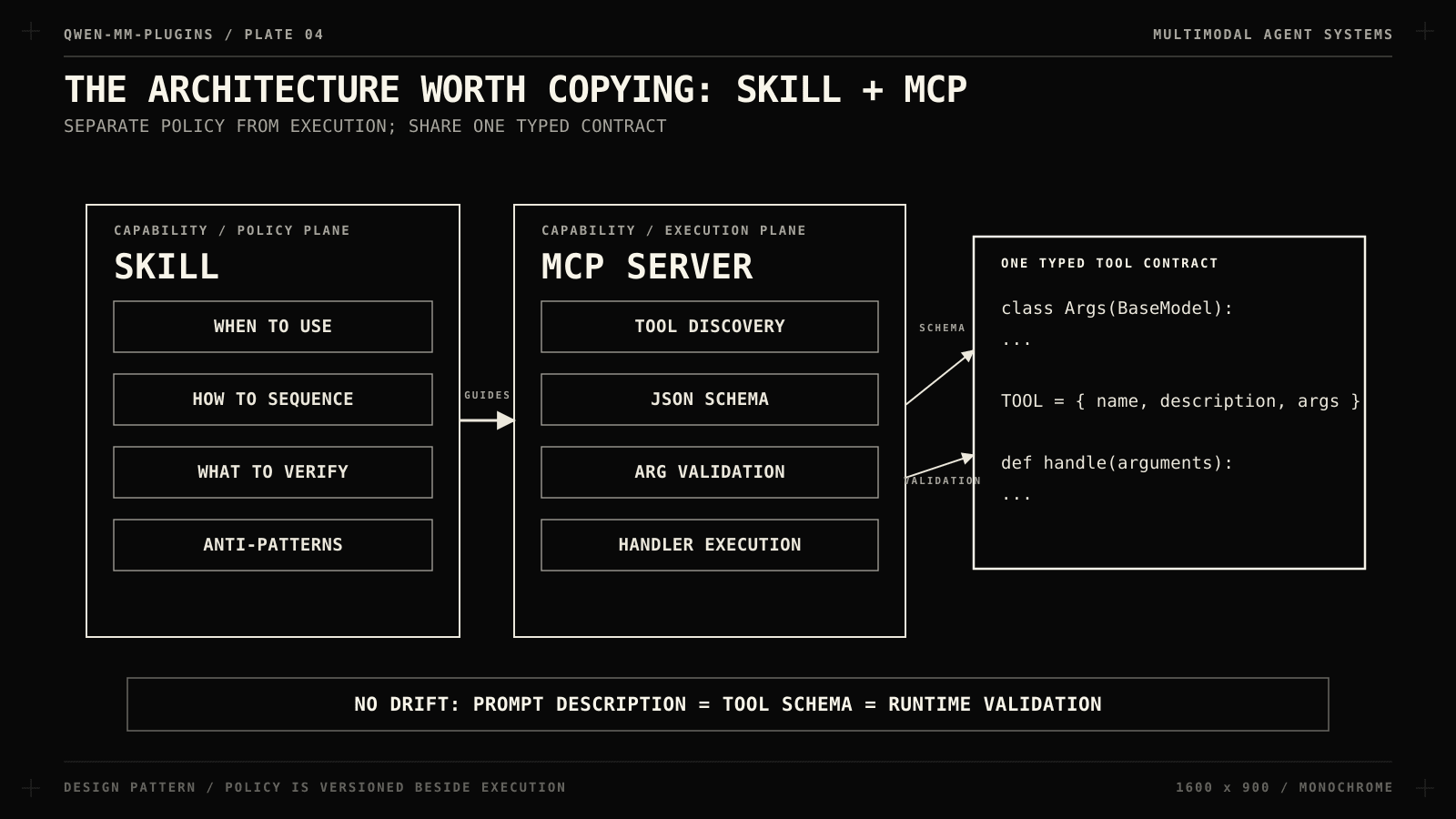
Capability
├── Skill → policy: when and how
└── MCP server → execution: typed tools
Skills are policy.
The core skill encodes a workflow:
run media_info before reading or editing media
use visualize for documents and odd file formats
read_image for images
read_video for frame extraction
save_view when a frame must become a standalone asset
crop and draw_bbox for image operations
Any experienced video engineer knows that variable frame rates, rotation metadata, and odd container timestamps silently break downstream work. The model may know it too but hoping it remembers on every run is not an architecture.
Put the workflow next to the tool.
MCP is execution.
Tools run on a shared FastMCP-based framework that discovers tool modules and turns their Pydantic argument models into MCP schemas.
One definition produces both the schema the model sees and the validation the runtime enforces.
You do not want three versions of a tool contract, e.g. prompt description, JSON schema, Python implementation.
That drift is exactly where agent tools become unreliable.
Local I/O is the sleeper feature
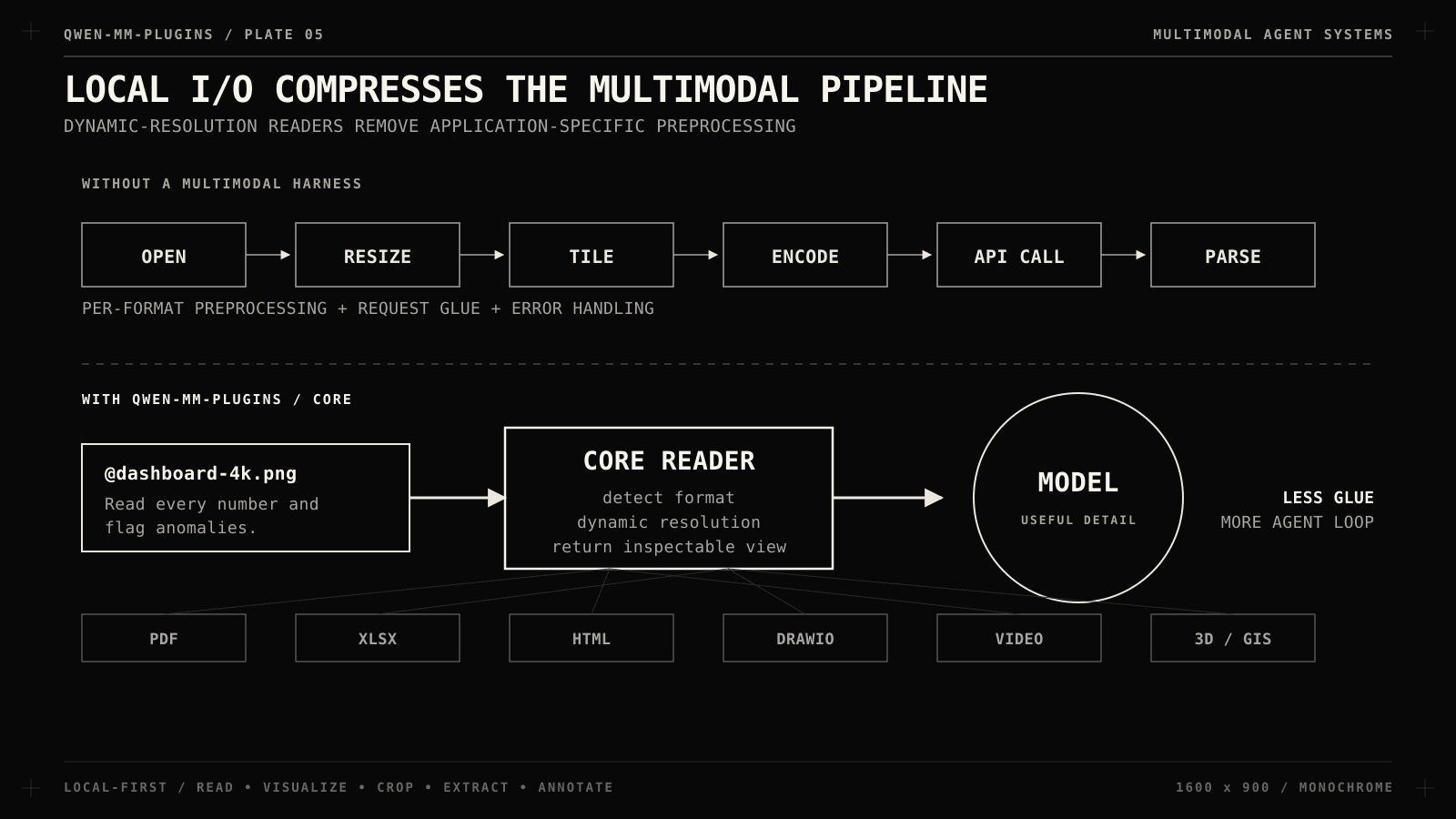
core sounds boring until you list what “local reading” covers.
Its visualize path handles PDFs, Office files, spreadsheets, source code, HTML, DrawIO, subtitles, 3D formats, GIS files, notebooks, LaTeX, images, and video.
Image, frame, and page reading are dynamic-resolution: content is scaled to the vision model’s patch grid, so a tiny icon and a 4K screenshot both get read at useful detail.
That kills a whole class of preprocessing code. Instead of
Capabilities launch through uvx in isolated per-capability Python environments, a plugin that reads PDFs, renders GIS data, edits media, and talks to CAD software would otherwise accumulate a frightening dependency tree.
Configuration is layered: environment variables override a shared ~/.qwen-mm-plugins/config, which overrides defaults. Terminal, IDE, and GUI-launched agents inherit environment variables differently, so one shared config beats repeating credential setup per harness.
core needs no API key for local reading.
Cloud understanding uses DASHSCOPE_API_KEY, search uses SERPER_API_KEY. Some capabilities also want system tools, e.g. ffmpeg, libreoffice, blender, texlive, chromium, depending on the formats you touch.
bash install.sh verify reports missing credentials and dependencies. Windows runs through WSL2.
Start with core and add capabilities when a workflow demands them.
Add qwen-mm-plugins-api for cloud understanding and qwen-mm-plugins-search for external verification. Codex and Qwen Code have equivalent marketplace flows.
If your harness has no plugin system, wire the MCP server manually:
You need an MCP client, a way to surface the skill text to the model, and a permissions policy.
That is the whole integration barrier, the capability is not welded to one chat application.
In practice: giving the agent perception
Debugging with eyes
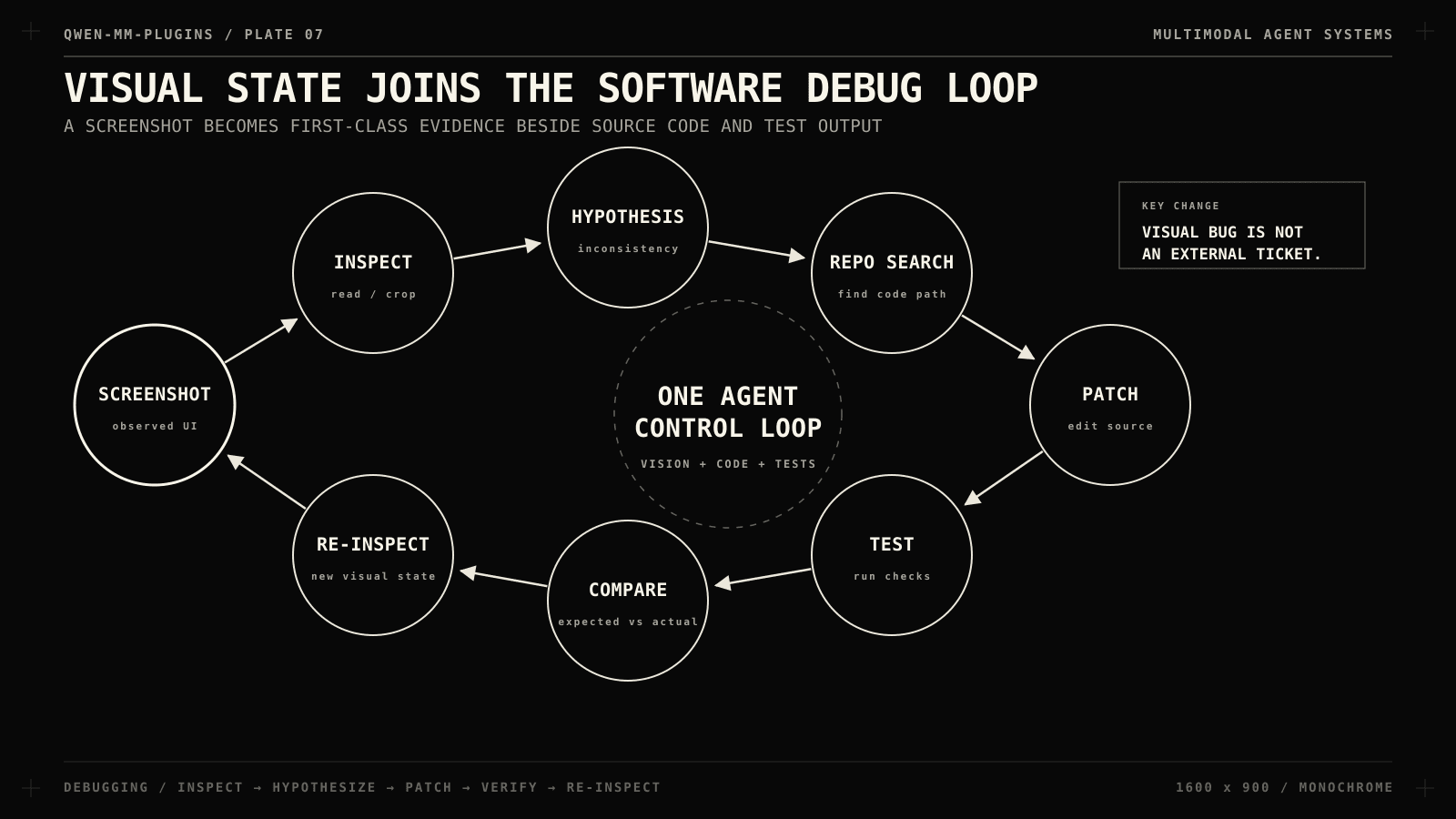
The bug is visible in a screenshot:
@dashboard-4k.png
Read every metric in this dashboard.
Compare totals across the three panels.
Tell me which values are inconsistent and which code paths to inspect first.
With core, the agent reads the image at fine detail and the visual input joins the same loop as the codebase: inspect, form a hypothesis, search the repository, patch, test.
Far more useful than a standalone describe-image endpoint.
OCR as a tool, not a prompt trick
With api installed, extraction is a dedicated operation instead of a general VLM improvising structure every time:
@receipt.jpg
OCR this receipt. Return the line items as a table.
Check the arithmetic and compute the final total yourself.
Tools are grouped by model family: VL (vision_chat, ocr, grounding) and omni (plain, timestamped, and multi-speaker ASR, audio and video captioning, temporal grounding, event counting, music analysis), plus dedicated Qwen3-ASR transcription and self-hosted SAM3 segmentation.
The point is specialization: precise operations beat one giant multimodal prompt.
Spatial answers as inspectable artifacts
@street.jpg
Find every car and return an annotated version
with a numbered box around each detection.
grounding answers where objects are, draw_bbox turns the coordinates back into an annotated image.
Agents earn trust when intermediate reasoning produces artifacts you can check.
Perception plus verification
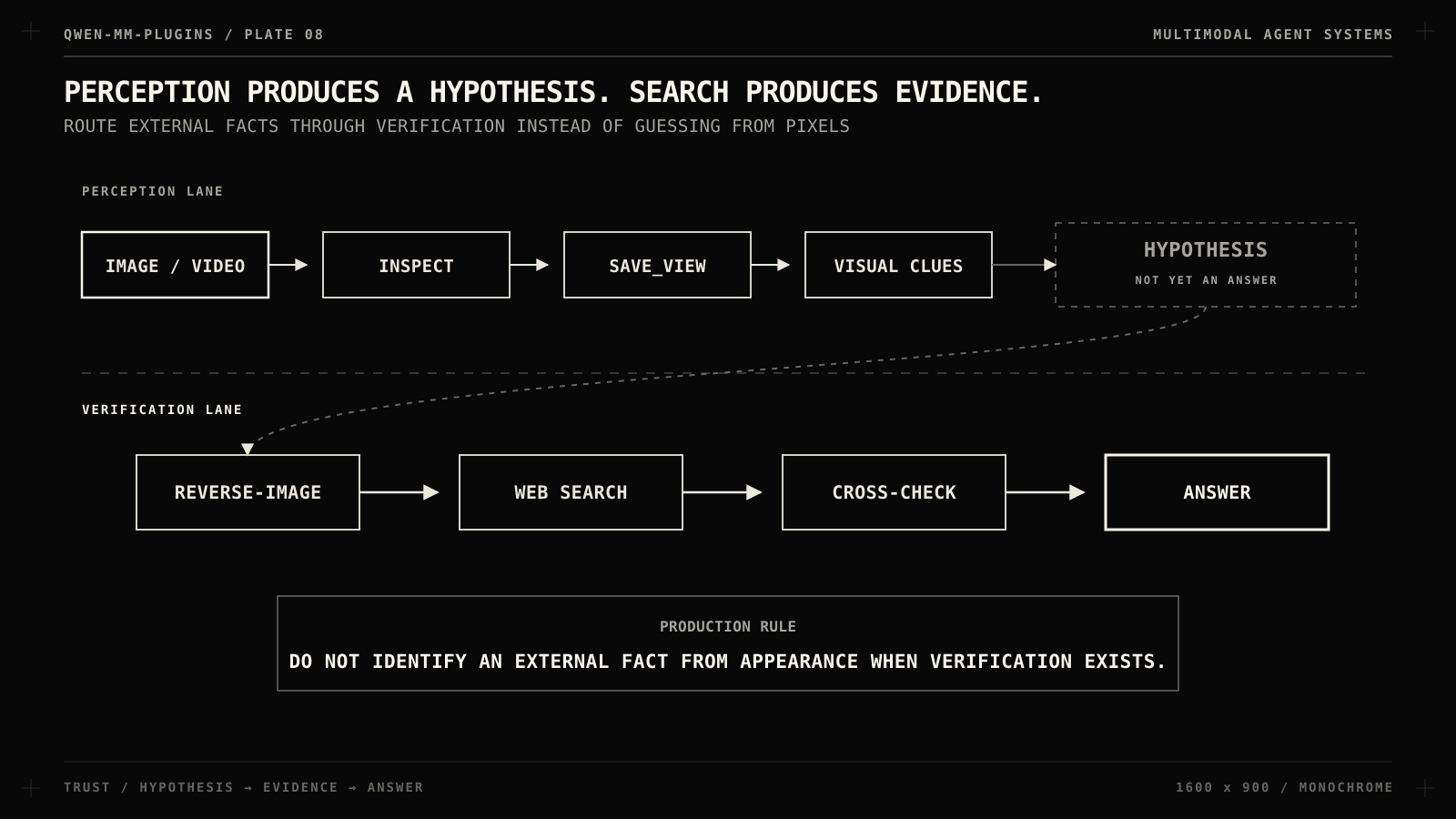
The search skill carries one of the best routing rules in the repo: never identify an external fact purely from appearance when verification is possible.
@place.jpg
Where was this photo taken?
Show the visual clues you used, then verify the location before answering.
The flow is inspect, save_view, reverse-image search, web search, answer.
Perception produces a hypothesis, search produces evidence.
Production agents live on that distinction.
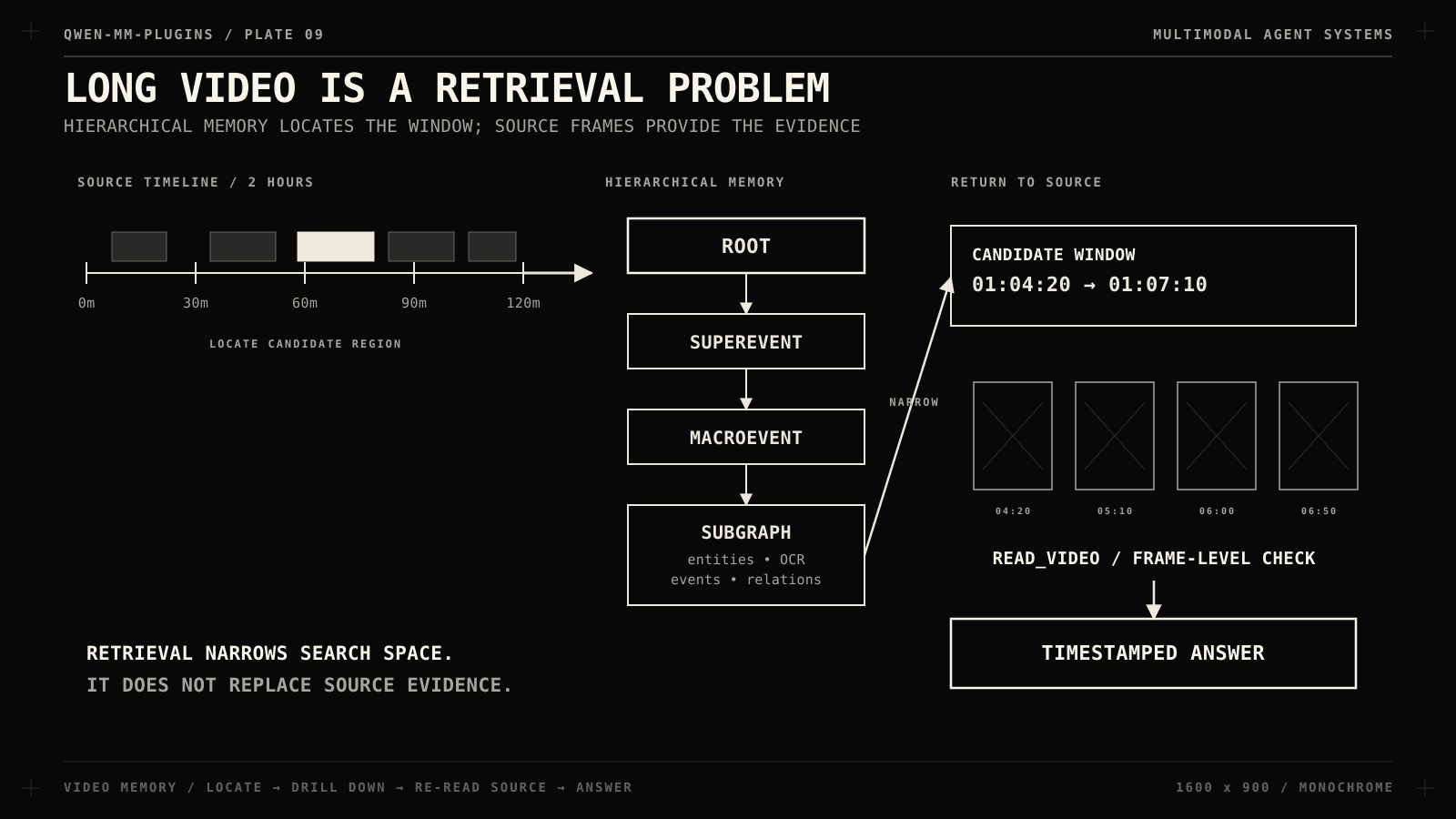
Long video is a retrieval problem
Sampling a handful of frames from a two-hour video and pretending they represent the timeline does not work. video-memory routes videos of roughly 30 minutes or more into a hierarchical graph memory:
Retrieval is staged on purpose: locate the relevant segment, drill into one or two macro events, then return to the source video and read frames in a narrow time window.
@lecture-2h.mp4
Find every section where the speaker discusses retrieval-augmented generation.
Summarize each and include timestamps.
The skill explicitly forbids answering detail questions from summaries alone.
That is the right principle for any memory-backed agent: retrieval narrows the search space.
From perception to action
The repo’s most opinionated idea shows up in the capabilities that act.
In non-code domains, tool use is rarely one function call.
Professional work has process, and the skills encode it.
video-edit treats the agent as an editing director: source review, art direction, pacing, scene planning, assembly gates, mixing, independent review.
blender is a thin client to a live Blender instance (scene inspection, assets, materials, Python execution, rendering).
Its skill’s core instruction is a quality loop: build, render, compare against the request, iterate.
A rough pile of primitives is not a final answer.
Model a low-poly wooden stool.
Use realistic dimensions. Add a warm key light.
Render a preview and refine anything that looks structurally wrong.
freecad applies the same loop to parametric CAD: inspect document state, prefer the parts library, create or modify geometry, verify object properties, inspect the result visually, export STEP, run FEM through CalculiX when the solver is present.
Create an M6 hex bolt, 30 mm long.
Use parametric dimensions.
Verify the object properties after creation.
Export the final part as STEP.
MCP tells the model which actions exist, and the skill tells it how professionals sequence those actions: two layers complement each other.
Design decisions worth stealing
Separate local perception from cloud inference.core reads locally; api calls out. That is a natural cost and privacy boundary: not every screenshot needs an API request, and not every PDF page should leave the machine. Narrow locally, escalate when it adds value.
Version routing rules with the capability. “Use long-video memory above ~30 minutes” and “probe metadata before editing” should not live in a developer’s head. Ship them in the skill and review them like code.
Compose capabilities instead of duplicating them.search does not reinvent video reading; it asks core for the frame. Small tools, explicit ownership, shared contracts.
Treat schemas as production interfaces. Tool schemas are generated from typed models, and the transformation itself has test coverage. A broken tool description is an API regression for the model.
Give expensive actions a dry run. The API tools can show the outbound request before sending it. If an action can spend money or move data off-machine, make it inspectable first.
Verify through a second modality. Bounding boxes become annotated images, CAD edits become screenshots, scene changes become renders, video retrieval ends in frame inspection. The agent produces evidence both the model and a human can check.
Extending it
The extension surface is small, a skill file plus a tool package:
Tool modules register through the shared build_registry, each exposing a Pydantic args model, metadata, and a handler.
python3 -m pytest tests/ auto-discovers server packages, and the framework has dedicated coverage for tool discovery, schema transformation, and MCP execution, you can test multimodal tools without launching an interactive agent session.
What I would build with it
The obvious build is a multimodal coding agent: bug-report screenshots, requirement PDFs, architecture diagrams, screen recordings, exported analytics, correlated with the codebase in one loop.
QA: test video → temporal grounding → find the UI failure → extract the frame → diff against the expected design → open an issue with evidence.
Media operations: raw footage → source review → transcription and diarization → segment selection → edit → render → review.
Industrial design: reference image → geometry reasoning → CAD model → inspection → FEM → STEP export.
They are orchestration problems across modalities and tools.
Concluding thoughts
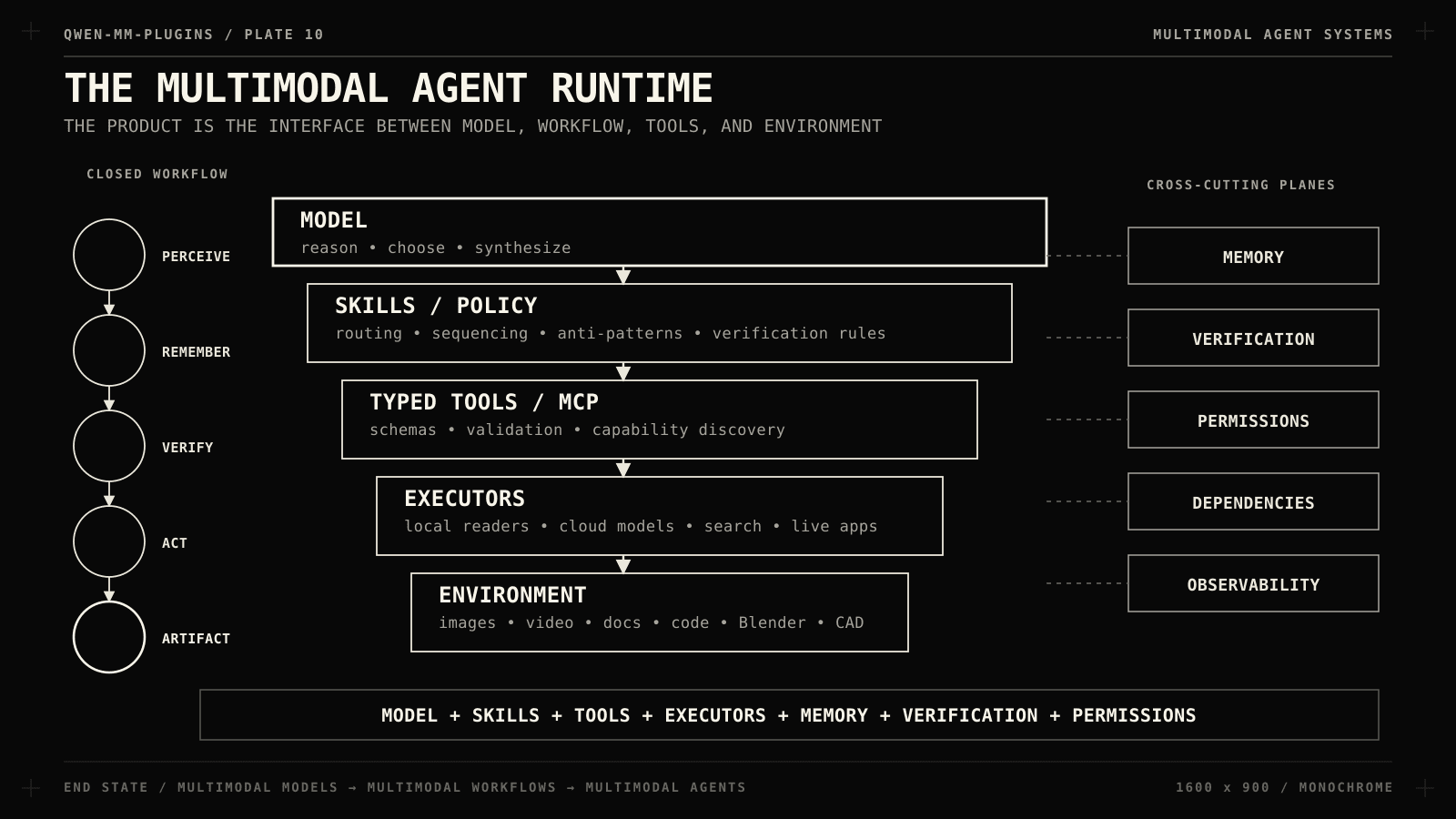
Agentic AI is moving from LLM-plus-prompt-plus-a-few-APIs toward something that looks like a runtime: model, skills, typed tools, local executors, remote services, memory, verification, permissions, dependency management.
Qwen-MM-Plugins is one implementation of that transition.
The next layer is multimodal workflows which lives in the harness.
That is why this project is worth studying even if Qwen is not your model provider: it is about the interface between models and environments.
Let me know how you approach it in your own projects in the comments.