DeepSeek Harness Hit 100K Stars in 2 Days. Real Frontier Is Agent Infrastructure.
Agent Native•August 16, 2026
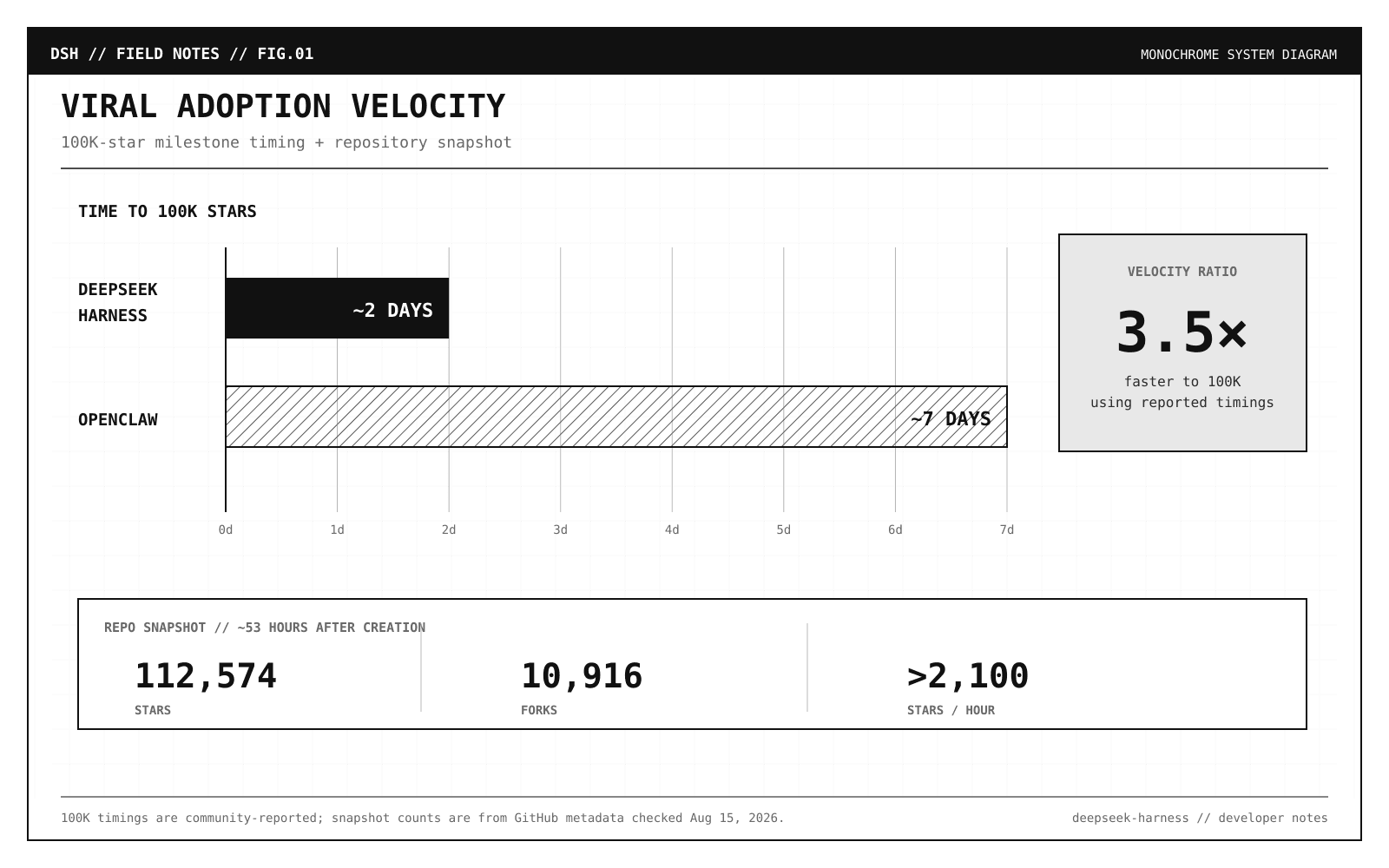
DeepSeek Harness crossed 112,000 GitHub stars and 10,000 forks.
That works out to more than 2,100 stars per hour across its first ~53 hours.
For comparison, OpenClaw have reached 100K stars in about a week and now sits at roughly 386K stars.
DeepSeek Harness compressed a similar early adoption curve into a fraction of the time.
The more interesting question is:
Why is an agent harness suddenly interesting enough for 100,000+ developers to care in the first place?
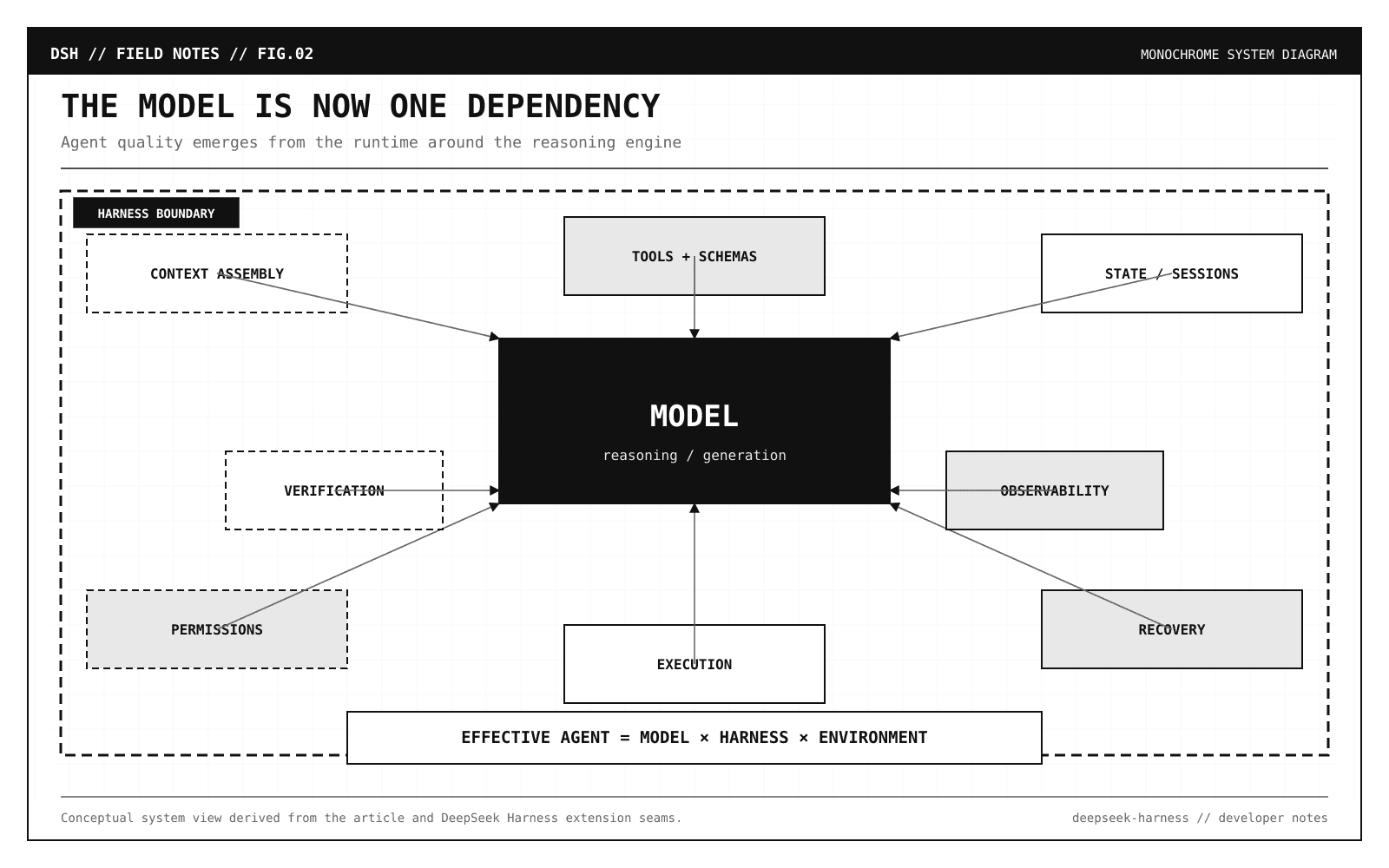
DeepSeek Harness is an unusually explicit bet on selecting context, exposing tools, persisting state, recovering from failures, enforcing permissions, and verifying actions.
Its architecture can be summarized in one sentence:
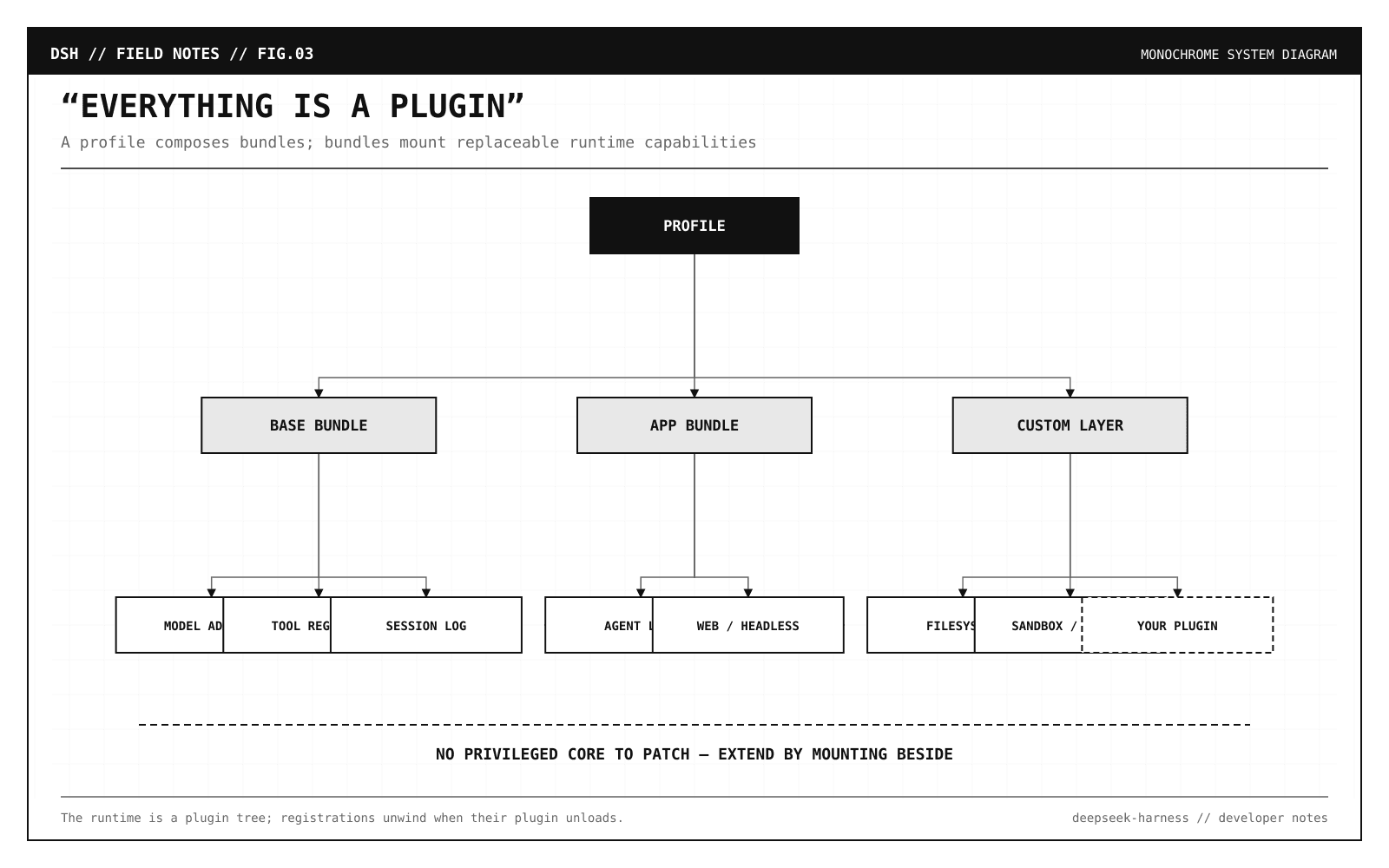
Everything is a plugin such as model adapter, tool registry, session log, agent loop.
Filesystem access, subprocess execution, sandboxing, approvals, telemetry, prompts, UI behavior, and persistence are all exposed through replaceable capabilities.
DeepSeek is open-sourcing a fairly opinionated answer to a question:
What should the runtime around an LLM actually look like?
What exactly is DeepSeek Harness?
DeepSeek Harness, or dsh, is an open-source runtime for building and running AI agents.
It is written primarily in TypeScript and built on Cordis, which describes itself as a meta-framework for spatiotemporal composability.
Running Harness instance is assembled from plugins contributing capabilities into a shared context:
services
typed events
reversible effects
model adapters
tools
session behavior
agent-loop behavior
filesystem and subprocess providers
sandboxing
approval policy
UI integrations
There is intentionally no privileged core that you are expected to patch every time you want to change agent behavior.
You mount another plugin beside the existing ones.
Because a lot of internal agent platforms begin as something like this:
Code
text
agent.ts
-> build prompt
-> call model
-> parse tool call
-> execute command
-> append result
-> repeat
We have all been there and this works for a prototype but then production requirements arrive like a remote sandbox, approval gates, different tool sets per tenant, OpenAI and Anthropic compatibility, session replay, background-job abstraction, structured telemetry, resumable shells, policy layer around filesystem access etc.
Before long, the agent loop is 5000 lines of framework code, and every new feature modifies it.
DeepSeek Harness tries to avoid that trap by treating the runtime as a composition problem from the beginning.
The architecture is more important than the default agent
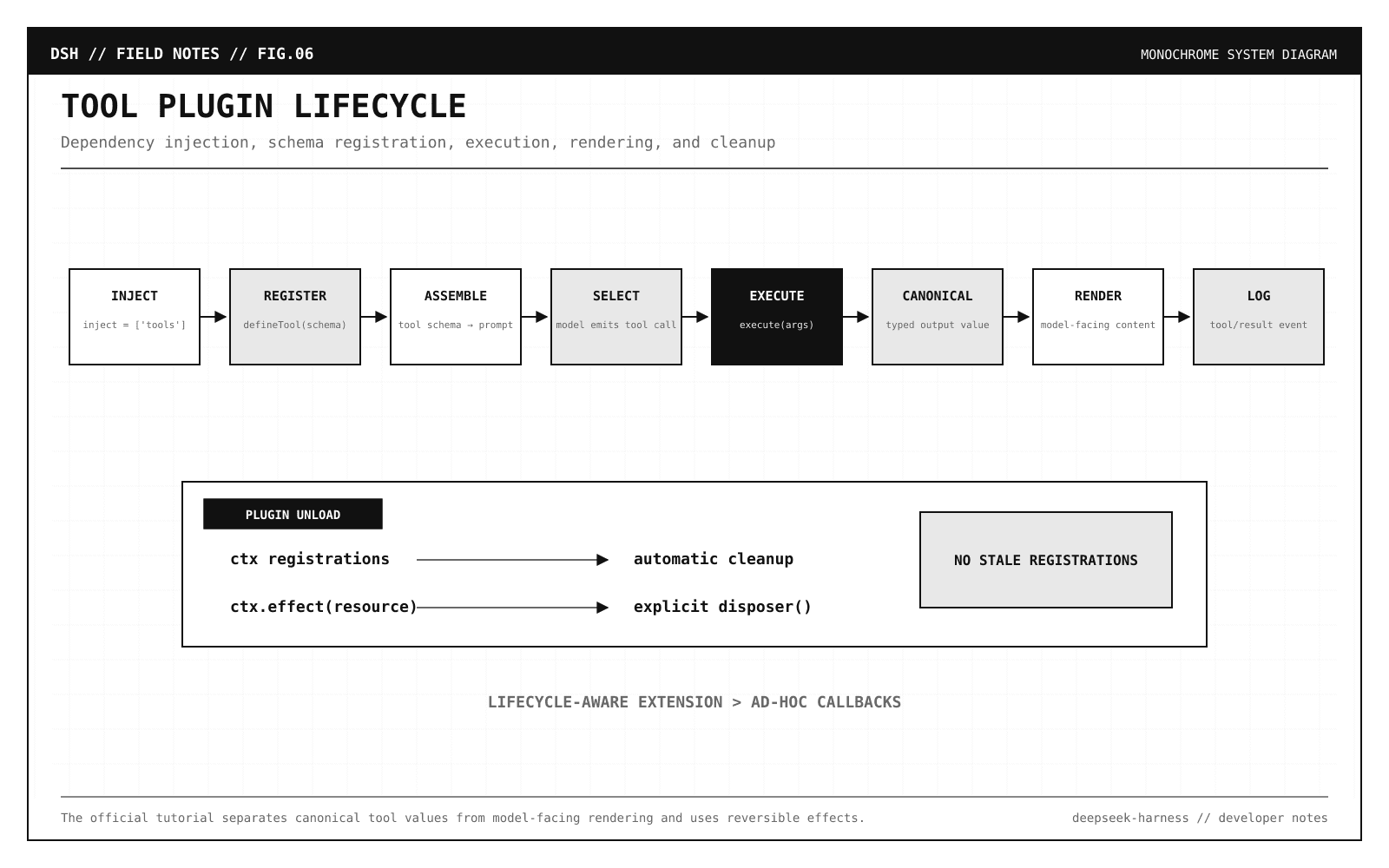
Every part of the product is a plugin, including the model adapter, the tool registry, the session log, and the agent loop itself.
That is the key idea.
A deployed Harness instance is built as a plugin tree.
The project introduces two important configuration concepts:
Concept
What it does
Profile
A named agent/runtime composition
Bundle
A distributable set of Cordis configuration rows and plugins
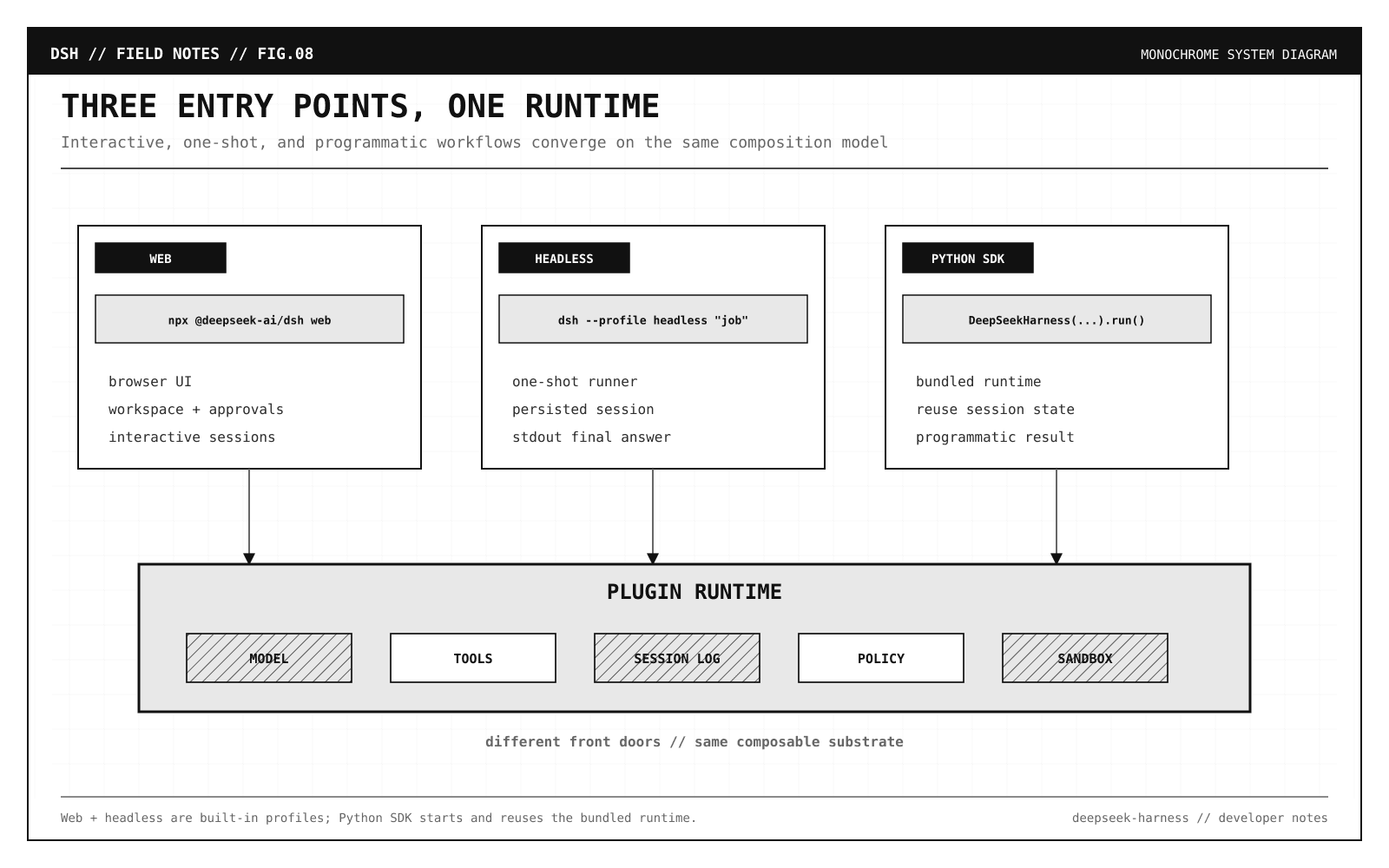
The built-in web profile gives you the browser application.
The built-in headless profile gives you a one-shot agent runner without the web server.
That is much closer to how we already build configurable infrastructure.
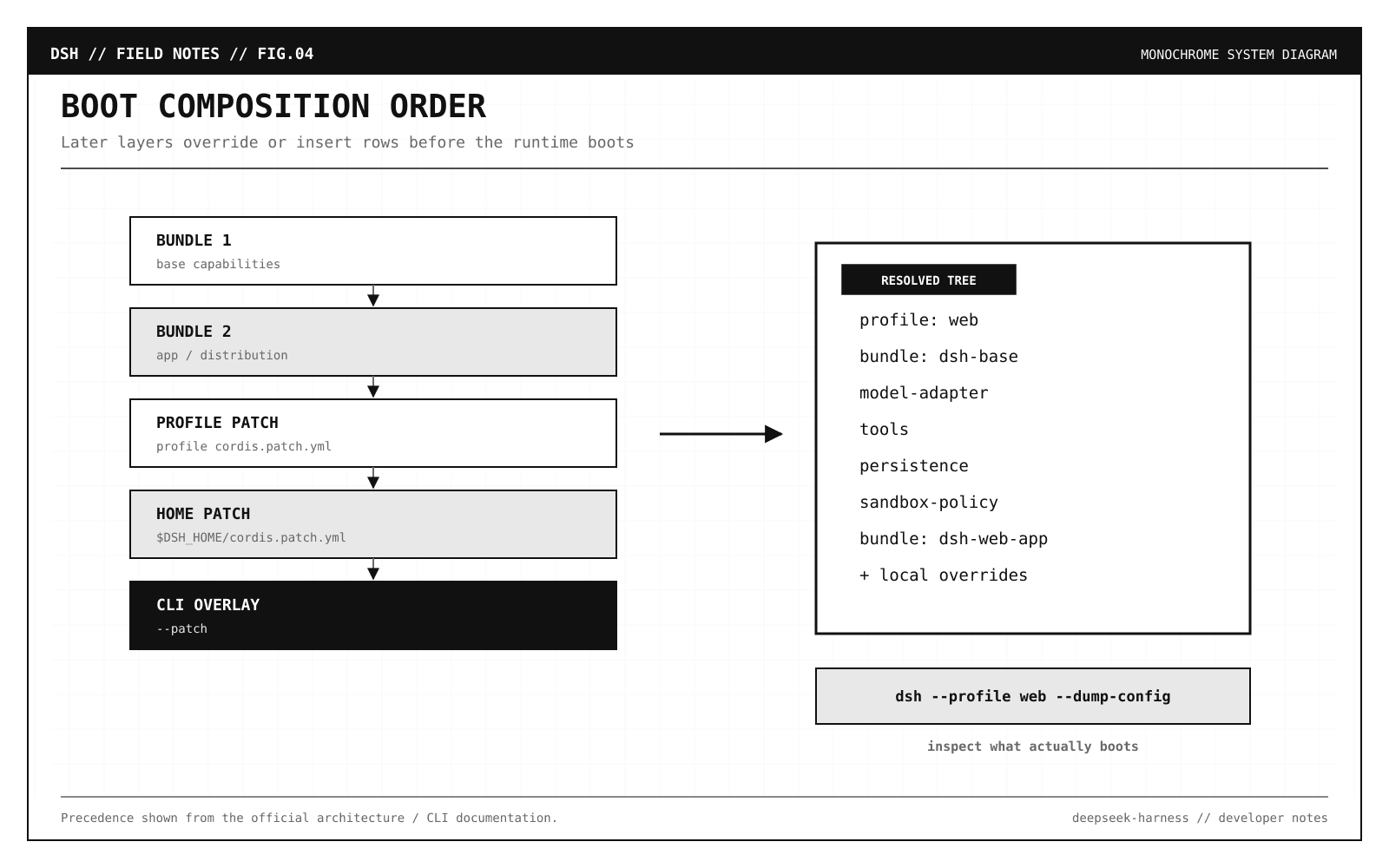
You can inspect the actual configuration tree that will boot:
dsh --profile web --dump-config
If an agent runtime is dynamically composed, developers need a way to inspect the resolved runtime, not just the source configuration that produced it.
Editor’s note: If you want to dive deep into Local LLMs and Agentic Stack, you can join our Agent Foundry program for hands-on, in-depth trainings.
Summarize this repository and identify its main packages.
The agent can read and edit files, execute commands, delegate work, and maintain a plan.
Operations that require approval are surfaced through the active permission policy.
Once a model can mutate files or execute commands, authorization becomes part of the agent architecture.
DeepSeek Harness treats policy and execution as separate capabilities rather than embedding all permission logic inside a single tool implementation.
Run it from source
If you want to inspect or extend the runtime itself:
Code
bash
git clone https://github.com/deepseek-ai/deepseek-harness.git
cd deepseek-harness

pnpm install
pnpm run build
pnpm dsh web
For contributors, the current development guide lists:
Node.js: 22.19+ or 24+
pnpm: 11.7.0 via Corepack
Git: 2.26+
If pnpm is not resolving through Corepack:
corepack enable
Then verify the checkout:
Code
bash
pnpm run typecheck
You will see that the project is a fairly serious TypeScript monorepo.
Its build separates Host and Client TypeScript aggregates, generates contracts used across the boundary, and runs different build phases for the runtime and Web client.
It is clearly trying to solve that class of problem.
Headless mode is probably more interesting for product engineers
The Web UI is useful for exploration.
But if you are building CI agents, background code workers, issue-resolution bots, or internal automation, the headless profile is more relevant.
After building from source and configuring DEEPSEEK_API_KEY:
Code
bash
pnpm dsh --profile headless "summarize this workspace"
The CLI treats the current directory as the default workspace.
dsh --profile <name>
dsh --profile headless "job"
dsh web
This means the CLI is primarily a launcher for a composition.
The launcher does not need to understand every option exposed by every future UI or agent configuration, it loads the selected profile and lets that composition handle its own arguments.
Again, this looks more like a runtime than a single coding assistant.
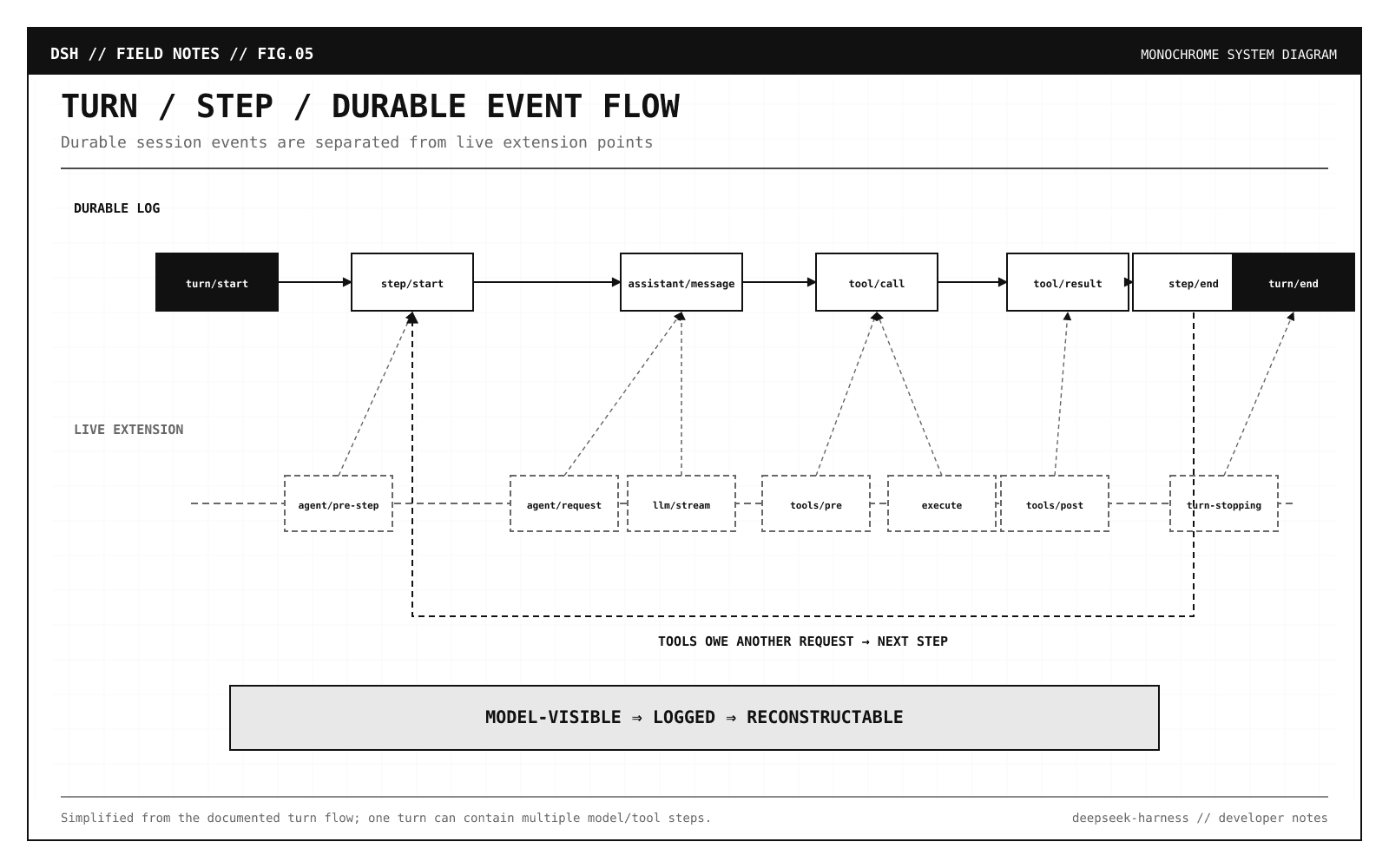
The agent loop is modeled as durable events
This was one of the more interesting design choices in the repository.
DeepSeek Harness distinguishes between a turn and a step.
A step is one model request plus the tools called by that request.
Invalid configuration fails when the plugin loads.
Do not discover that a production agent has an invalid timeout, a missing credential, or a malformed tool policy halfway through a 40-minute execution.
Fail during composition.
The capability-seam idea is where this gets powerful
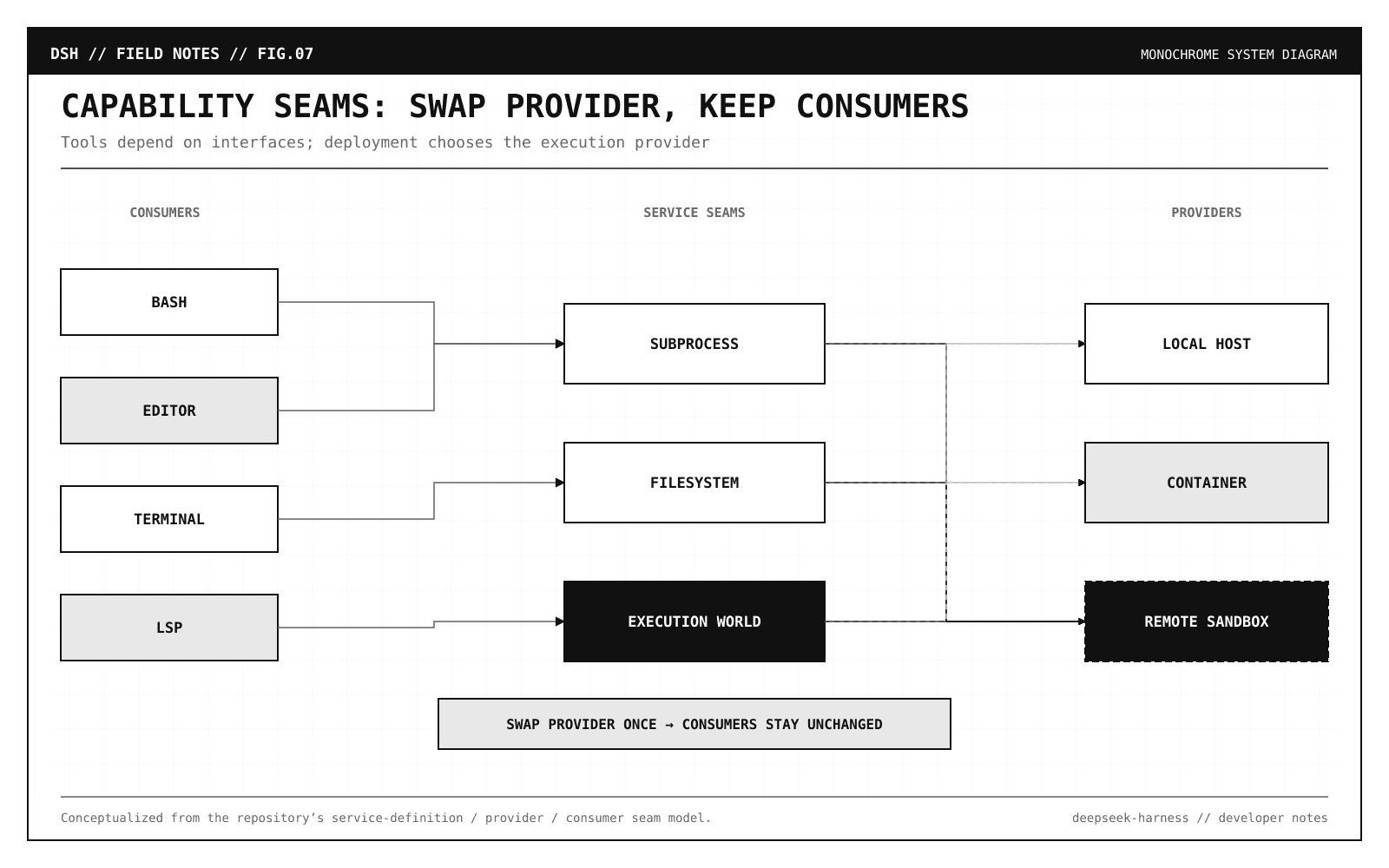
DeepSeek Harness defines replaceable capabilities around three roles:
Service Definition: the interface.
Service Provider: the implementation.
Consumer: the component using it.
For example, filesystem access does not have to mean “Node.js reads local disk”, local provider can expose files from the host machine, remote provider can expose files inside an isolated environment, tools consume the filesystem capability without needing to know where it is implemented.
The same pattern applies to subprocesses and sandboxes as filesystem and subprocess providers can share an execution world.
So if you swap the underlying execution provider to a remote sandbox, Bash, persistent terminals, editor operations, and language-server interactions can move with it rather than requiring separate forks of each tool.
That is a much cleaner way to build secure agent infrastructure.
local provider
or
sandbox provider
or
remote provider
Agent engineering is slowly rediscovering interface segregation and dependency inversion, that is a good thing.
You can also use it from Python
DeepSeek is not limiting the project to TypeScript consumers.
There is also a published Python SDK:
Code
bash
git clone https://github.com/deepseek-ai/deepseek-harness.git
cd deepseek-harness

python -m venv .venv
..venv/bin/activate
Code
bash
python -m pip install deepseek-harness-sdk
The SDK bundles the runtime, so users of the published Python package do not need a system Node.js installation.
A minimal program looks like this:
Code
python
from pathlib import Path

from deepseek_harness import DeepSeekHarness

config = Path("examples/jsonrpc-agent/minimal.cordis.yml").resolve()
workspace = Path("/absolute/path/to/workspace").resolve()
sessions = Path("/absolute/path/to/sessions").resolve()
Code
text
with DeepSeekHarness(
  provider="deepseek-official",
  model="deepseek-v4-flash",
  max_tokens=49_152,
  cwd=str(workspace),
  session_root=str(sessions),
  cordis=str(config),
) as harness:
  result = harness.run(
      "Inspect the repository and fix the failing tests.",
      session_id="example-001",
  )

  print(result.final_response)
This is probably the most relevant entry point for ML/platform teams that already have Python orchestration around their workloads.
The SDK reuses the same runtime inside the context manager.
If you reuse a session ID, you continue the same durable conversation and persistent Bash process, including working directory, environment variables, and shell functions.
Use a new session ID when you want isolation and execution state is part of the session.
One security warning you should not skip
Python examples deliberately uses a very permissive composition, it is called danger-full-access.
Bash and the editor can modify any path visible to the runtime process, and DeepSeek explicitly recommends running it only in a disposable checkout or container.
That should be your default mental model for all coding agents.
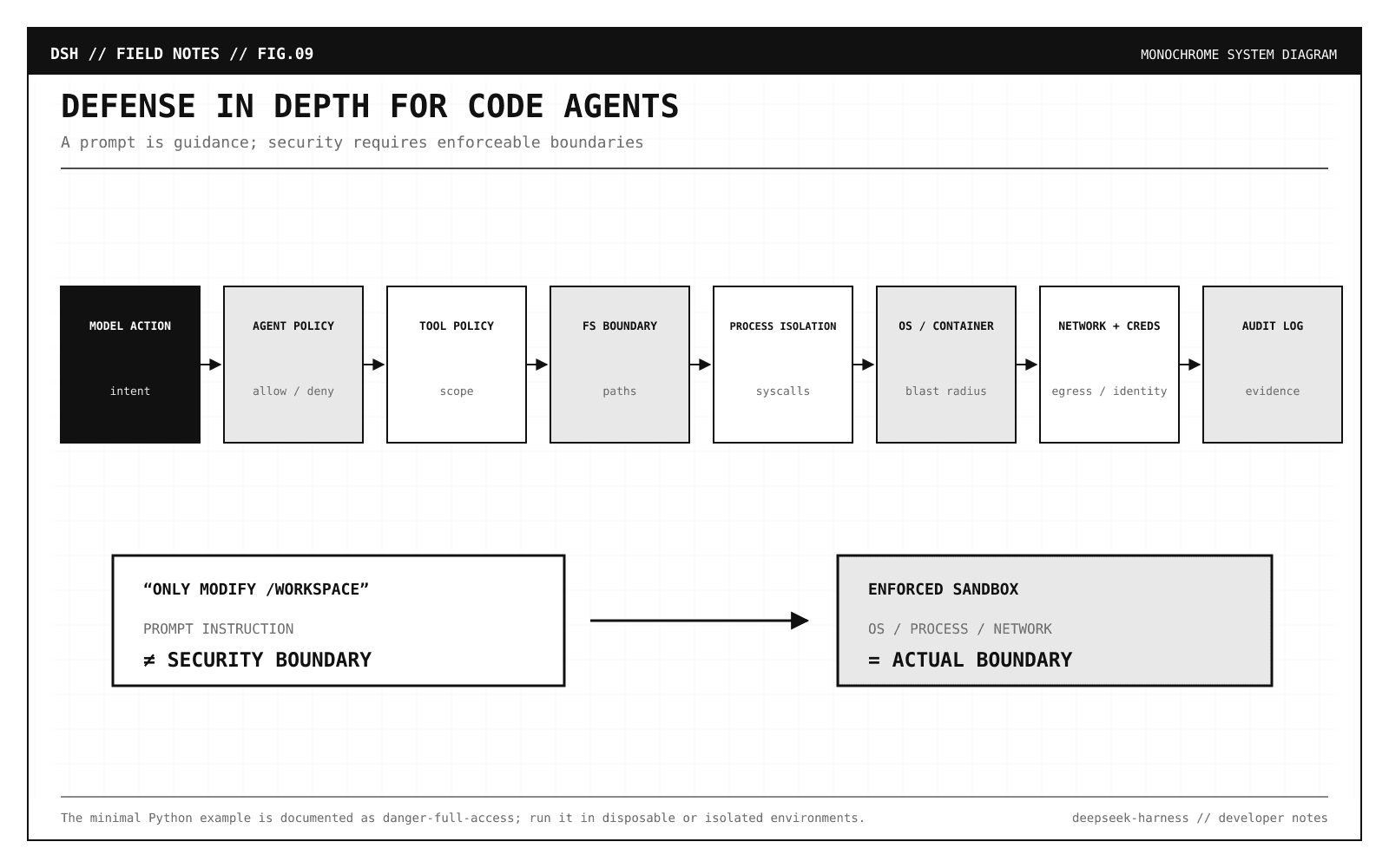
If a model can execute shell commands and edit files, workspace is not a sufficient security boundary unless the operating system or sandbox actually makes it one.
For serious deployment, you want defense in depth:
agent policy
tool policy
filesystem boundary
subprocess isolation
OS/container sandbox
credential scoping
network policy
audit log
In DeepSeek Harness, these concerns are represented as replaceable capabilities rather than one enormous executeTool() function.
Treat a third-party Harness plugin with the same suspicion you would give an npm package that can execute commands on your machine because that is effectively what it is.
Harness engineering is becoming a real discipline
The timing of this release is not accidental.
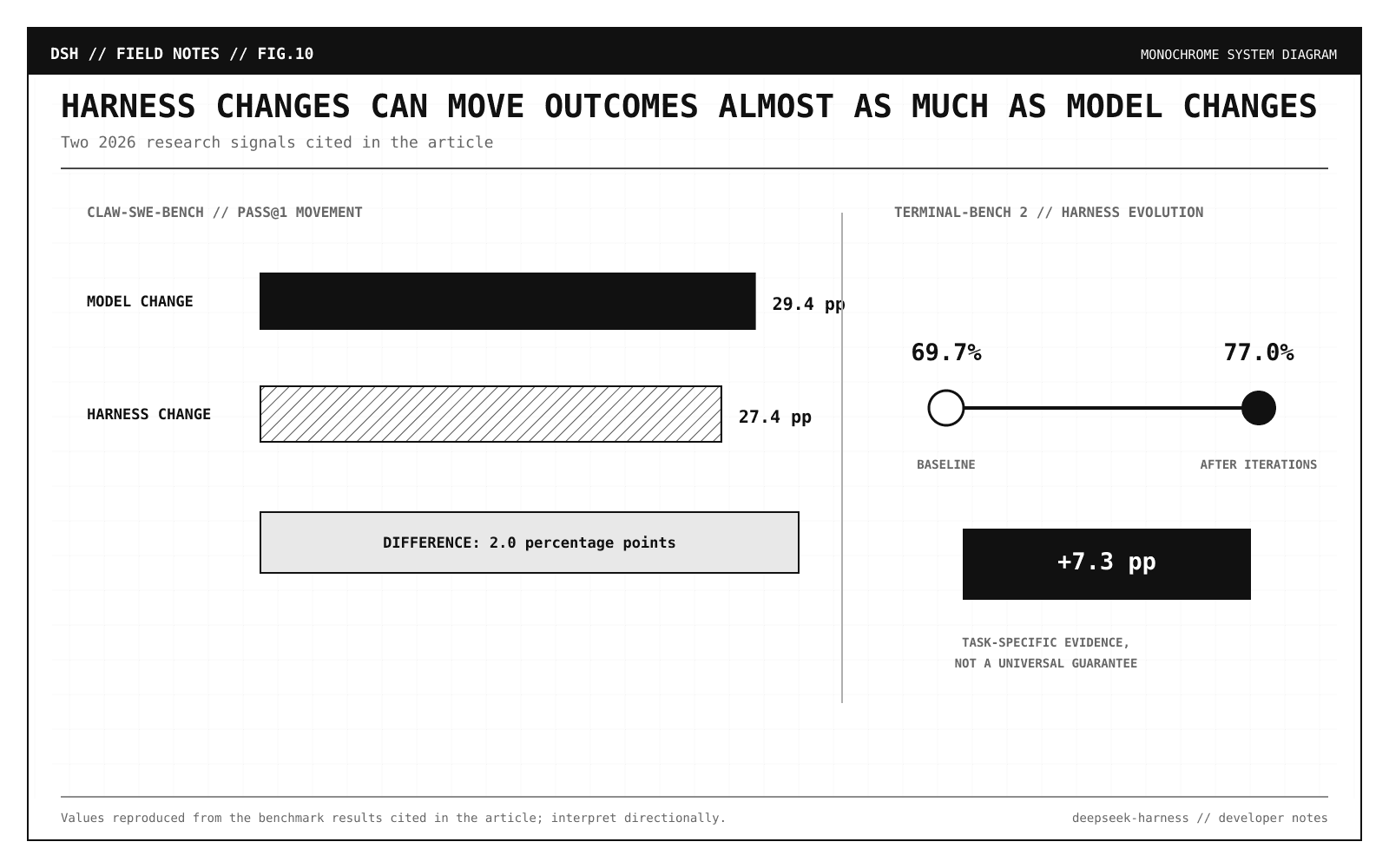
In 2026, research around coding agents has increasingly separated model capability from harness capability.
A recent benchmark, Claw-SWE-Bench, compared different model/harness combinations and reported that under controlled settings, changing the model moved Pass@1 by 29.4 percentage points while changing the harness moved it by 27.4 points.
That is remarkably close.
Another 2026 paper, Agentic Harness Engineering, focused on automatically improving the tools, middleware, memory, and other runtime components around a coding agent.
Its authors reported gains on Terminal-Bench 2 from 69.7% to 77.0% across harness-evolution iterations.
And AI Harness Engineering argues for treating software-agent capability as a property of the full model-harness-environment system, not the model in isolation.
You should not take any single benchmark as universal truth but the next question is: